LC-32/40/46/52LE700UN
4 – 3
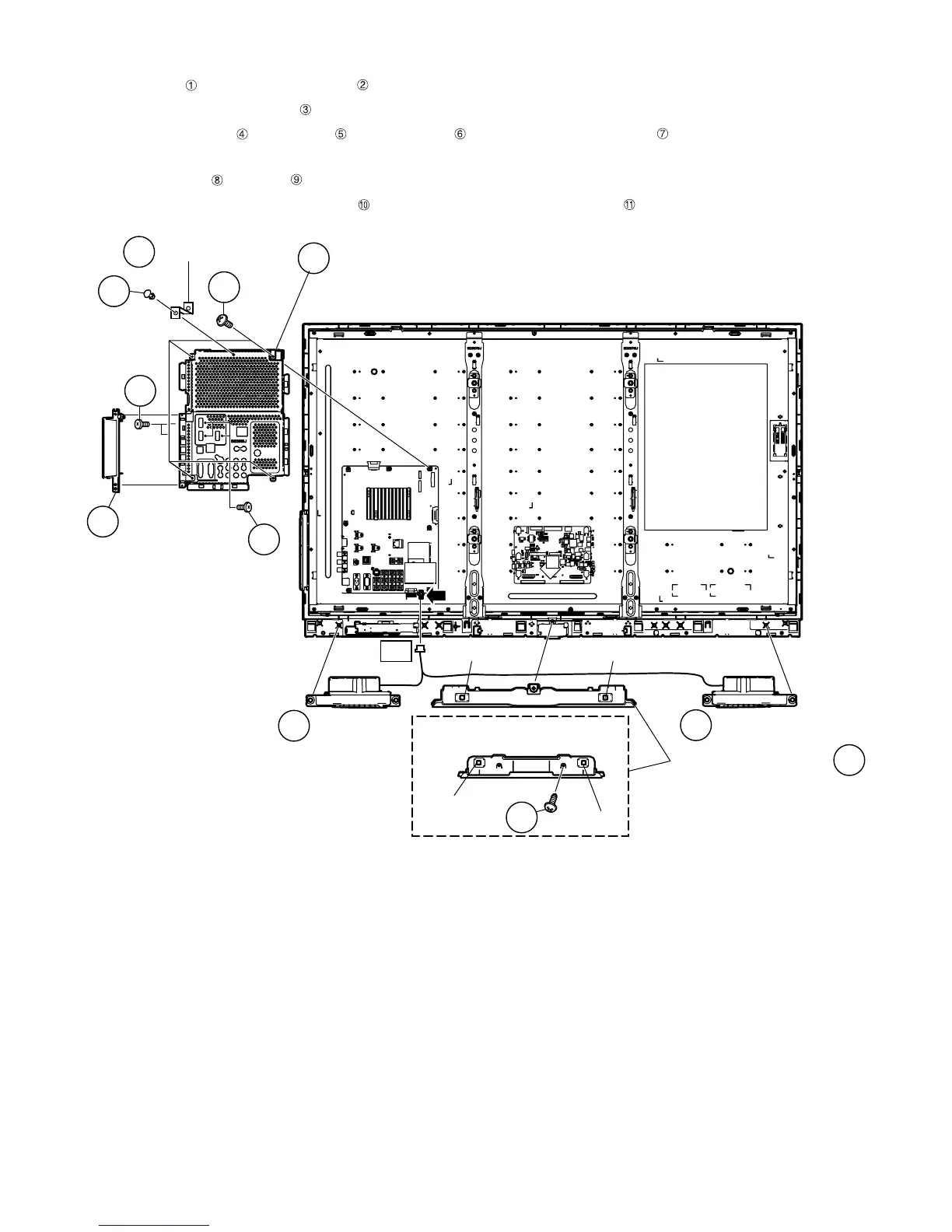
2. Removing of Side Terminal Cover Ass’y, Main PWB Shield, Speaker-L/R and Bottom Cover Ass’y.
1. Remove the rivet and detach the Shield Main .
2. Detach the Side Terminal Cover Ass’y .
3. Remove the 3 lock screws , 2 lock screws and 4 lock screws and detach the Main PWB Shield .
4. Disconnect SP wire.
5. Detach the Speaker-L ,Speaker-R .
6. Remove the 1 lock screw (LC-32LE700UN Only) , 2 hooks and detach the Bottom Cover Ass’y .
䎶䎳
䎔
䎙
䎚
䎘
䰟䏋䏌䏈䏏䏇䎃䰙䏄䏌䏑
䎰䏄䏌䏑䎃䎳䰣䰎䙤䎶䏋䏌䏈䏏䏇
䎗
䎖
䎶䏌䏇䏈䎃䎷䏈䏐䏌䏑䏄䏏䎃
䎦䏄䏙䏈䏕䎃䎤䏖䏖䎊䏜
䎔䎓
䎶䏓䏈䏄䏎䏈䏕䎐䎵
䎶䏓䏈䏄䏎䏈䏕䎐䎯
䎜
䎛
䎥䏒䏗䏗䏒䏐䎃䎦䏄䏙䏈䏕䎃䎤䏖䏖䎊䏜
䎔䎔
䎶䎳
䎕
䰘䰏䎐䎖䎕䎯䎨䎚䎓䎓䎸䎱
Hook
Hook
Hook
Hook













 To Next Page