LC-32/40/46/52LE700UN
2 – 1
LC32LE700UN
Service Manual
CHAPTER 2. OPERATION MANUAL
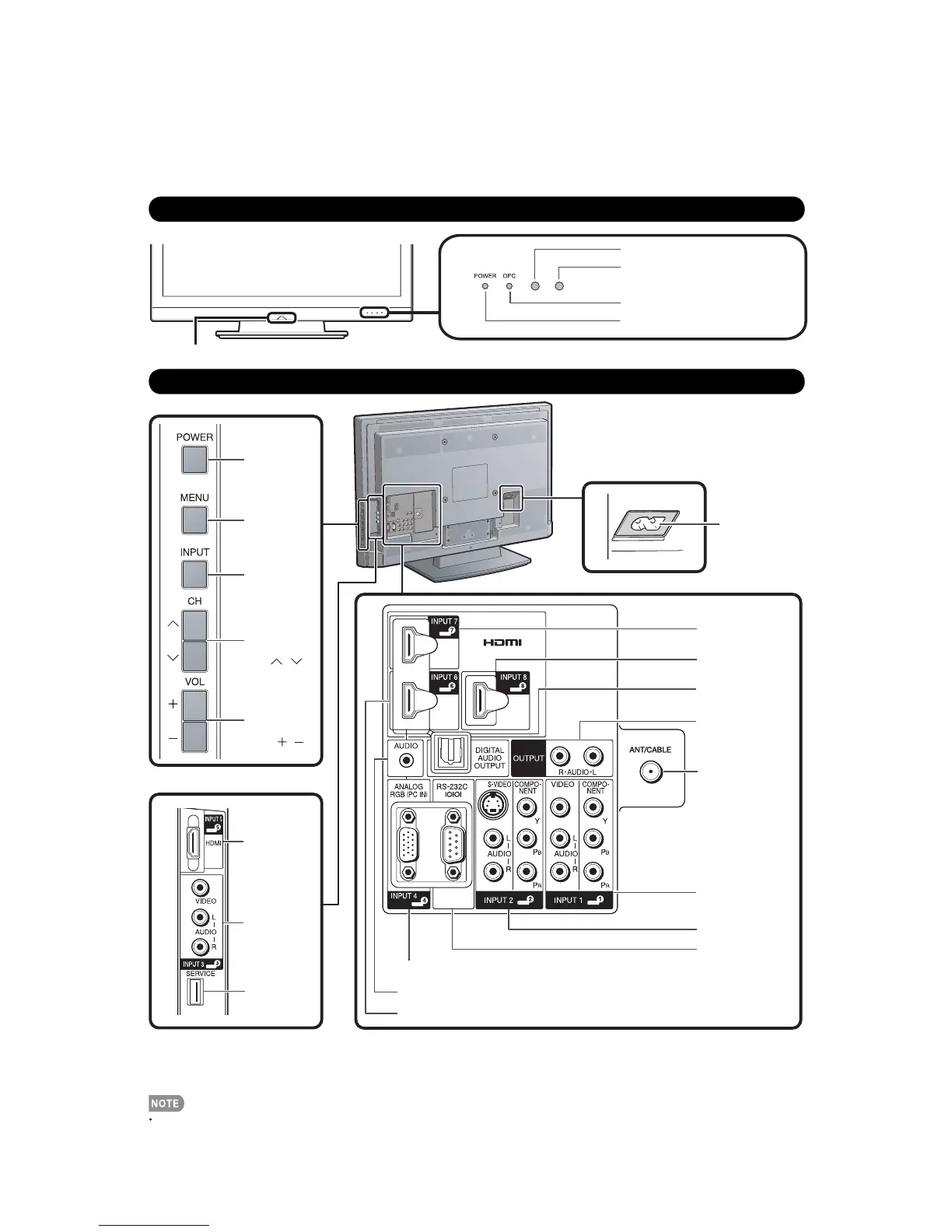
[1] Parts Name (LC-32LE700UN)
TV (Front)
OPC sensor*
POWER indicator
Remote control sensor
OPC indicator
TV (Rear/Side)
AC INPUT
terminal
POWER
button
MENU
button
INPUT
button
Channel
buttons
(CH /)
Volume
buttons
(VOL /)
RS-232C terminal
DIGITAL AUDIO
OUTPUT terminal
INPUT 7 terminal
(HDMI)
INPUT 8 terminal
(HDMI)
INPUT 6 terminal (HDMI)
INPUT 4 terminal (PC-IN)
AUDIO terminal (shared for INPUT 4 and INPUT 6) *4
Antenna/Cable in
INPUT 1 terminals
INPUT 2 terminals
AUDIO OUTPUT
terminals
INPUT 3
terminals
SERVICE
terminal
INPUT 5
terminal
(HDMI)
*1
*2
*3
*1
*1 External equipment connection.
*2 Button operations.
*3 Connecting the AC cord.
*4 Details on the PC Audio Select function.
The illustrations in this operation manual are for explanation purposes and may vary slightly from the actual operations.
Blue Illumination LED
* OPC: Optical Picture Control












 To Next Page