33
LC-50LB261U Sharp 50" LED TV
www.sharpusa.com
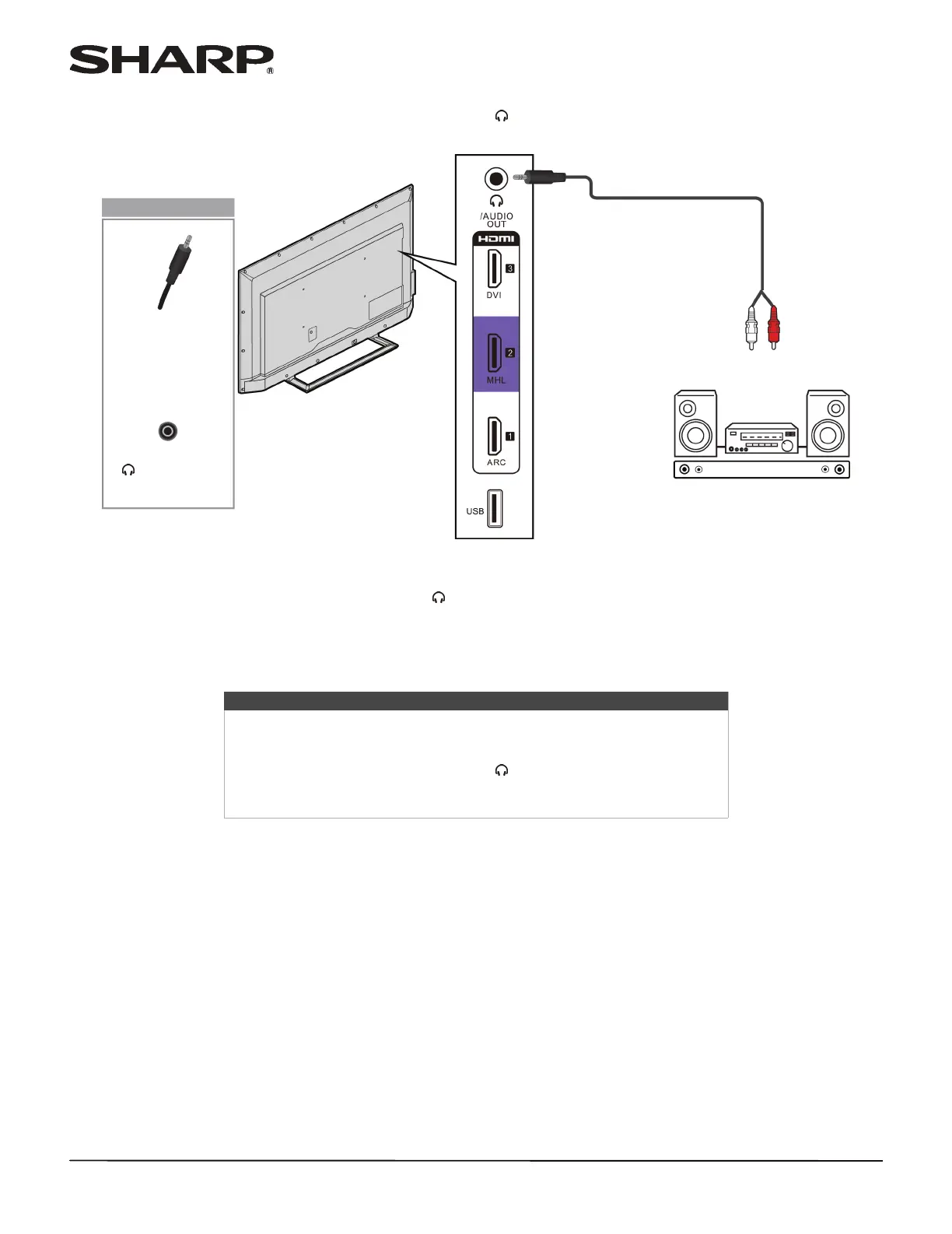
Analog audio
When you connect external speakers or a sound bar to the /AUDIO OUT jack, the TV speakers are muted.
1 Make sure that your TV’s power cord is unplugged and the external speaker system or sound bar is turned off.
2 Connect an audio cable (not provided) to the /AUDIO OUT jack on the side of your TV and to the AUDIO IN jacks
on the external speaker system or sound bar.
3 Plug your TV’s power cord into a power outlet, then turn on your TV.
4 Turn on the external speaker system or sound bar, then set it to the correct source. For more information, see the
documentation that came with the external speaker system or sound bar.
Notes
• For information about selecting the audio out mode for an external
speaker system or sound bar, see the Headphones/Audio Out option in
“Adjusting sound settings” on page 52.
• You can connect headphones to the /AUDIO OUT jack. If you want to
use headphones, you need to disconnect the external speaker system or
sound bar.
Audio cable
External speaker
system
Side of TV
Audio cable
connector
/AUDIO OUT
jack
On your TV
Sound bar




 To Next Page