QUICK REFERENCE
QUICK INSTALLATION TIPS
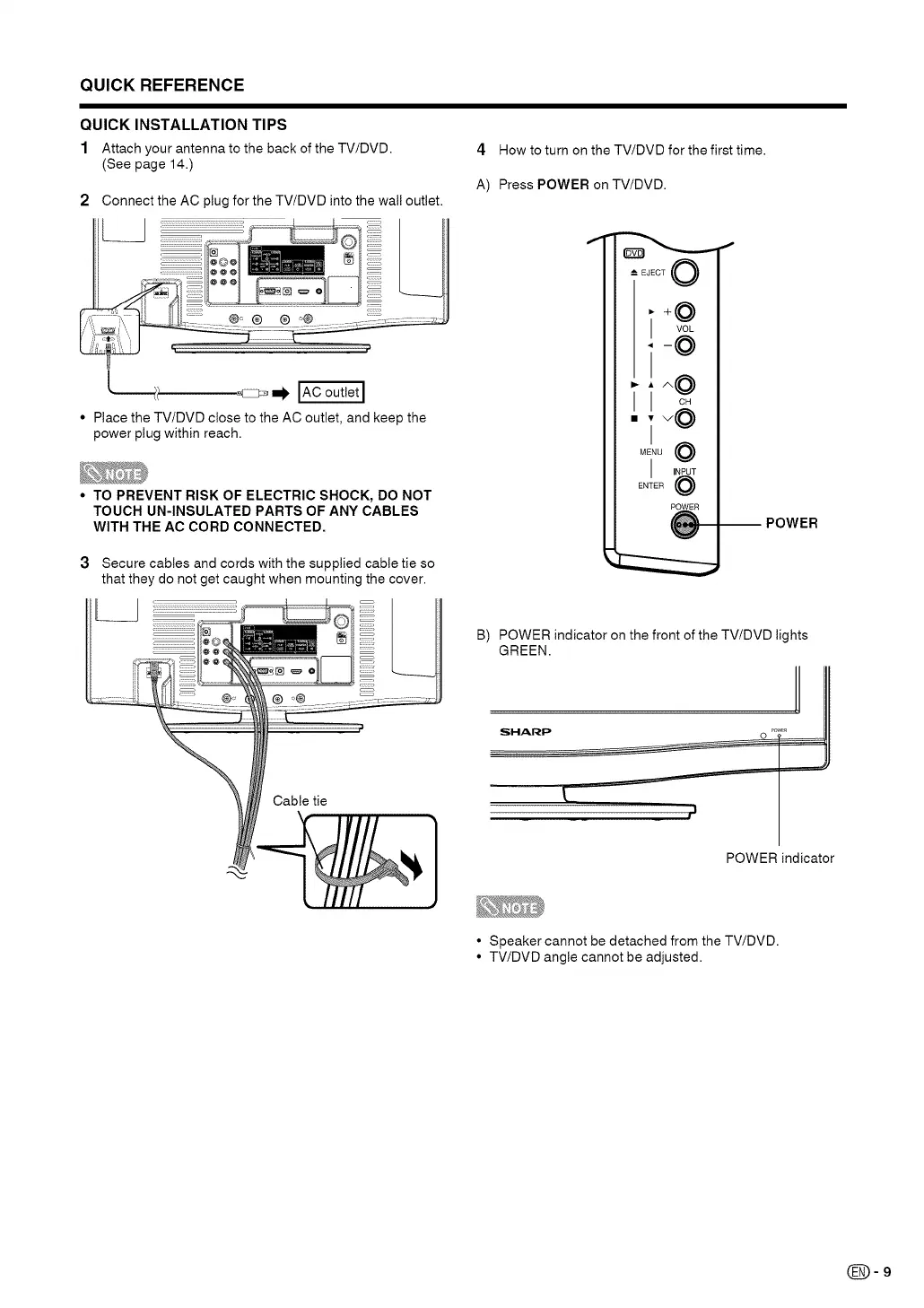
1 Attach your antenna to the back of the TV/DVD.
(See page 14.)
2 Connect the AC plug for the TV/DVD into the wal! outlet.
4 How to turn on the TV/DVD for the first time.
A) Press POWER on TV/DVD.
• Place the TV/DVD close to the AC outlet, and keep the
power plug within reach.
• TO PREVENT RISK OF ELECTRIC SHOCK, DO NOT
TOUCH UN-INSULATED PARTS OF ANY CABLES
WITH THE AC CORD CONNECTED.
3 Secure cables and cords with the supplied cable tie so
that they do not get caught when mounting the cover.
L
t
[JECT 0
I
_:F
POWER
i
POWER
B) POWER indicator on the front of the TV/DVD lights
GREEN.
SHARP
POWER indicator
• Speaker cannot be detached from the TV/DVD.
• TV/DVD angle cannot be adjusted.
(_=9




 To Next Page