Other convenience functions
¸i
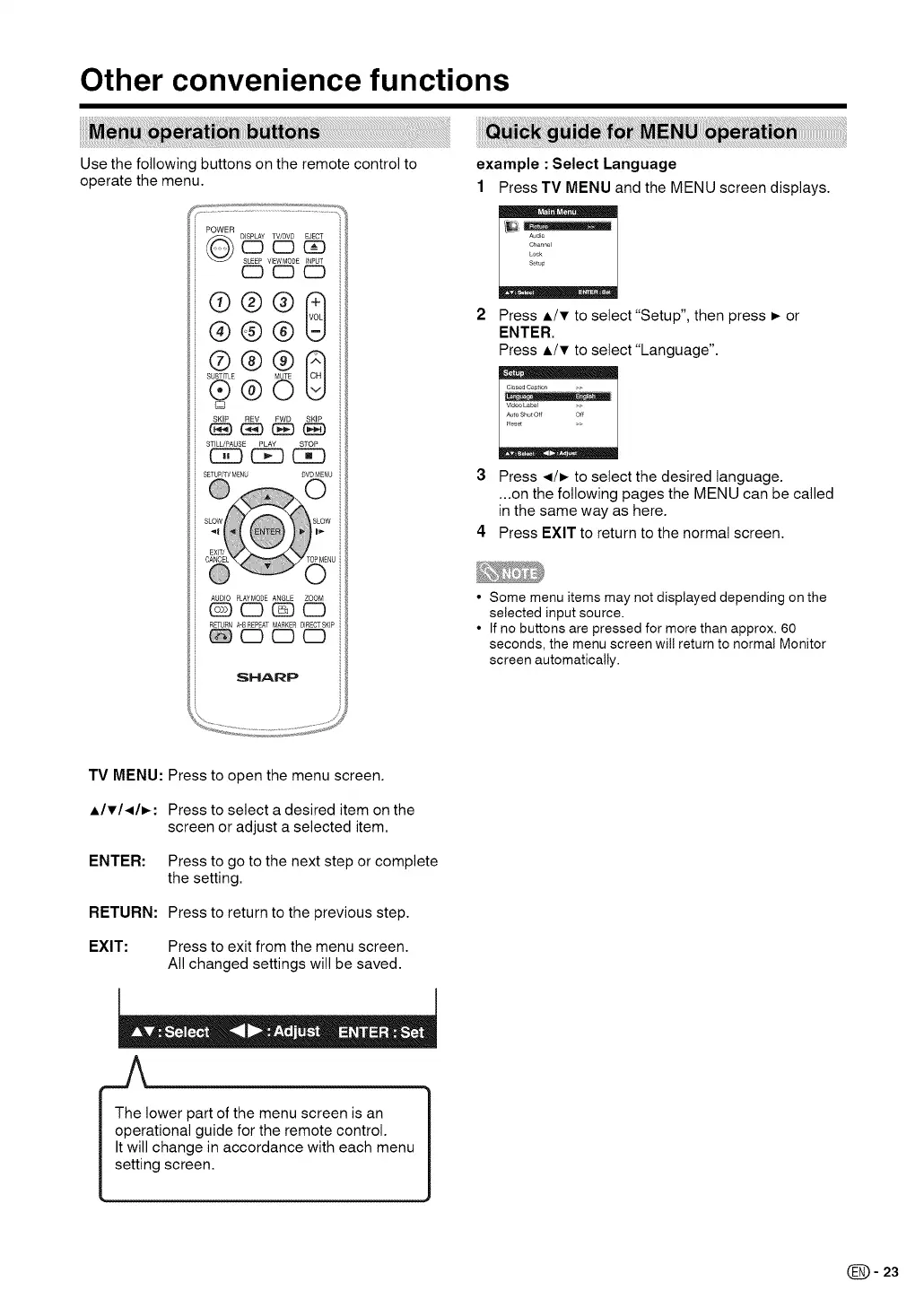
Use the following buttons on the remote control to
operate the menu.
POWER
DISPLAY TV/DVS EJECT
CD CD C_D
SLEEP VIEWMODE INPUT
CD CD CD
@@@
SLE'_LE @ _ 8
®®O
Q
SKIP REV FWD SKIP
(E_)GE) (:EE)(BE)
STILL/PAUSE PLAY STOP
C5_ C_ CK3
SETUP/TV MENU SVD MENU
AUDIO PLAYMODE ANGLE ZOOM
(_ (ZD GE)(ZD
RETURN A-SREPEAT MARKER DIRECTSKIP
CD CD CD
SHARP
example : Select Language
1 Press TV MENU and the MENU screen displays.
Audio
Channel
Lock
Setup
Press A/T to select "Setup", then press _ or
ENTER.
Press A/T to select "Language",
C_osed Caption >>
Video L&bel
Auto ShutOff Off
Res_
3 Press ,,_/_ to select the desired language.
...on the following pages the MENU can be called
in the same way as here.
4 Press EXIT to return to the normal screen.
• Some menu items may not displayed depending on the
selected input source.
• If no buttons are pressed for more than approx. 60
seconds, the menu screen wil! return to normal Monitor
screen automatically.
TV MENU: Press to open the menu screen.
AITI.,_I_: Press to select a desired item on the
screen or adjust a selected item.
ENTER: Press to go to the next step or complete
the setting.
RETURN: Press to return to the previous step.
EXIT: Press to exit from the menu screen.
All changed settings will be saved.
I The lower part of the menu screen is an
operational guide for the remote control.
It will change in accordance with each menu
setting screen.
(_= 23




 To Next Page