Connecting a PC (Personal computer)
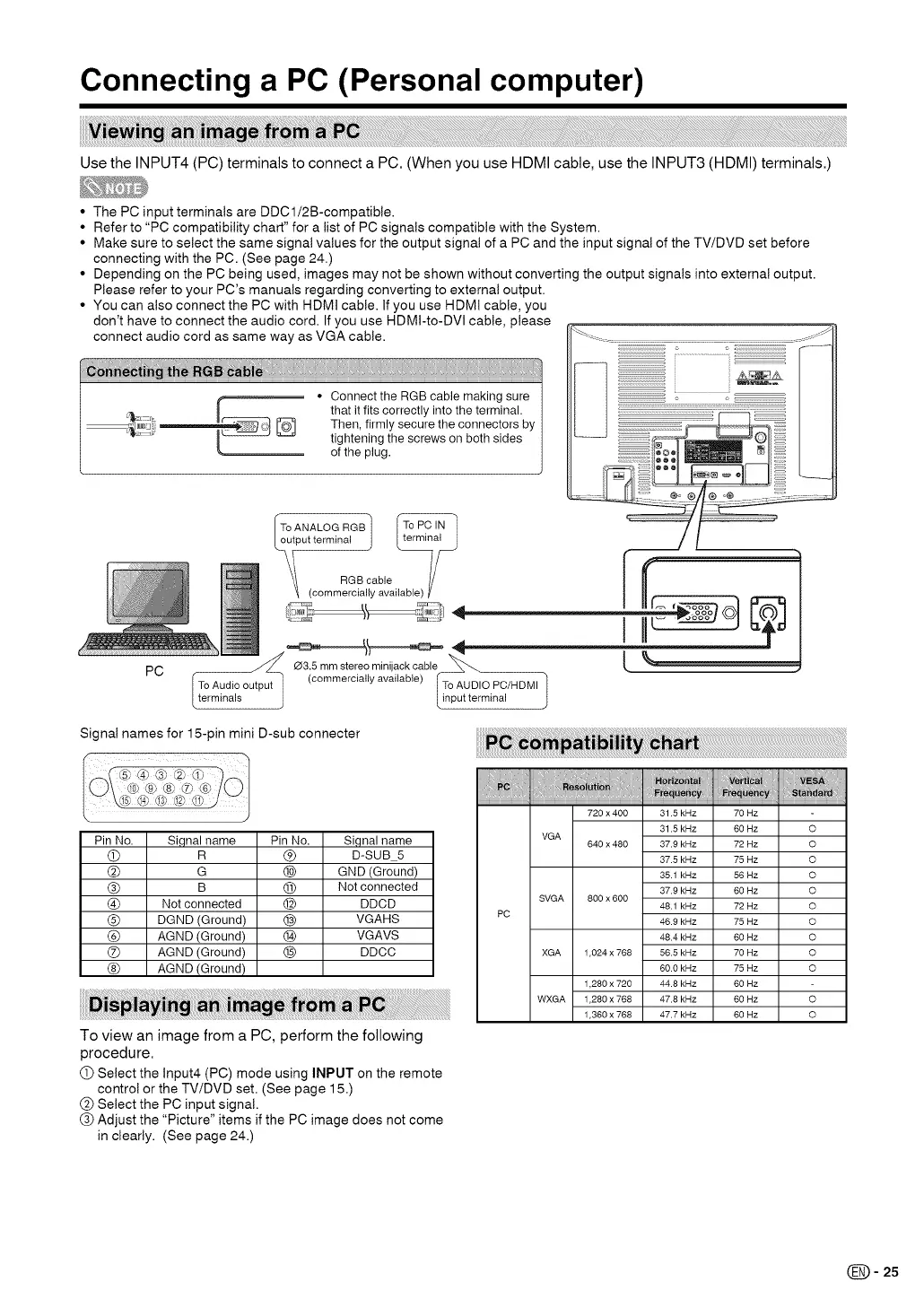
Use the INPUT4 (PC) terminals to connect a PC. (When you use HDMI cable, use the INPUT3 (HDMI) terminals.)
• The PC input terminals are DDCl/2B-compatible.
• Refer to "PC compatibility chart" for a list of PC signals compatible with the System.
• Make sure to select the same signal values for the output signal of a PC and the input signal of the TV/DVD set before
connecting with the PC. (See page 24.)
• Depending on the PC being used, images may not be shown without converting the output signals into external output.
Please refer to your PC's manuals regarding converting to external output.
• You can also connect the PC with HDMI cable. If you use HDMt cable, you
don't have to connect the audio cord. If you use HDMI-to-DVI cable, please
connect audio cord as same way as VGA cable.
PC
ToANA'OGRGB1
put terminal j _at _
'_ (.... mrGcBa_yb'eai,ab,e) V
//
°_ ....
35mmst.....inijackoab,e
[ TOrA_ndai/sout put ] (....... iatiy available) TOpAtUtDIOiPC/H DM, l
Signal names for 15-pin mini D-sub connecter
Pin No. Si,qnal name Pin No. Signal name
(_) m (_) D-SUB 5
(_) G (_) GND (Ground)
(_) B @ Not connected
(_ Not connected @ DDOD
(_) DGND (Ground) @ VGAHS
O AGND (Ground) _) VGAVS
0 AGND (Ground) (_) DDOC
(_) AGND (Ground)
To view an image from a PC, perform the following
procedure.
O Select the Input4 (PC) mode using INPUT on the remote
control or the TV/DVD set. (See page 15.)
(_) Select the PC input signal.
(_) Adjust the "Picture" items if the PC image does not come
in clearly. (See page 24.)
PC
720 x 400 31.5 kHz 70 Hz
31.5 kHz 60 Hz
VGA
640 x 480 37.8 kHz 72 Hz
37.5 kHz 75 Hz
35.1 kHz 56 Hz
37.8 kHz 60 Hz
SVGA 800 x 600
48.1 kHz 72 Hz
46.8 kHz 75 Hz
48.4 kHz 60 Hz
XGA 1,024 x 768 56.5 kHz 70 Hz
60.0 kHz 75 Hz
1,280 x 720 44.8 kHz 60 Hz
WXGA 1,280 x 768 47.8 kHz 60 Hz
1,360 x 768 47.7 kHz 60 Hz
O
O
O
O
O
O
O
O
O
O
(_= 25




 To Next Page