MP3/WMA/JPEG and Audio CD operation Function setu p
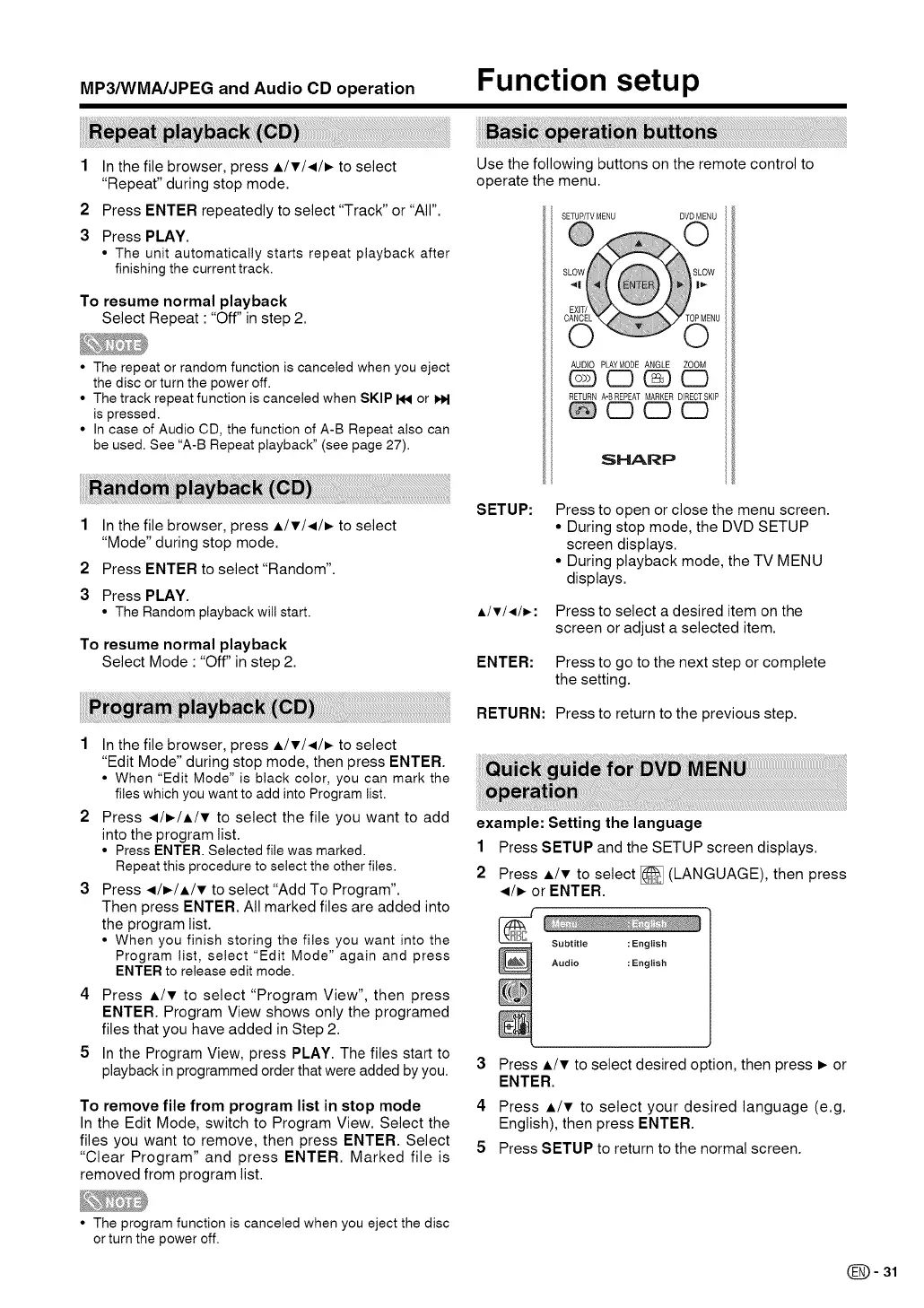
1 In the file browser, press A/v/.,e- to select
"Repeat" during stop mode.
2 Press ENTER repeatedly to select "Track" or "All".
3 Press PLAY.
• The unit automatically starts repeat playback after
finishing the current track.
To resume normal playback
Select Repeat • "Off" in step 2.
• The repeat or random function is canceled when you eject
the disc or turn the power off.
• The track repeat function is canceled when SKIP I_ or I_
is pressed.
• In case of Audio CD, the function of A-B Repeat also can
be used. See "A-B Repeat playback" (see page 27).
Use the following buttons on the remote control to
operate the menu.
SETUP/TVMENU DVDMENU
AUDIO PLAYMODE ANGLE ZOOM
CD CD
RETURN A-BREPEAT MARKER DIRECTSKIP
C3 C3 CD
SHARP
1
2
3
In the file browser, press i/v/,.e- to select
"Mode" during stop mode.
Press ENTER to select "Random".
Press PLAY.
• The Random playbackwill start.
To resume normal playback
Select Mode • "Off" in step 2.
1 In the file browser, press A/V/41/I_ to select
"Edit Mode" during stop mode, then press ENTER.
• When "Edit Mode" is black color, you can mark the
files which you want to add into Program list.
2 Press _/_/A/v to select the file you want to add
into the program list.
• Press ENTER. Selected file was marked.
Repeat this procedure to select the other files.
3 Press _/_/A/v to select "Add To Program".
Then press ENTER. All marked files are added into
the program list.
• When you finish storing the files you want into the
Program list, select "Edit Mode" again and press
ENTER to release edit mode.
4 Press A/v to select "Program View", then press
ENTER. Program View shows only the programed
files that you have added in Step 2.
5 In the Program View, press PLAY. The files start to
playback in programmed order that were added by you.
To remove file from program list in stop mode
In the Edit Mode, switch to Program View. Select the
files you want to remove, then press ENTER. Select
"Clear Program" and press ENTER. Marked file is
removed from program list.
SETUP:
A/T/,/_:
ENTER:
RETURN:
Press to open or close the menu screen.
• During stop mode, the DVD SETUP
screen displays.
• During playback mode, the TV MENU
displays.
Press to select a desired item on the
screen or adjust a selected item.
Press to go to the next step or complete
the setting.
Press to return to the previous step.
example: Setting the language
1 Press SETUP and the SETUP screen displays.
2 Press A/v to select [] (LANGUAGE), then press
_/_ or ENTER.
Subtitle : English
Audio : English
3 Press A/v to select desired option, then press _ or
ENTER.
4 Press A/v to select your desired language (e.g.
English), then press ENTER.
5 Press SETUP to return to the normal screen.
• The program function is canceled when you eject the disc
or turn the power off.
(_)= 31


 To Next Page
 Loading...