EasyManua.ls Logo

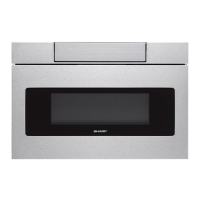
Sharp Microwave Drawer SMD2479JS - User Manual

Sharp Microwave Drawer SMD2479JS
28 pages
Print Icon
To Next Page IconTo Next Page
Loading...
Microwave Drawer
oven:
SMD2489ES, SMD2479JS
OPERATION MANUAL
MICROWAVE DRAWER
OVEN
MODELS
SMD2489ES, SMD2479JS
STAINLESS STEEL
SMD2489ES
CUSTOMER ASSISTANCE .....................................2
CONSUMER LIMITED WARRANTY ........................... 3
PRECAUTIONS TO AVOID POSSIBLE EXPOSURE
TO EXCESSIVE MICROWAVE ENERGY ......................4
IMPORTANT SAFETY INSTRUCTIONS .................... 5-6
INFORMATION YOU NEED TO KNOW .................... 7-10
PART NAMES..... ........................................ 11-12
BEFORE OPERATING ........................................ 13
CONNECTING YOUR APPLIANCE........................... 14
MICROWAVE COOKING.................................. 15-21
OTHER FEATURES ....................................... 22-23
CLEANING AND CARE ....................................... 24
BEFORE YOU CALL FOR SERVICE ......................... 25
AUTO-TOUCH GUIDE ............................ BACK COVER


Other manuals for Sharp Microwave Drawer SMD2479JS

Questions and Answers

  • K
    Kerri HowardAug 12, 2025
    What to do if Sharp Warming Drawer shows 'Connection Failed'?
    • B
      Benjamin MartinezAug 12, 2025
      If your Sharp Warming Drawer displays 'Connection Failed', ensure that your Wi-Fi signal is strong and that your router is located near the drawer.
  • R
    rachel27Aug 16, 2025
    Why is my Sharp Warming Drawer Wi-Fi network not found?
    • B
      bowmanjoannaAug 16, 2025
      If your Sharp Warming Drawer's Wi-Fi network is not found by your device, ensure that your drawer is in AP Mode. To activate AP Mode, press and hold the '0' (zero) button for three seconds until you hear a beep.
  • S
    Sean StrongAug 19, 2025
    What to do if Sharp Warming Drawer app displays a 'Network Error!' message?
    • C
      Corey TurnerAug 19, 2025
      If your Sharp Warming Drawer app displays a 'Network Error!' message, ensure that your wireless network is working properly and that your Internet connection is active.
  • T
    Tony JonesAug 23, 2025
    Why can't I connect my device to my Sharp Warming Drawer?
    • P
      patrickpearsonAug 23, 2025
      If you cannot connect your device to the Sharp Warming Drawer, double-check that you have correctly entered your home network’s SSID and password. Remember that both are case-sensitive. Also, ensure that your mobile device is connected to the same 2.4 GHz Wi-Fi network as the drawer when pairing.
  • J
    johnsonrobertAug 27, 2025
    What to do if Sharp Warming Drawer displays “WI-FI OFF. TOUCH CLEAR.”?
    • J
      James WilsonAug 27, 2025
      If you tried pairing your Sharp Warming Drawer and it displayed “WI-FI OFF. TOUCH CLEAR,” go back to the initial pairing screen and select “Pair a New Oven” instead of “Add an Additional Device.”
  • S
    swilkersonAug 31, 2025
    How to open Sharp Warming Drawer after successful pairing?
    • R
      richardgreenAug 31, 2025
      If you have successfully paired your Sharp Warming Drawer but cannot open it, enable Remote Start by pressing the [TIMER/SETTINGS] button 3 times and then press [START/+30 SEC].
  • V
    Vincent SmithSep 3, 2025
    What to do if I incorrectly enter the OTP for my Sharp Warming Drawer?
    • S
      susanwilliamsSep 3, 2025
      If you entered the OTP (One-Time-Password) incorrectly for your Sharp Warming Drawer, please check that the OTP displayed on the drawer matches the OTP entered in the app.
  • J
    Javier LewisSep 7, 2025
    How to make Sharp Warming Drawer app compatible with my device?
    • P
      Pedro GarciaSep 7, 2025
      To ensure compatibility of the Sharp Warming Drawer app with your device, please make sure your mobile device is updated to the latest software available.

Sharp Microwave Drawer SMD2479JS Specifications

General IconGeneral
BrandSharp
ModelMicrowave Drawer SMD2479JS
CategoryMicrowave Oven
LanguageEnglish

Related product manuals