MX-M1204 MX-M904/M1054/M1204 (MAIN UNIT) 2 – 12
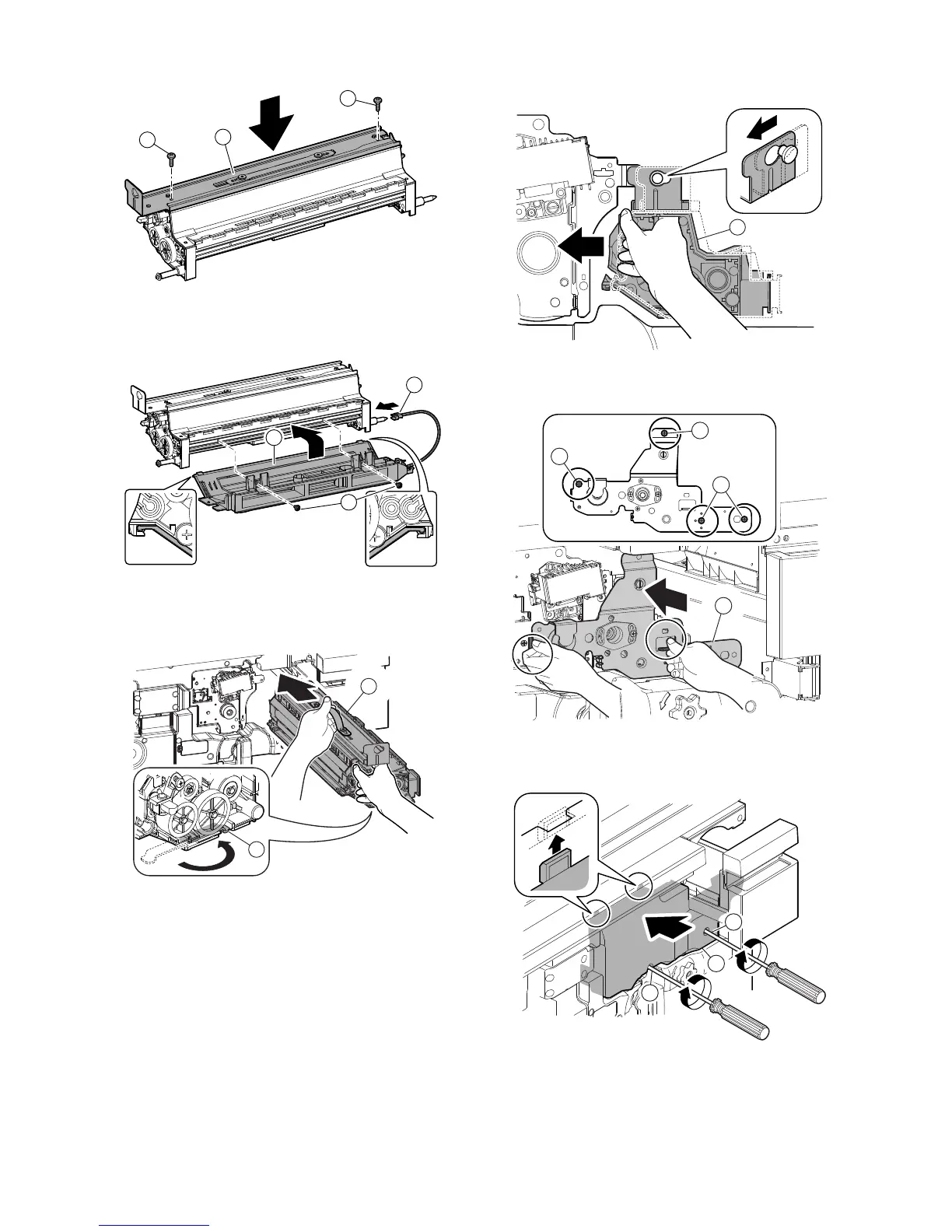
12) Attach the cover (a), and secure it with the screw (b). Connect
the connector (c).
* Check to confirm that the pin of the connector (c) is not
smeared with toner.
13) Rotate the stabilizing leg (a) under the developing unit
and install the developing unit (b).
* When inserting a developing unit with SIM25-2 not exe-
cuted, be sure to check that the power is turned OFF.
14) Slide the developing unit (a) to the left, and lock it.
15) Attach the plate (a), and secure it with the screw (b).
16) Attach the cover (a), and secure it with the screw (b).
17) Insert the toner tray (a), and close the front cover (b).
b
b
a
c
b
a
a
b
a
b
b
b
a
b
b
a



 To Next Page