MX-M1204 MX-M904/M1054/M1204 (MAIN UNIT) 2 – 14
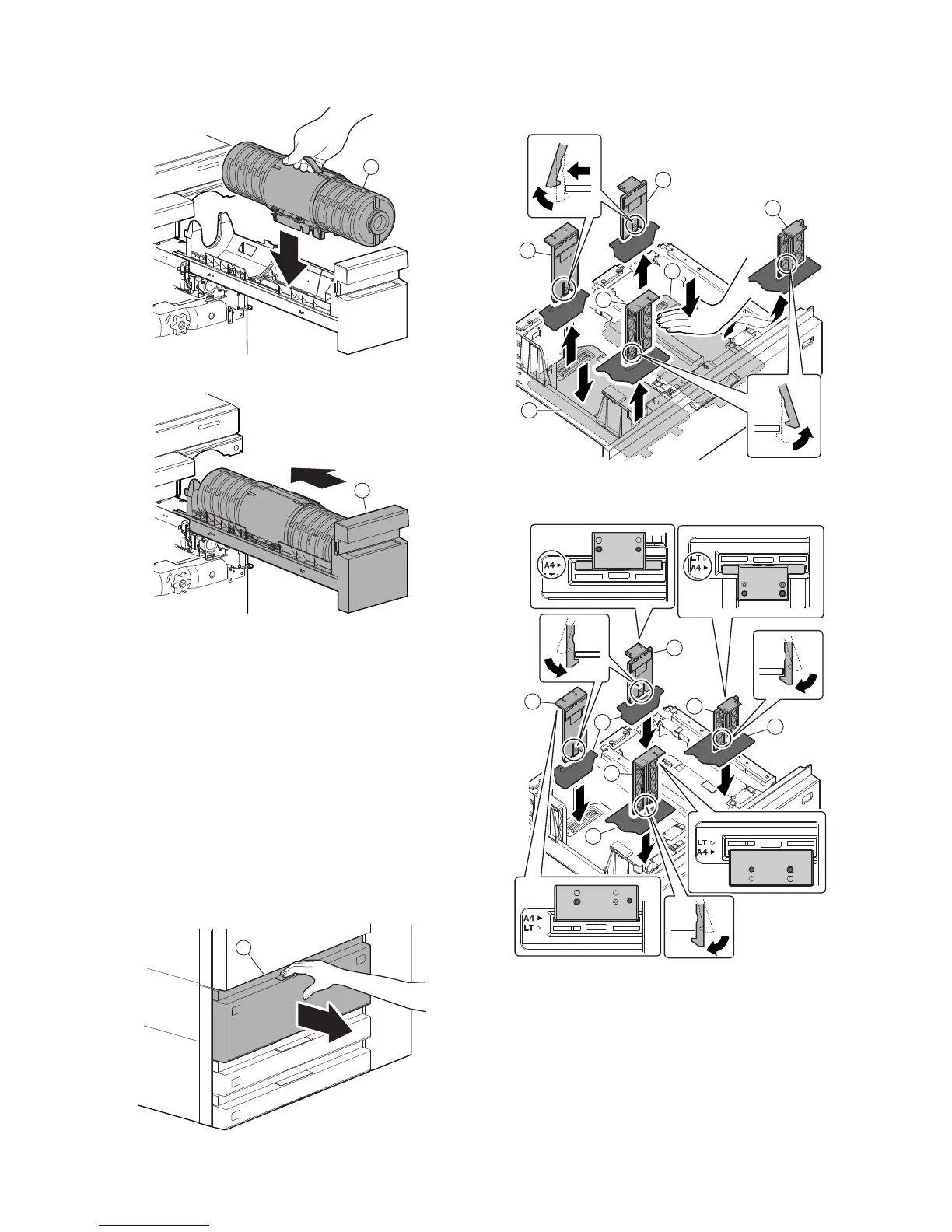
2) Install the toner cartridge (a).
3) Install the toner tray (a).
J. Tray setup
(1) Setting of paper size and paper type
Change the tray setting in the "system setting" mode. Some items
require administrator authority for display. The paper setting (to A4/
recycle) procedure for tray 3 is as follows.
However, if the size of tray 1 has been switched to B5, execute SIM
26-2, and set the paper size.
1) Press the [SETTINGS] key on the operation panel.
2) Press the [SYSTEM SETTINGS] key.
3) Touch the [Paper Tray Settings] key.
4) Touch the [Tray 3] key.
5) Select "recycled" on the selection box of the "Type". Select
"A4" on the selection box of the "Size". Touch the [Submit] key.
(2) Tray size setup
a. Inch series tray 1, tray 2 (LT to A4)
1) Pull out the tray 1/2 (a).
2) Push down the paper feed base plate (a) gently, hold the
hooks and remove A4 size regulation plate (b).
3) Fit the A4 size regulation plate (a) to A4 size, and attach it.
* Be careful to align regulation plates properly into base.
a
a
a
a
a
b
b
b
b
a
a
a
a
b
b
b



 To Next Page