MX-M232D (MX-FX13/XB17) 6 - 2
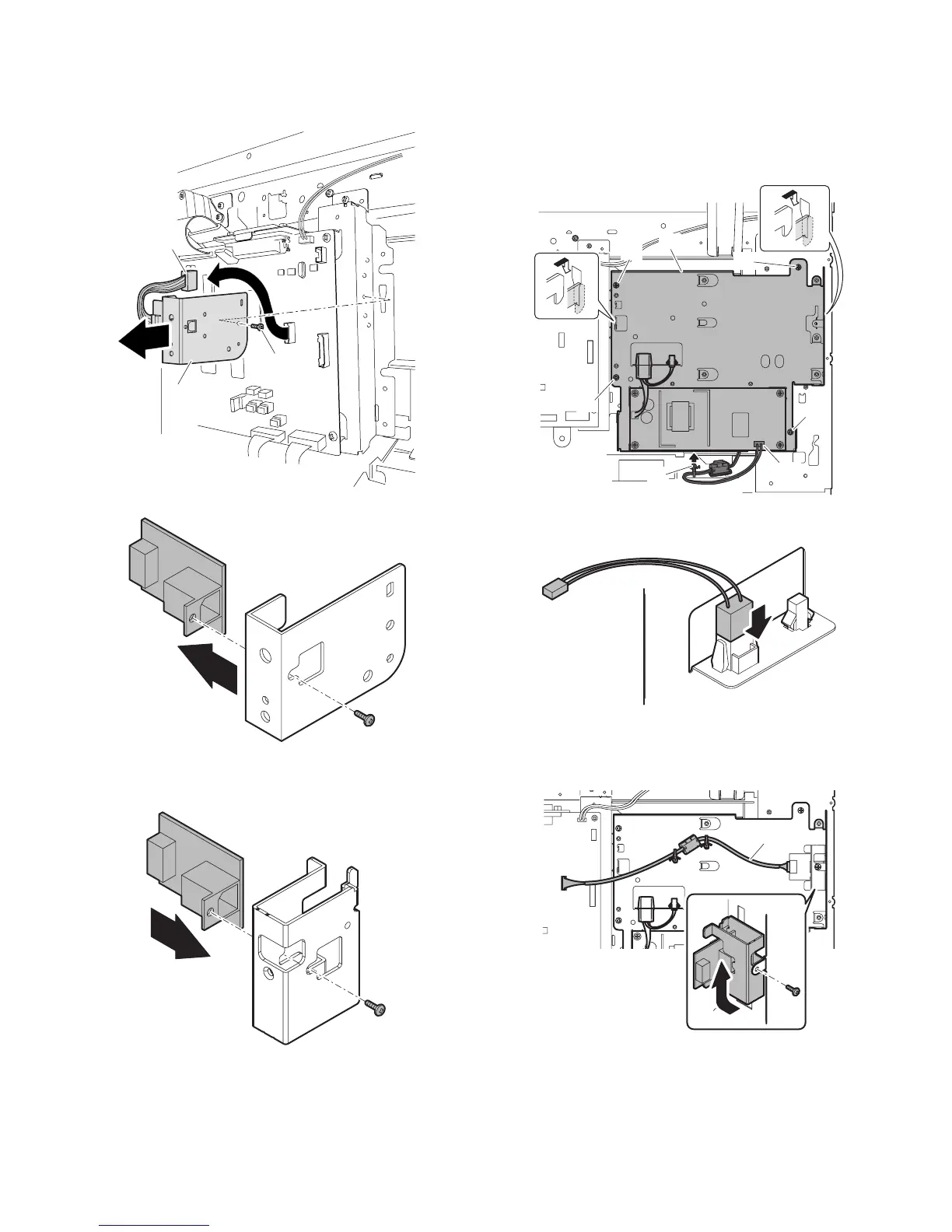
3) Remove the USB devise connector PWB.
<1>Remove one screw.
<2>Remove the USB device connector PWB Unit.
<3>Remove the screw and remove the USB devise connector PWB.
4) Attach the USB device connector PWB to USB holder, which is
included FAX Mounting kit, using the removed screw.
5) Install FAX Mounting Unit.
<1>Hook the attaching parts of FAX Mounting Unit onto the machine
frame.
<2>Secure the unit onto the machine using 4 screws.
<3>Connect the AC harness, which is connected to the power PWB in
the machine, to the FAX mounting Unit. Connect USB expansion
harnesses to MCU PWB.
6) Connect the FAX power harness.
7) Attach the USB holder.
<1>Slide up the USB holder and secure the unit using a screw.
<2>Connect the USB Expansion harness, fix the FAX mounting Unit.
(3)
(2)
(1)



 To Next Page