11-5/8" (longitudinal) x 17" (transversal)
297 mm (longitudinal) x 432 mm (transversal)
When the original is a non-standard size, see the appropriate explanation below for the
mode you are using.
- COPY "SPECIFYING THE ORIGINAL SIZE"
- FAX "SPECIFYING THE ORIGINAL SCAN SIZE USING NUMERIC VALUES"
- IMAGE SEND "SPECIFYING THE ORIGINAL SCAN SIZE USING NUMERIC VALUES"
Operation
Open the automatic document feeder.
Load the paper with the print side facing down.
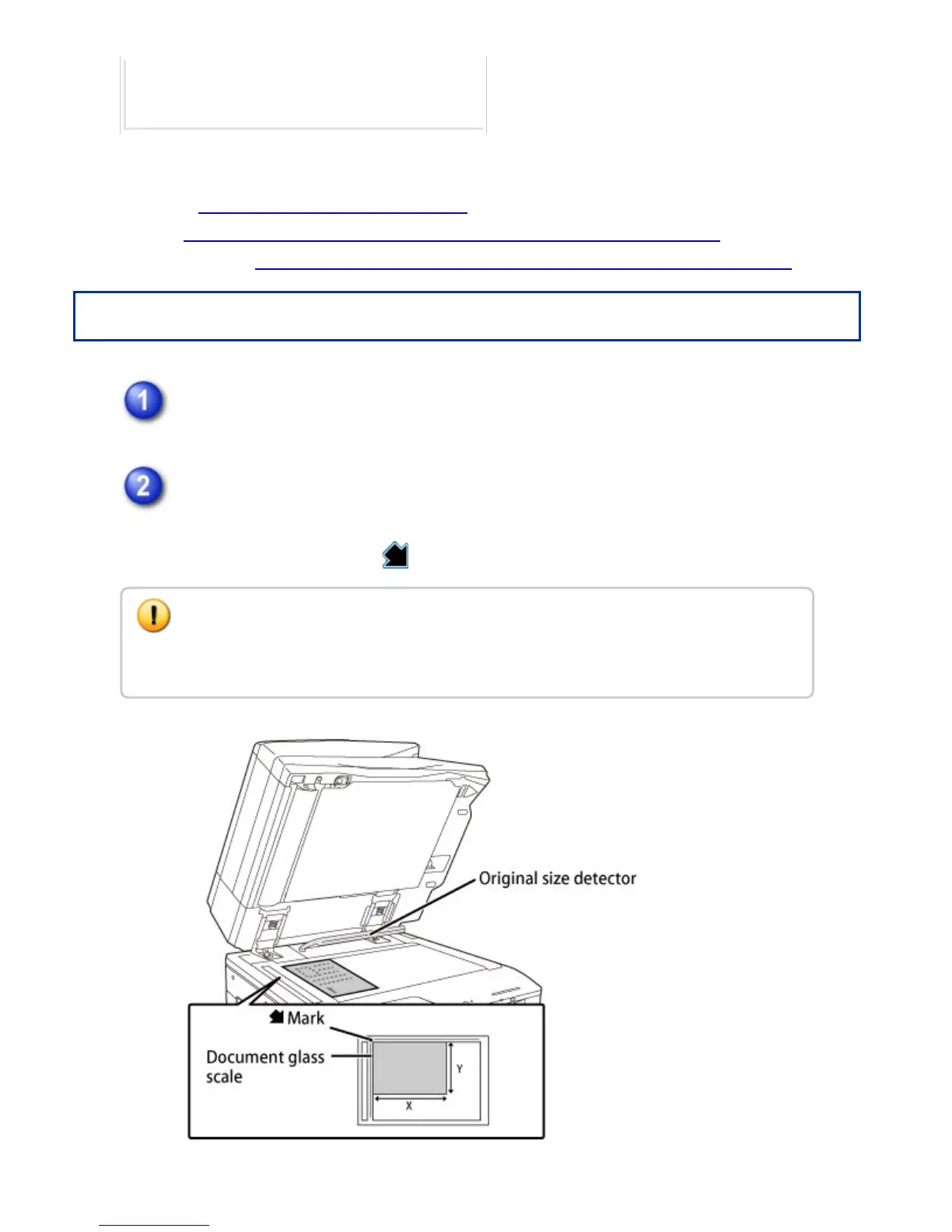
Place the original face down and align the top left corner of the original with back
left (at the tip of the mark ) of the document glass.
Do not place any objects under the original size detector.
Closing the automatic document feeder with an object underneath may damage the
original size detector or disable correct detection of the original size.
USER'S MANUAL | MX-M365N/MX-M465N/MX-M565N USER'S ... http://siica.sharpusa.com/portals/0/downloads/Manuals/MX-M365N-M...
137 of 1441 3/17/2016 7:14 AM



 To Next Page