ENLARGING/REDUCING THE LENGTH AND
WIDTH SEPARATELY
Overview
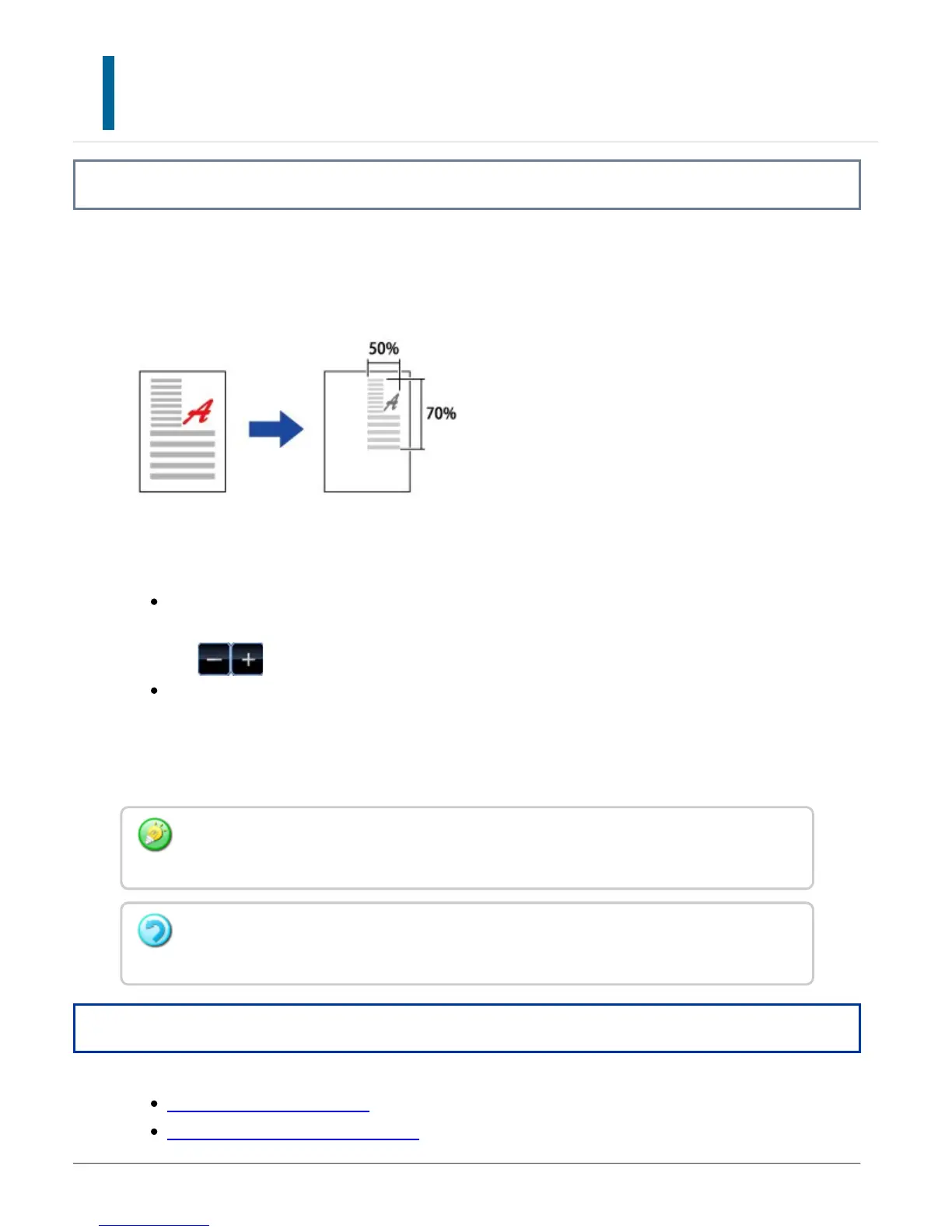
This section explains how to individually specify the horizontal and vertical copy ratios.
When 50% is selected for the horizontal ratio and 70% is selected for the vertical ratio
The following two methods can be used to specify the ratio.
Using the preset ratio key
Specify any ratio by combination of preset ratio key, which is pre-registered, with
the zoom key, which allows you to adjust the ratio in 1% units.
Specifying the image dimensions
Specify the image sizes of the original and output to automatically obtain the
appropriate ratio.
Enter the vertical and horizontal sizes.
Operation
Using the preset ratio key
Specifying the image dimensions
When the automatic document feeder is used, the vertical and horizontal ratio selection
ranges are both between 25% to 200%.
To cancel the XY zoom setting:
Tap the [Zoom] tab or the [CA] key.
USER'S MANUAL | MX-M365N/MX-M465N/MX-M565N USER'S ... http://siica.sharpusa.com/portals/0/downloads/Manuals/MX-M365N-M...
244 of 1441 3/17/2016 7:14 AM



 To Next Page