COPYING A PAMPHLET
(BOOK COPY)
Overview
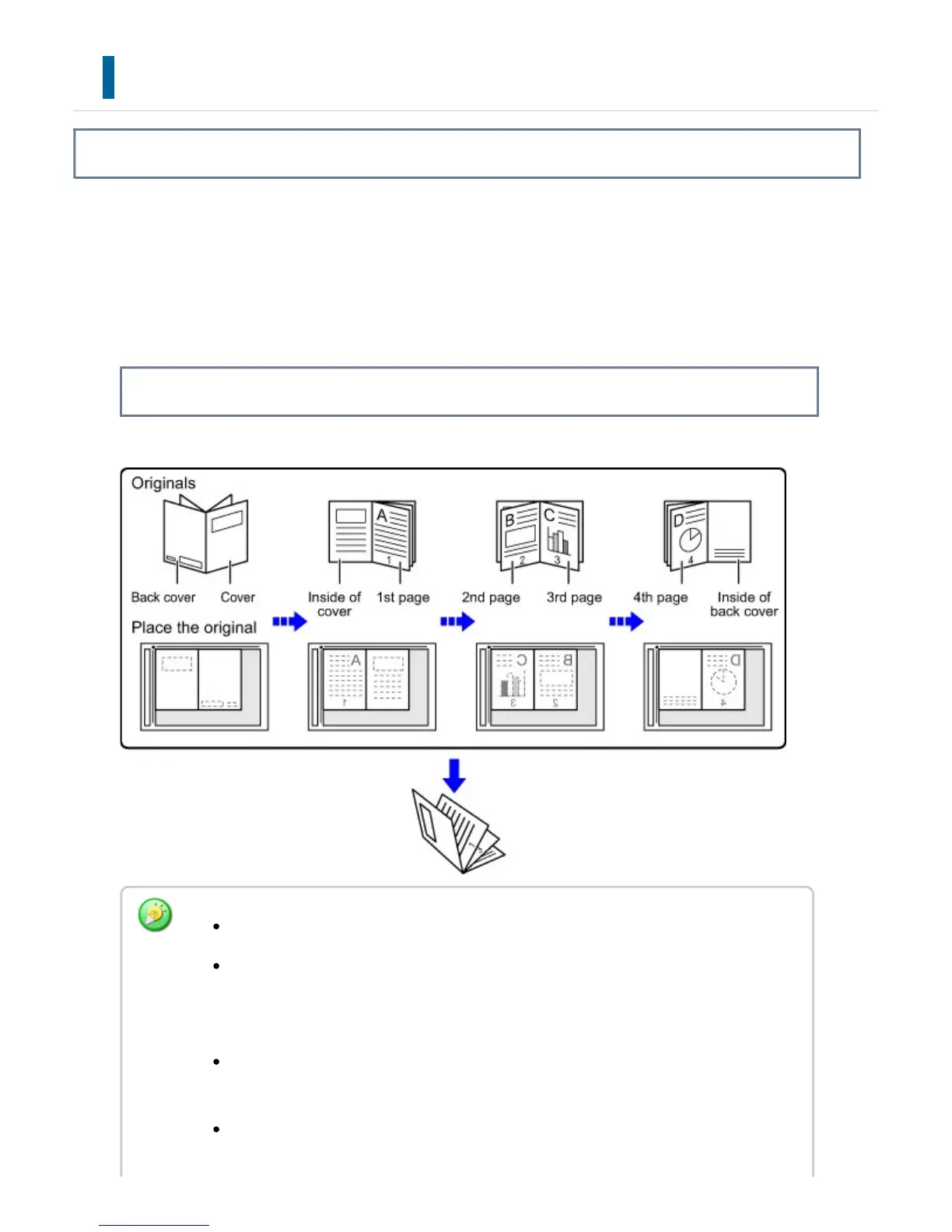
This function makes a copy of the two facing pages of an open book or other bound
document.
Copies made with this function can be folded at the center to create a booklet.
This function is convenient for arranging copies into an attractive booklet or pamphlet.
How to place the original
Book Copy must be specified before scanning the original.
Four original pages will be copied onto each sheet of paper. Blank pages will be
automatically added at the end if the total number of original pages is not a
multiple of four.
This function can be combined with saddle stitch or fold if a saddle finisher is
installed.
When the book copy function is selected, 2-sided copying mode is automatically
selected.
USER'S MANUAL | MX-M365N/MX-M465N/MX-M565N USER'S ... http://siica.sharpusa.com/portals/0/downloads/Manuals/MX-M365N-M...
288 of 1441 3/17/2016 7:14 AM



 To Next Page