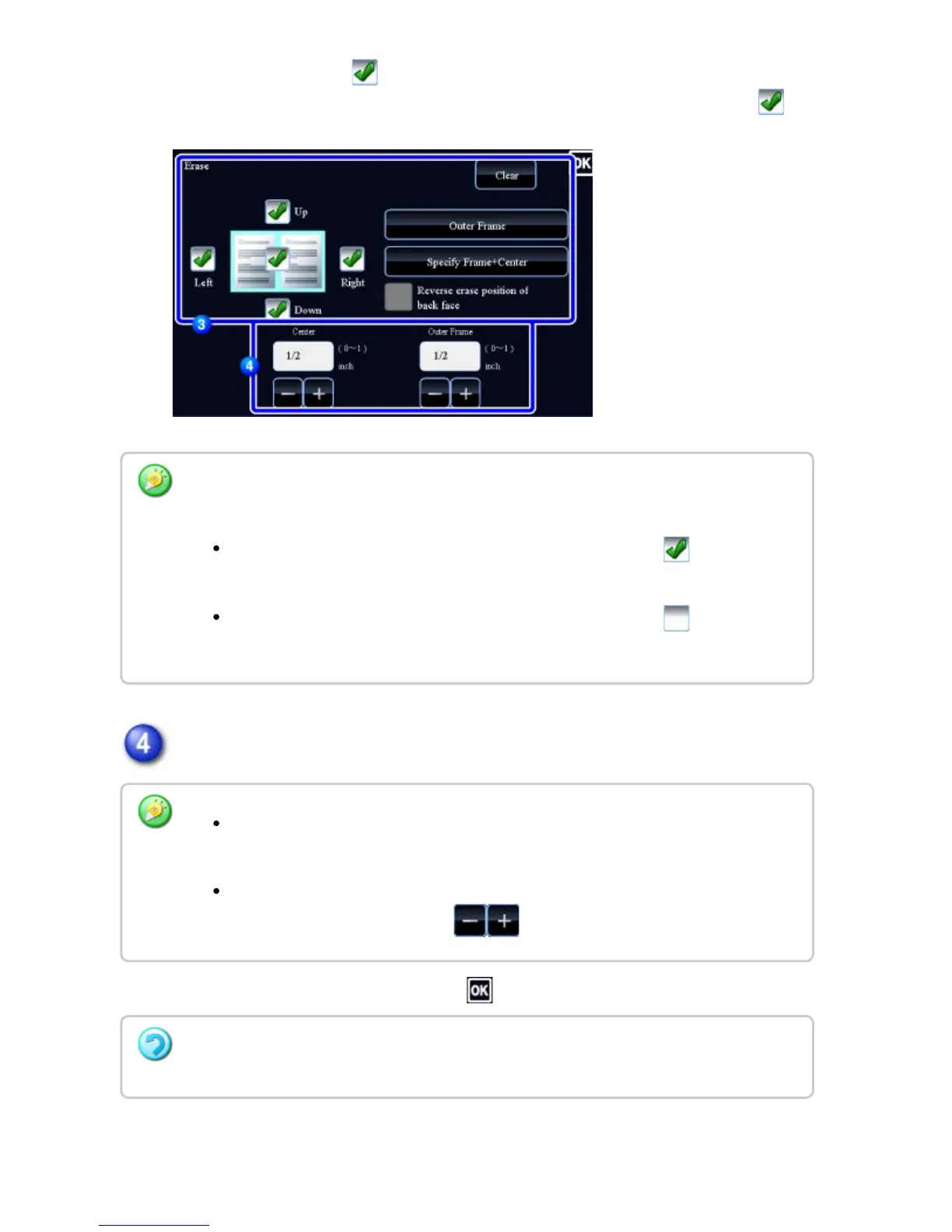
checkboxes are set to .
If the [Specify Frame+Center] key is tapped, all the checkboxes are set to .
Specify the erase width.
After the settings are completed, tap and [Back] keys in sequence.
Specify the erase edge on the reverse side when erasing edges of one to three sides of
Up, Down, Left, and Right on the front side to scan a 2-sided original.
If the [Reverse erase position of back face.] checkbox is set to , the edge in
the position opposite to the erased edge on the front side will be erased.
If the [Reverse erase position of back face.] checkbox is set to , the edge in
the same position as on the front side will be erased.
Tap the numeric value display indicating the margin shift area on the front side or
reverse side, and enter the area using the numeric keys.
To quickly set the area, first specify a value close to the desired value by the
numeric keys, then adjust it with .
To cancel the erase setting:
Tap the [Clear] key.
USER'S MANUAL | MX-M365N/MX-M465N/MX-M565N USER'S ... http://siica.sharpusa.com/portals/0/downloads/Manuals/MX-M365N-M...
319 of 1441 3/17/2016 7:14 AM



 To Next Page