ADJUSTING RESOLUTION WHEN
SCANNING
(RESOLUTION)
This function adjusts the resolution when scanning the original, enabling the high-quality
output or speed-priority output according to the application.
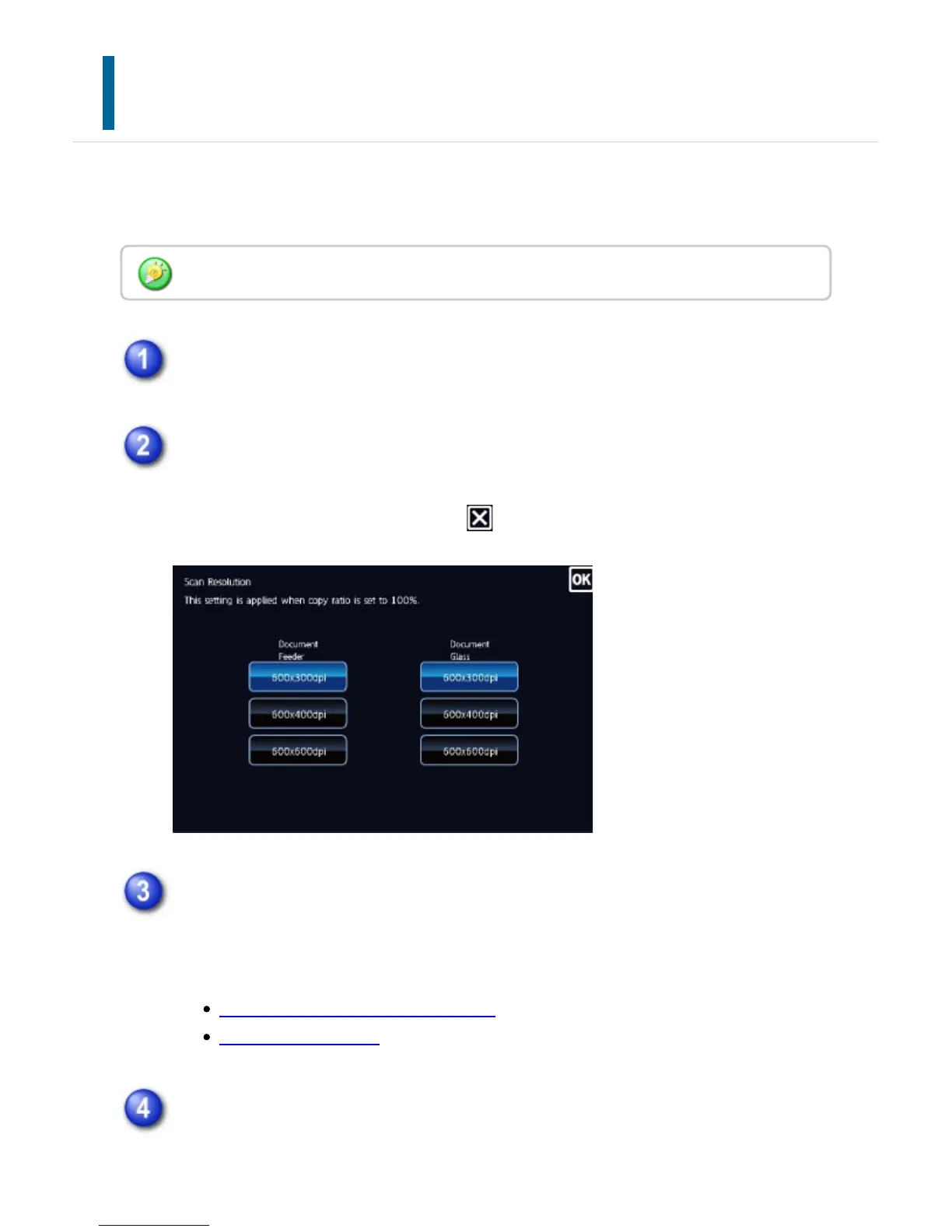
Touch the [Others] key, and tap the [Scan Resolution] key.
Select the resolution.
The resolution can be set to both the document feeder and document glass.
After the settings are completed, tap and [Back] keys in sequence.
Place the original and tap the [Preview] key.
Place the original in the document feeder tray of the automatic document feeder, or
on the document glass.
AUTOMATIC DOCUMENT FEEDER
DOCUMENT GLASS
Tap the [Start] key to start copying.
When making only one set of copies, you do not need to specify the number of
Resolution must be specified before scanning the original.
USER'S MANUAL | MX-M365N/MX-M465N/MX-M565N USER'S ... http://siica.sharpusa.com/portals/0/downloads/Manuals/MX-M365N-M...
338 of 1441 3/17/2016 7:14 AM


 To Next Page