The format of the [Text] tab can be entered using pre-set text or soft keyboard.
Setting using the [Text] tab
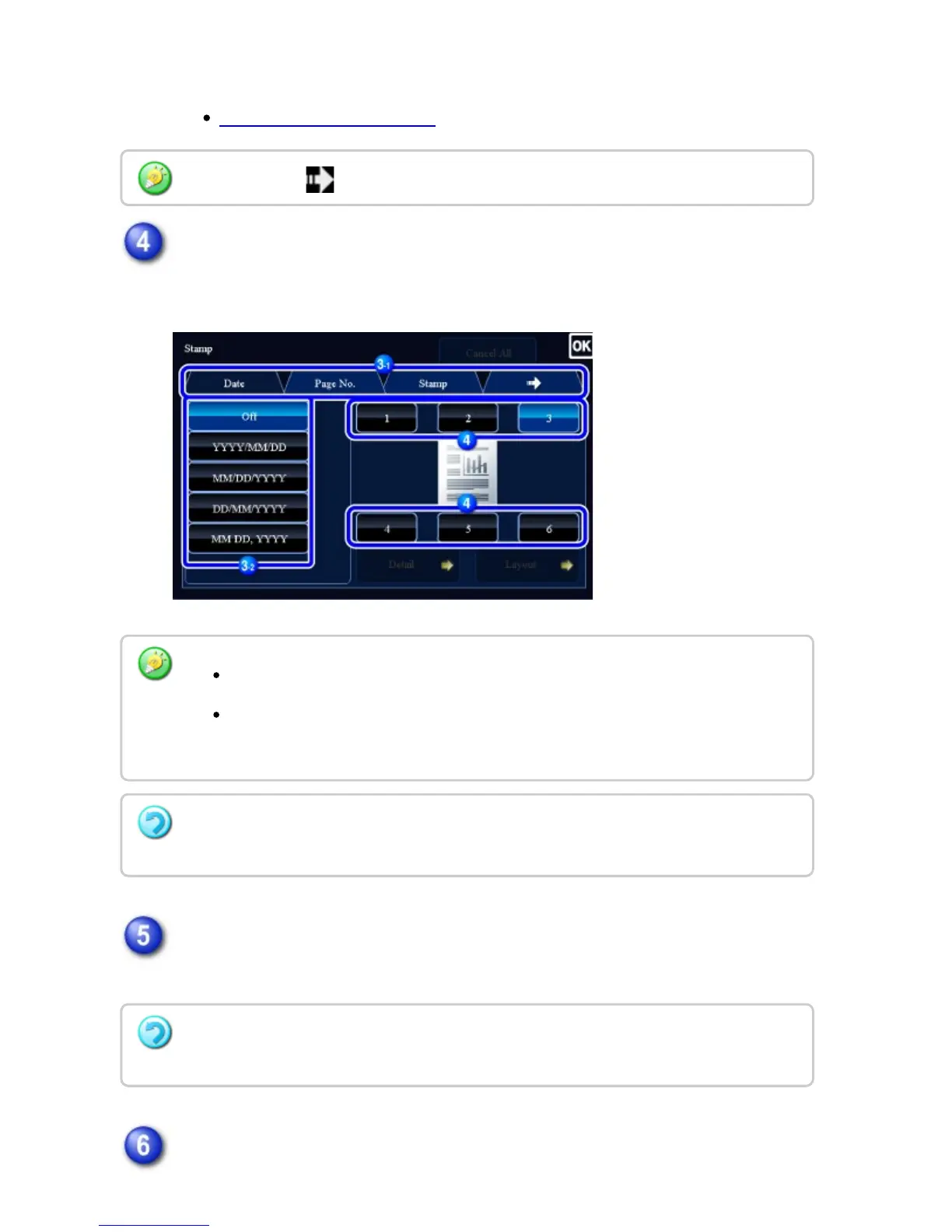
Tap a key of the desired print position.
Tap any of [1] to [6] keys.
Check the preview image in the preview screen.
Check whether or not settings produce the required results.
Tap the [Start] key to start copying.
When you tap the tab, the display tab is switched.
Tapping the [Detail] key allows you to configure setting for each tab.
Tapping the [Layout] key allows you to check the printing position or detailed
settings.
To cancel the text settings:
Tap the [Cancel All] key.
To cancel all settings:
Tap the [CA] key.
USER'S MANUAL | MX-M365N/MX-M465N/MX-M565N USER'S ... http://siica.sharpusa.com/portals/0/downloads/Manuals/MX-M365N-M...
342 of 1441 3/17/2016 7:14 AM


 To Next Page