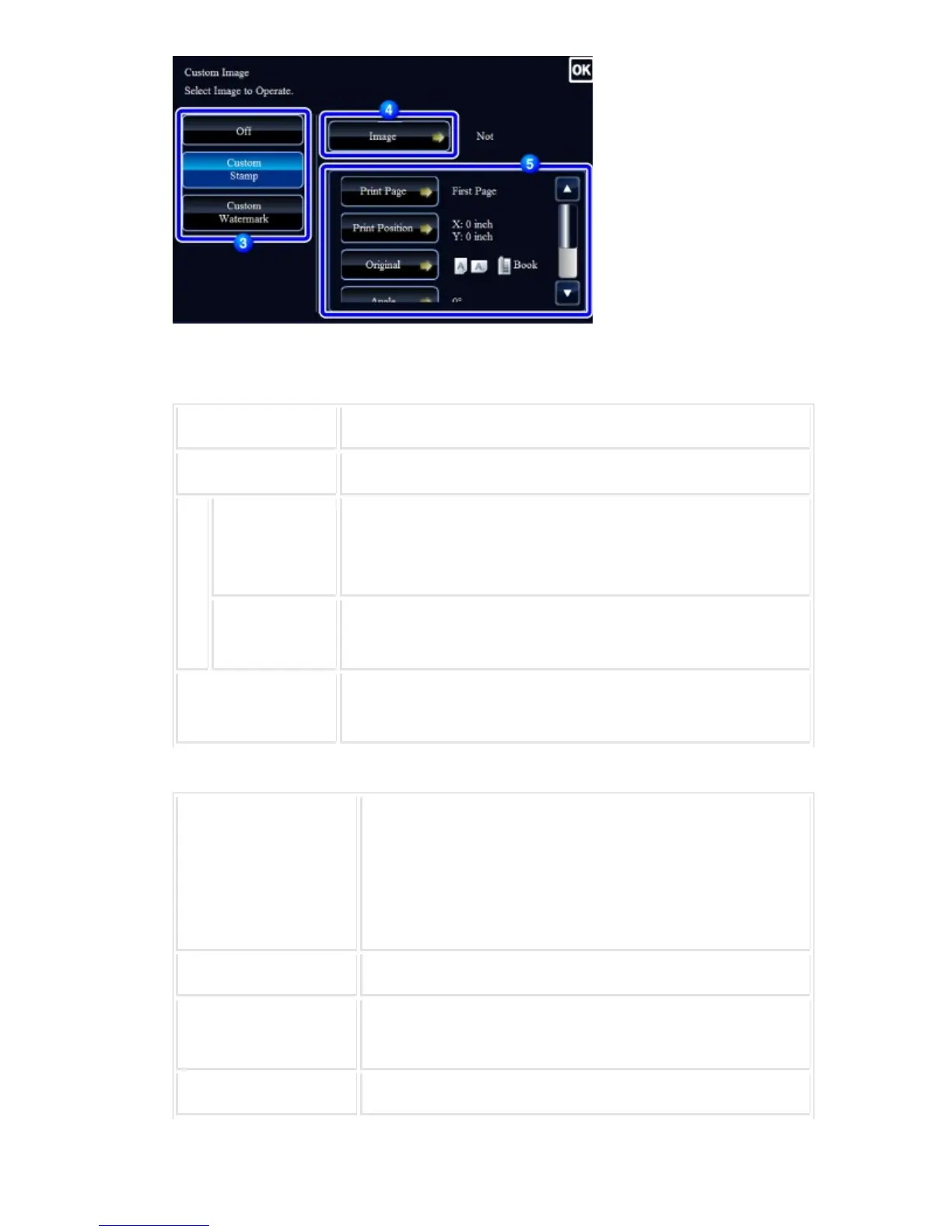
For custom stamp
Print Page Specify a page(s) for stamp copy. First Page or All Pages
Print Position Specify a position for stamp copy.
Or
igi
na
ls
ORIGINAL PLA
CEMENT ORIE
NTATION
Specify the original orientation.
2-Sided Original
Type
Specify the binding edge for 2-sided original. Book or Tablet
Angle Specify the corner of the image. 0 degrees, -90 degrees, 90 degre
es, or 180 degrees
For custom watermark
Print Pattern Specify the image watermark print pattern.
Transparent: Makes an original image transparent for stamp cop
y.
Overlap: Hides a watermark added to an original image for stamp
copy.
Exposure Select the exposure of a watermark from nine levels.
Print Page Specify a page(s) for stamp copy.
First Page or All Pages
Print Position Specify a position for stamp copy.
USER'S MANUAL | MX-M365N/MX-M465N/MX-M565N USER'S ... http://siica.sharpusa.com/portals/0/downloads/Manuals/MX-M365N-M...
348 of 1441 3/17/2016 7:14 AM


 To Next Page