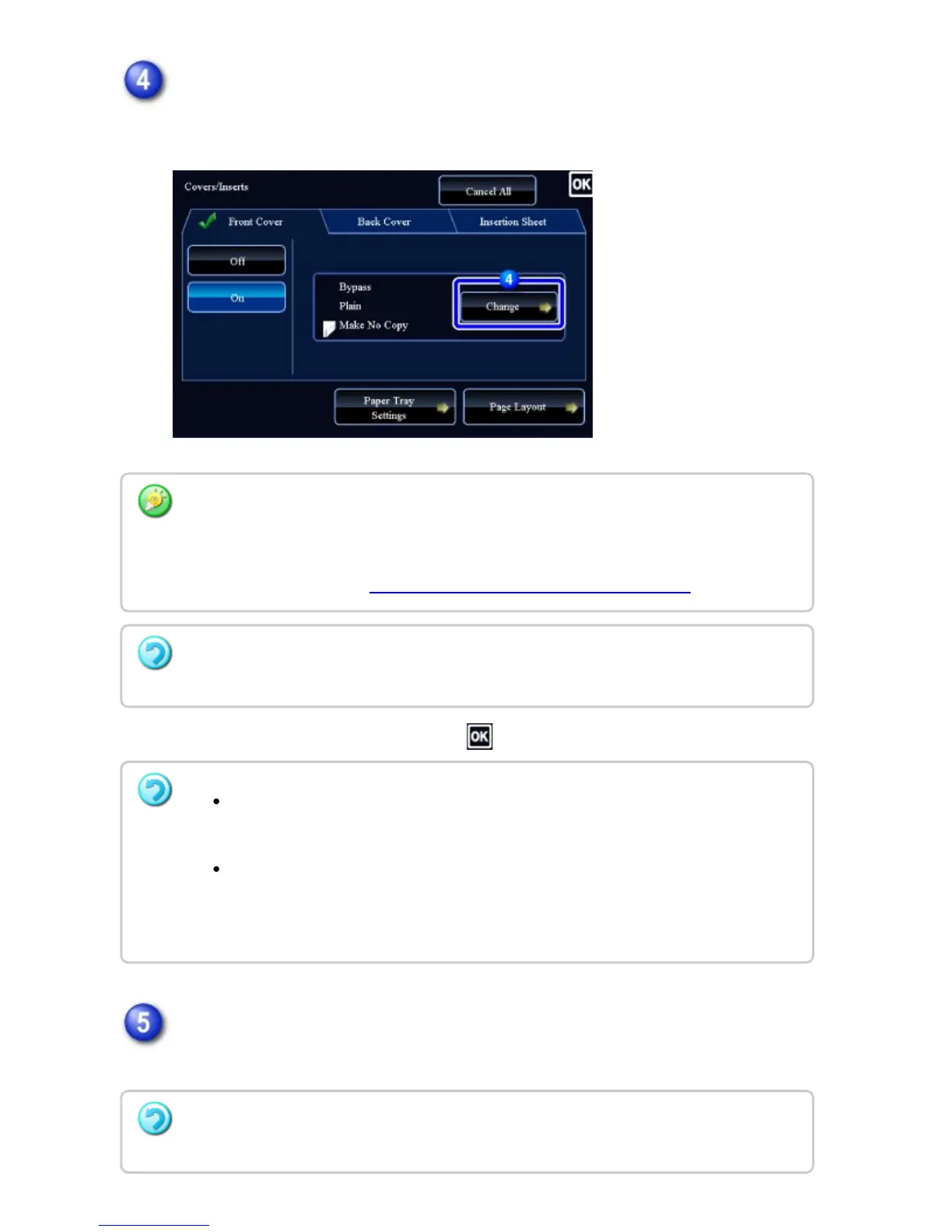
Tap the [Change] key, and configure copy setting of a front cover sheet.
When only inserting a cover, tap the [Do not copy] key.
After the settings are completed, tap and [Back] keys in sequence.
Check the preview image in the preview screen.
Check whether or not settings produce the required results.
To change the cover input tray:
Tap the [Paper Tray Settings] key to display the input tray setting screen. On the input
tray setting screen, tap the [Paper Tray] key of [Front Cover] or [Back Cover].
For more information, see "SELECTING THE PAPER TRAY FOR COPYING".
If the cover will be copied on, label sheets, transparency film, and tab paper cannot be
used. If not copied on, tab paper can be inserted.
To cancel cover sheet insertion:
Tap the [Off] key.
To cancel the front cover, back cover, and insertion sheet settings at the
same time:
Tap the [CA] key.
To cancel all settings:
Tap the [CA] key.
USER'S MANUAL | MX-M365N/MX-M465N/MX-M565N USER'S ... http://siica.sharpusa.com/portals/0/downloads/Manuals/MX-M365N-M...
360 of 1441 3/17/2016 7:14 AM



 To Next Page