Operation
Place the original in the document feeder tray of the automatic document
feeder, and tap the [Preview] key.
AUTOMATIC DOCUMENT FEEDER
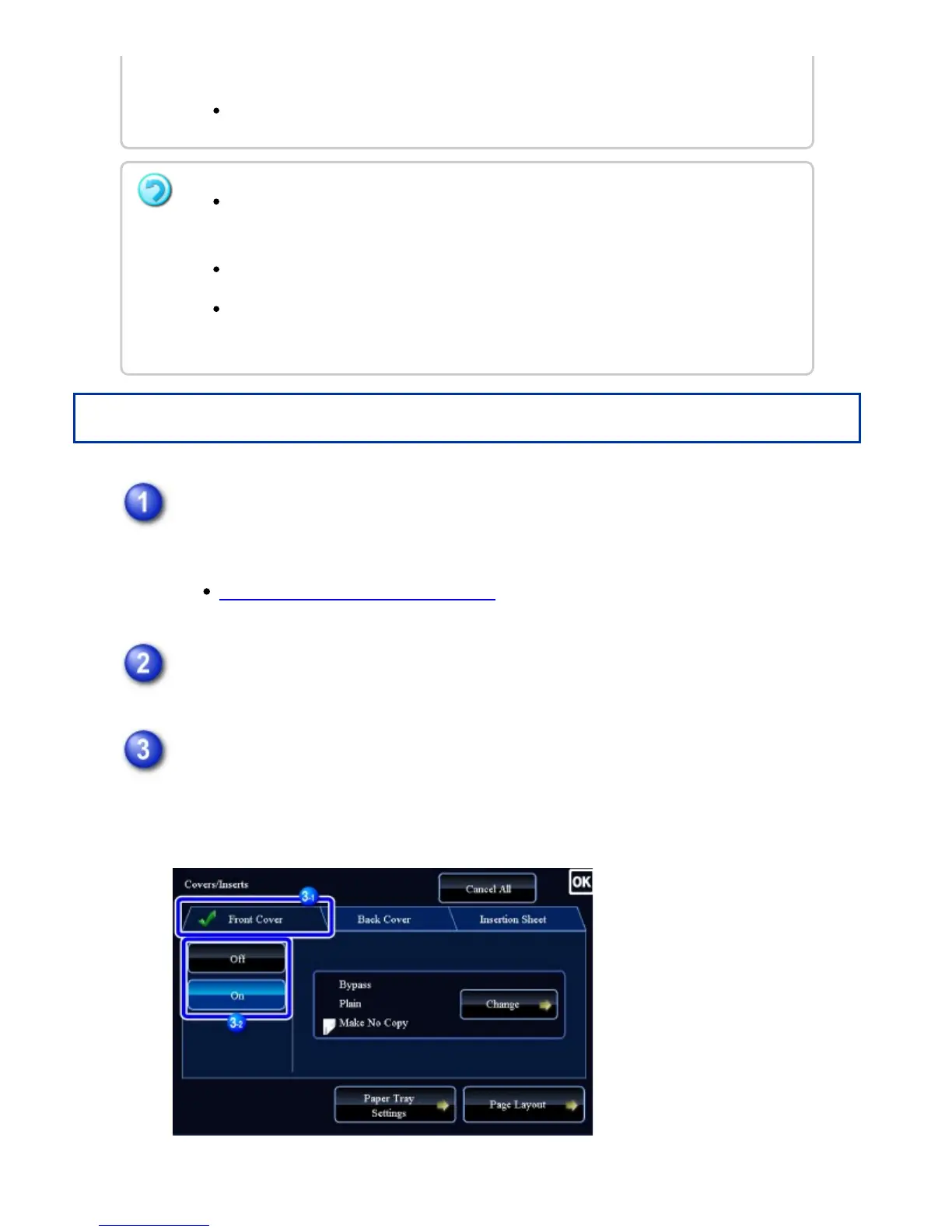
Tap the [Others] key, and then tap the [Covers/Inserts] key.
Tap the [Front Cover] key, and then tap the [On] key.
When inserting a back cover, tap the [Back Cover] key, and then tap the [On]
key.
perform the procedure to select covers/inserts.
One sheet can be inserted for each of front and back covers.
When performing 2-sided copying of 2-sided originals, an insertion sheet cannot
be inserted between the front and reverse sides of an original.
This function cannot be used in combination with the saddle stitch function.
This setting is not available when the covers/inserts function is disabled in
"Setting mode".
USER'S MANUAL | MX-M365N/MX-M465N/MX-M565N USER'S ... http://siica.sharpusa.com/portals/0/downloads/Manuals/MX-M365N-M...
359 of 1441 3/17/2016 7:14 AM



 To Next Page