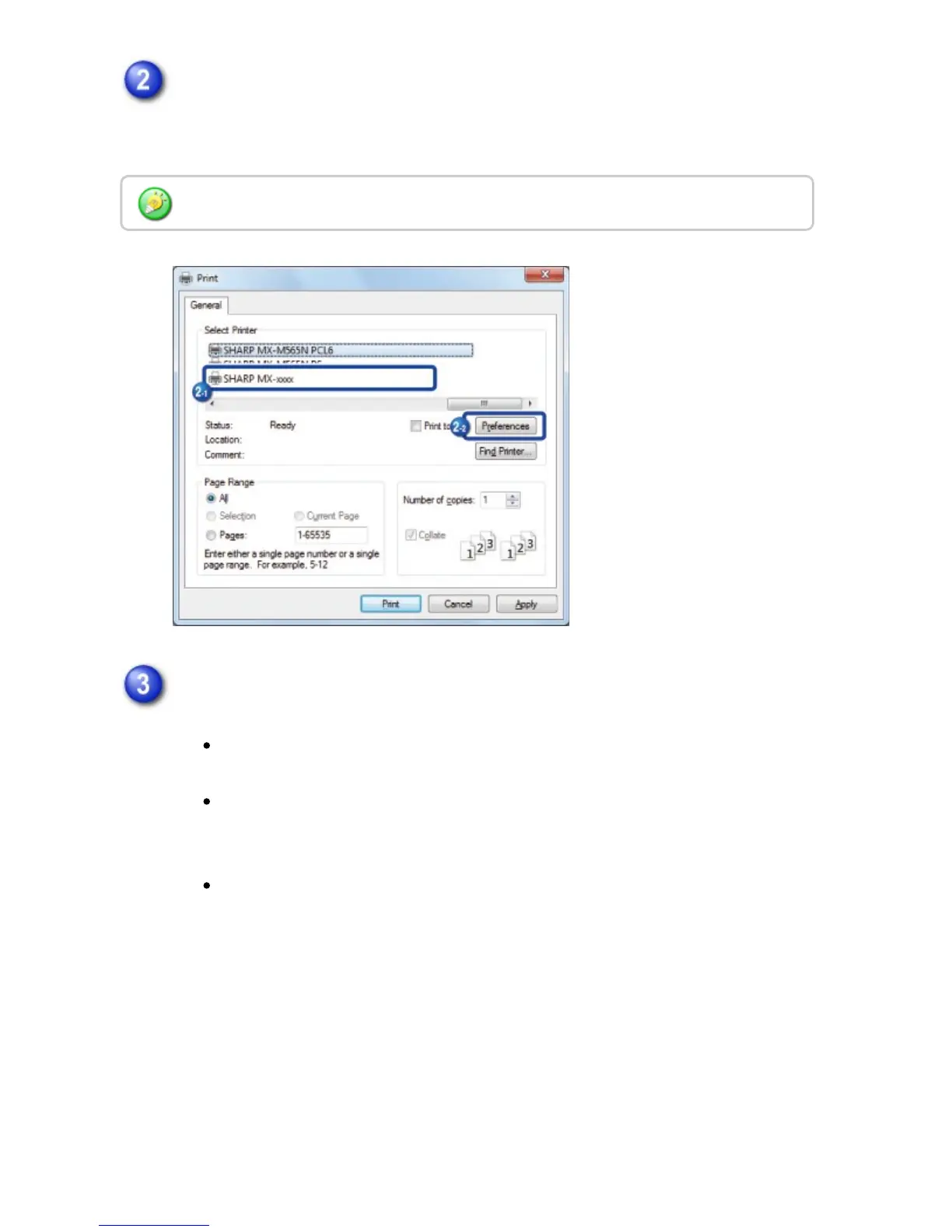
Select the printer driver for the machine and click the [Preferences] button.
If the printer drivers appear as a list, select the name of the printer driver to be
used from the list.
Click the [Paper] tab and select the paper size.
Make sure the paper size is the same as the paper size set in the
application.
You can register up to seven user-defined sizes in the pull-down menu. To
store a paper size, select [Custom Paper] or one of [User 1] to [User 7]
from the pull-down menu and click the [Custom] button.
To select settings on other tabs, click the desired tab and then select the
settings.
Click a tab on the "Print" dialog box to adjust the settings on that tab.
USER'S MANUAL | MX-M365N/MX-M465N/MX-M565N USER'S ... http://siica.sharpusa.com/portals/0/downloads/Manuals/MX-M365N-M...
397 of 1441 3/17/2016 7:14 AM



 To Next Page