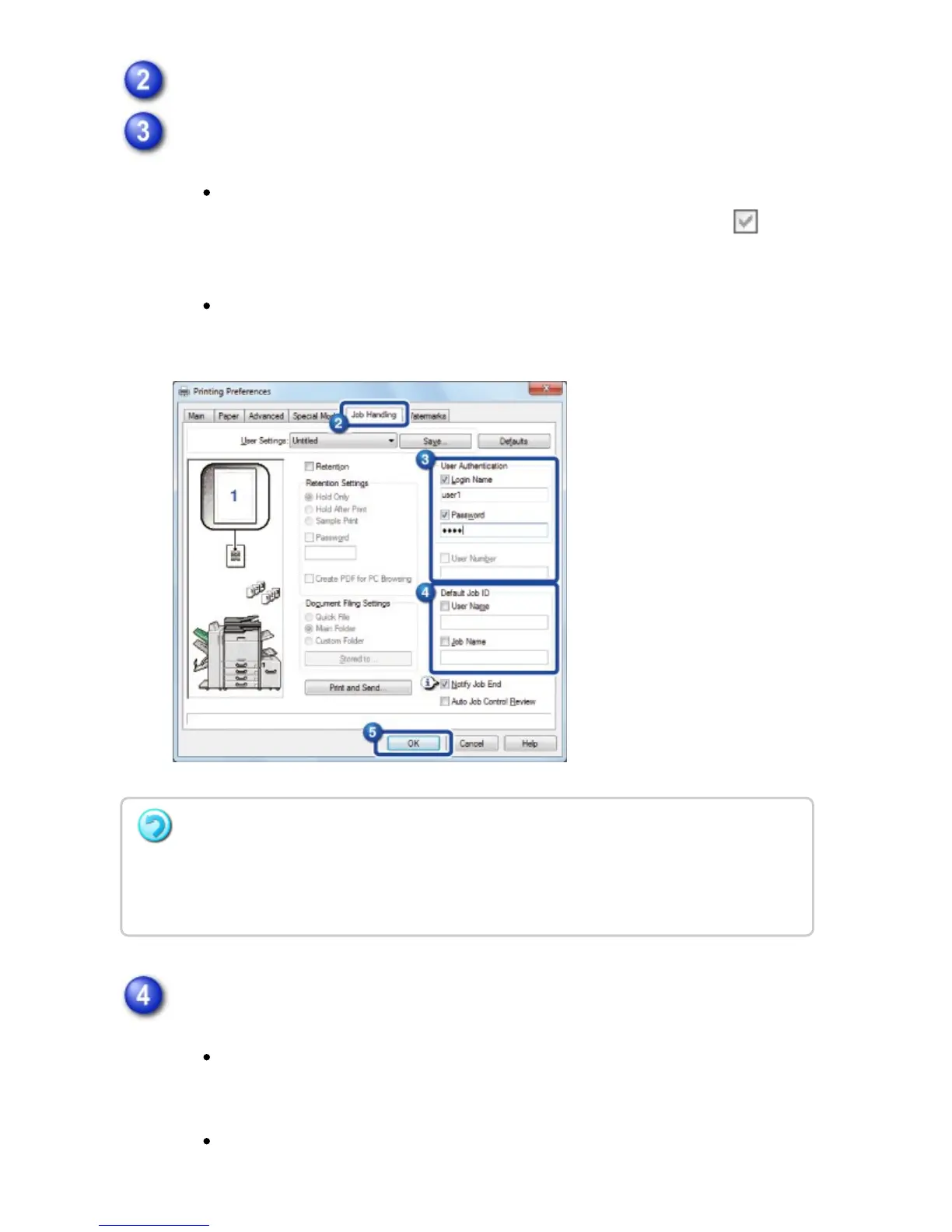
Click the [Job Handling] tab.
Enter your user information.
When authentication is carried out using the login name/password, click the
[Login Name] and [Password] checkboxes so that the checkmark
appears, and enter your login name and password. Enter the password using
1 to 32 characters.
When authentication is carried out using the user number, select the [User
Number] checkbox and enter your user number using 5 to 8 digits.
Enter the user name and job name as necessary.
Click the [User Name] checkbox, and enter your user name using up to 32
characters. The entered user name will appear on the touch panel of the
machine. If you do not enter a user name, your PC login name will appear.
Click the [Job Name] checkbox, and enter a job name using up to 80
If you have configured "Printing Policy" on the [Options] tab so that user authentication
is always performed, user information cannot be entered here.
User information must be entered in the dialog box that appears each time the user starts
a print job.
USER'S MANUAL | MX-M365N/MX-M465N/MX-M565N USER'S ... http://siica.sharpusa.com/portals/0/downloads/Manuals/MX-M365N-M...
403 of 1441 3/17/2016 7:14 AM



 To Next Page