SENDING BY CHAIN DIALING
Number sequences entered using the numeric keys and/or one-touch keys can be linked
together with pauses and dialed as a single number.
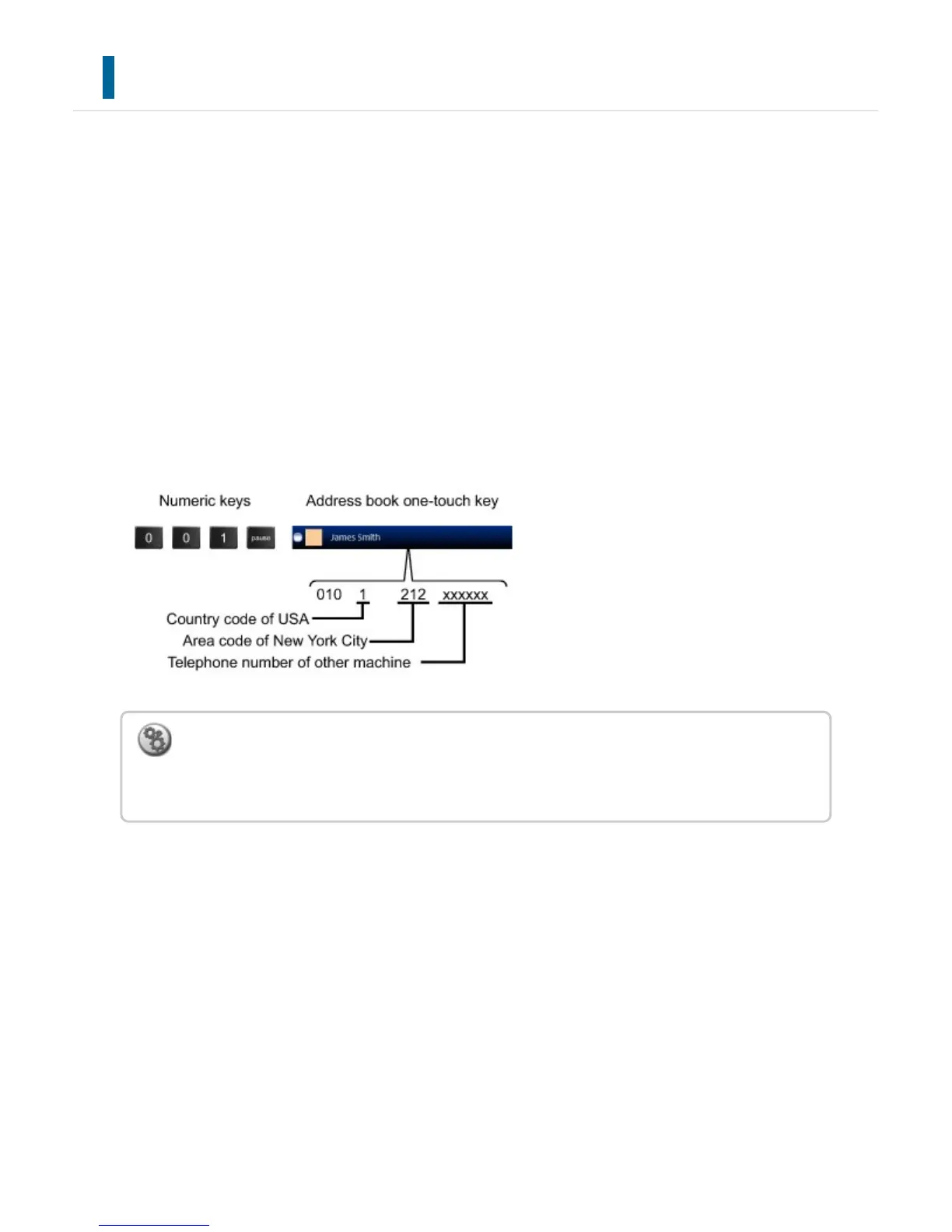
For example when dialing an international number, tap the [Pause] key between the
identification number of an international telephone service company (e.g., "001") and the
country code (e.g., "81" for Japan) to insert a pause for smoother line connection.
The time (in seconds) set in [Pause Time Setting] of "Setting mode" defines the length of
pause.
On the screen, a hyphen "-" indicates a pause.
If two seconds are set in [Pause Time Setting], tapping the [Pause] key three times enters
pauses for 6 seconds.
Example: Using chain dialing to dial an international number
To set the length of pause:
In "Setting mode", select [System Settings] → [Image Send Settings] → [Fax Settings] →
[Default Settings] → [Pause Time Setting].
USER'S MANUAL | MX-M365N/MX-M465N/MX-M565N USER'S ... http://siica.sharpusa.com/portals/0/downloads/Manuals/MX-M365N-M...
546 of 1441 3/17/2016 7:14 AM



 To Next Page