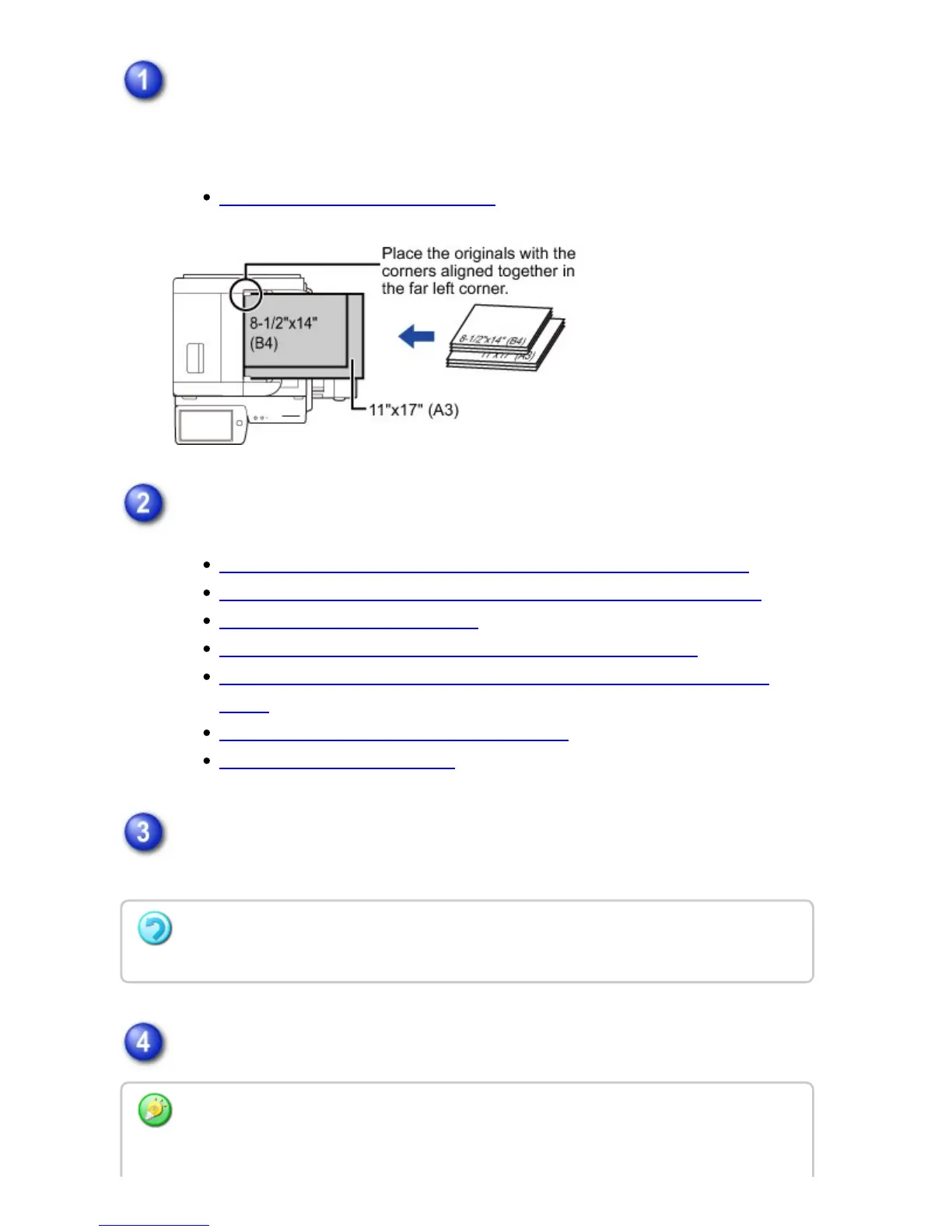
Place originals in the automatic document feeder.
Insert the originals with the corners aligned together in the far left corner of the
document feeder tray.
AUTOMATIC DOCUMENT FEEDER
Enter the destination fax number.
ENTERING A DESTINATION NUMBER USING THE NUMERIC KEYS
RETRIEVING A DESTINATION NUMBER FROM AN ADDRESS BOOK
THE SELECTED DESTINATIONS
USING A SEARCH NUMBER TO RETRIEVE A DESTINATION
RETRIEVING A DESTINATION NUMBER FROM A GLOBAL ADDRESS
BOOK
USING A TRANSMISSION LOG TO RESEND
SENDING BY CHAIN DIALING
Tap the [Mixed Size Original] key.
A checkmark appears on the icon.
Tap the [Start] key to start scanning of the original.
To cancel the Mixed Size Original setting:
Tap the [Mixed Size Original] key to clear the checkmark.
Tap the [Preview] key to preview the output image before sending it. After you have
scanned an original by tapping the [Preview] key, tap the [Additional Scan] key to scan the
USER'S MANUAL | MX-M365N/MX-M465N/MX-M565N USER'S ... http://siica.sharpusa.com/portals/0/downloads/Manuals/MX-M365N-M...
633 of 1441 3/17/2016 7:14 AM



 To Next Page