STAMPING SCANNED
ORIGINALS
(VERIFICATION STAMP)
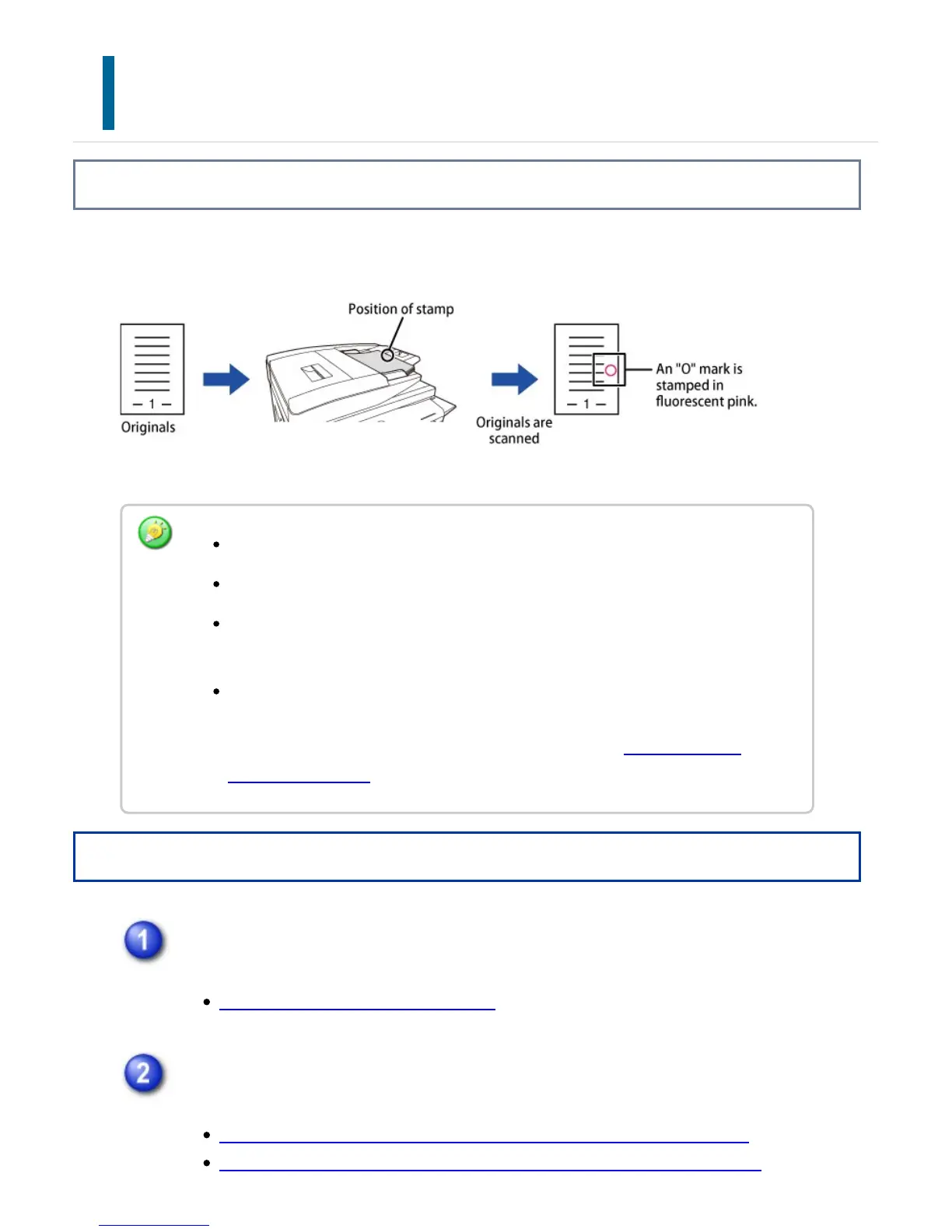
Overview
This function stamps each original that is scanned using the automatic document feeder,
allowing you to verify that all originals were correctly scanned.
Operation
Place originals in the automatic document feeder.
AUTOMATIC DOCUMENT FEEDER
Enter the destination fax number.
ENTERING A DESTINATION NUMBER USING THE NUMERIC KEYS
RETRIEVING A DESTINATION NUMBER FROM AN ADDRESS BOOK
To use the verification stamp function, the optional stamp unit must be installed.
When 2-sided originals are used, the front of each original is stamped twice.
If an error occurs during scanning, an original that was not scanned may be
stamped.
When the "O" mark that is stamped on originals starts to become faint, replace
the stamp cartridge.
For the procedure for replacing the stamp cartridge, see "REPLACING THE
STAMP CARTRIDGE".
USER'S MANUAL | MX-M365N/MX-M465N/MX-M565N USER'S ... http://siica.sharpusa.com/portals/0/downloads/Manuals/MX-M365N-M...
649 of 1441 3/17/2016 7:14 AM



 To Next Page