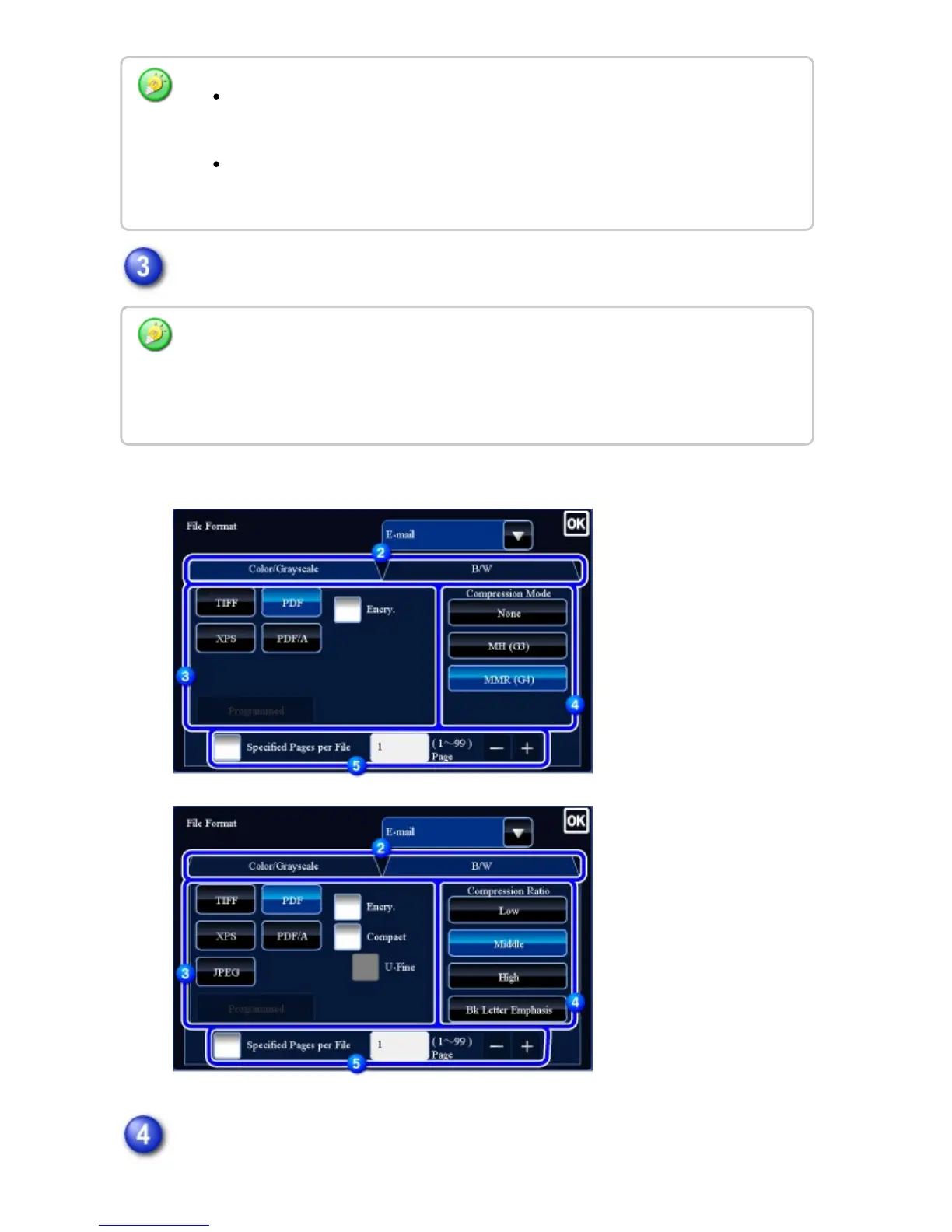
Tap the key of the desired file type.
When [B/W] tab is selected
When [Color/Grayscale] tab is selected
Tap the desired compression mode key or tap the desired compression ratio
The format setting for [B/W] mode is the file format with the color mode set to
[Mono2].
The format setting for [Color/Grayscale] mode is the file format with the color
mode set to [Full Color] or [Grayscale].
When [Color/Grayscale] mode is selected and the scanner function expansion kit is
installed, the [Compact] and [U-Fine] checkboxes appear. To suppress image quality
deterioration and reduce the data size of a file to be transmitted, select High Compression
PDF. Select [U-Fine] only when you select High Compression PDF.
USER'S MANUAL | MX-M365N/MX-M465N/MX-M565N USER'S ... http://siica.sharpusa.com/portals/0/downloads/Manuals/MX-M365N-M...
781 of 1441 3/17/2016 7:14 AM



 To Next Page