PN-L803C/80TC3 SERVICE MENU/VARIOUS SETTING TOOL OPERATING PROCEDURES 4- 38
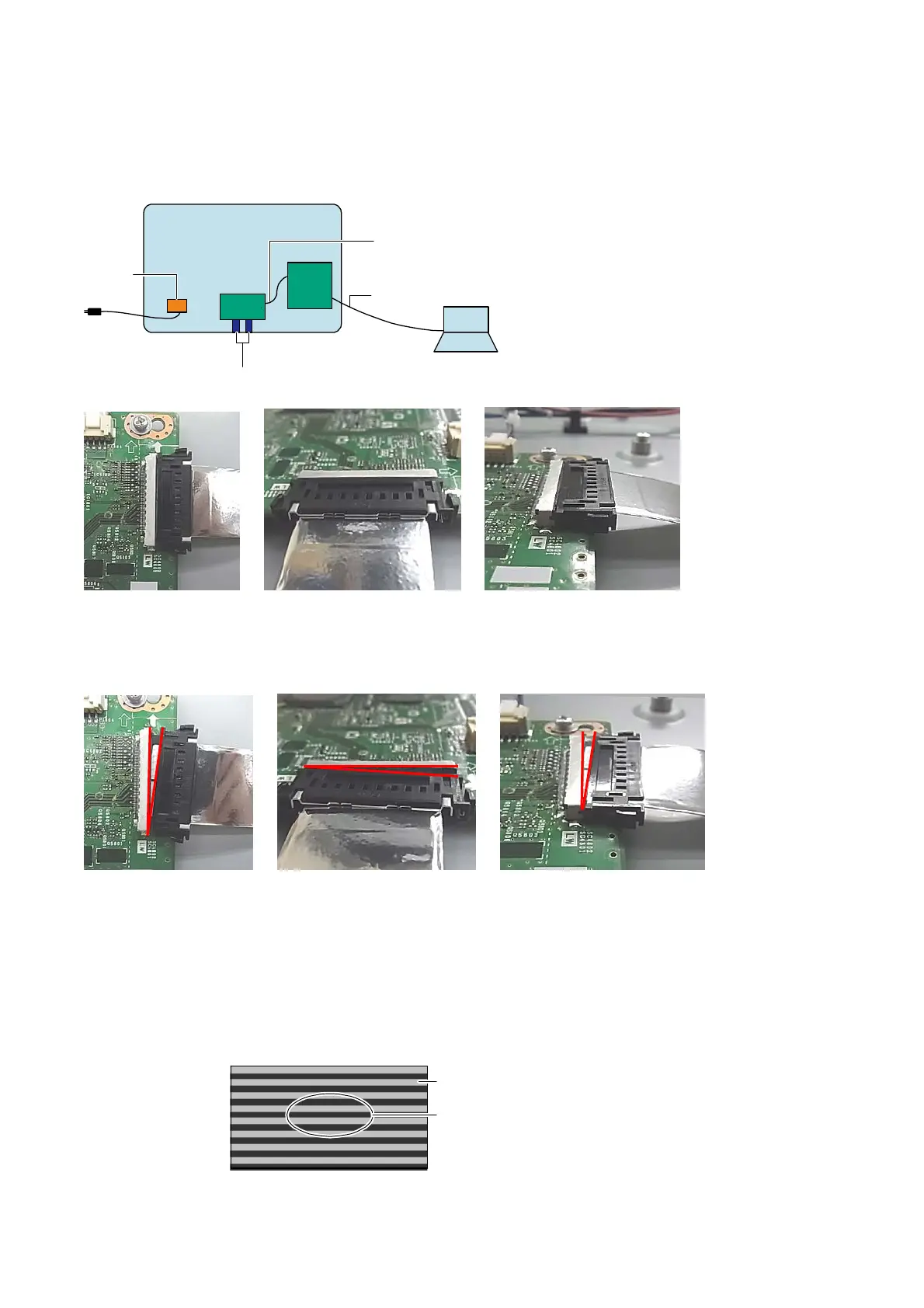
■ Figures 1
<CONNECTION OF INSTRUMENTS AND IDP>
PC
Back view of PN-L803C/80TC3
FFC
LVDS harness
LAN cable
AC inlet
MAIN
PWB
T-CON
PWB
<CHECKING CONNECTION BETWEEN C-PWB AND FFC/LVDS>
- Connect straightly and completely.
- Connector of FFC has holding mechanism. Holding part must not be loose.
EXAMPLES OF IMPORER STATE
■ Figures 2
<CONNECTION OF INSTRUMENTS AND IDP>
1 ) Display flicker pattern with service tool.
2 ) Change the value roughly from min. to max. (with [UP] or [DOWN] button) and watch display.
3 ) Degree of flicker changes as the value change.
4 ) Search approximate value which flicker is least at center of the display (with [UP] or [DOWN] button).
5 ) In addition to above, Search value which flicker is least at the center of the display (with [UP] or [DOWN] button) in detail.
FIGURE SHOWS REGION TO OBSERVE
FLICKER WITH RED CIRCLE
DISPLAY
Observe flicke
near center.


 To Next Page