PN-L803C/80TC3 INSTALLATION, ADJUSTMENT, SETTING, OPERATION 2 - 40
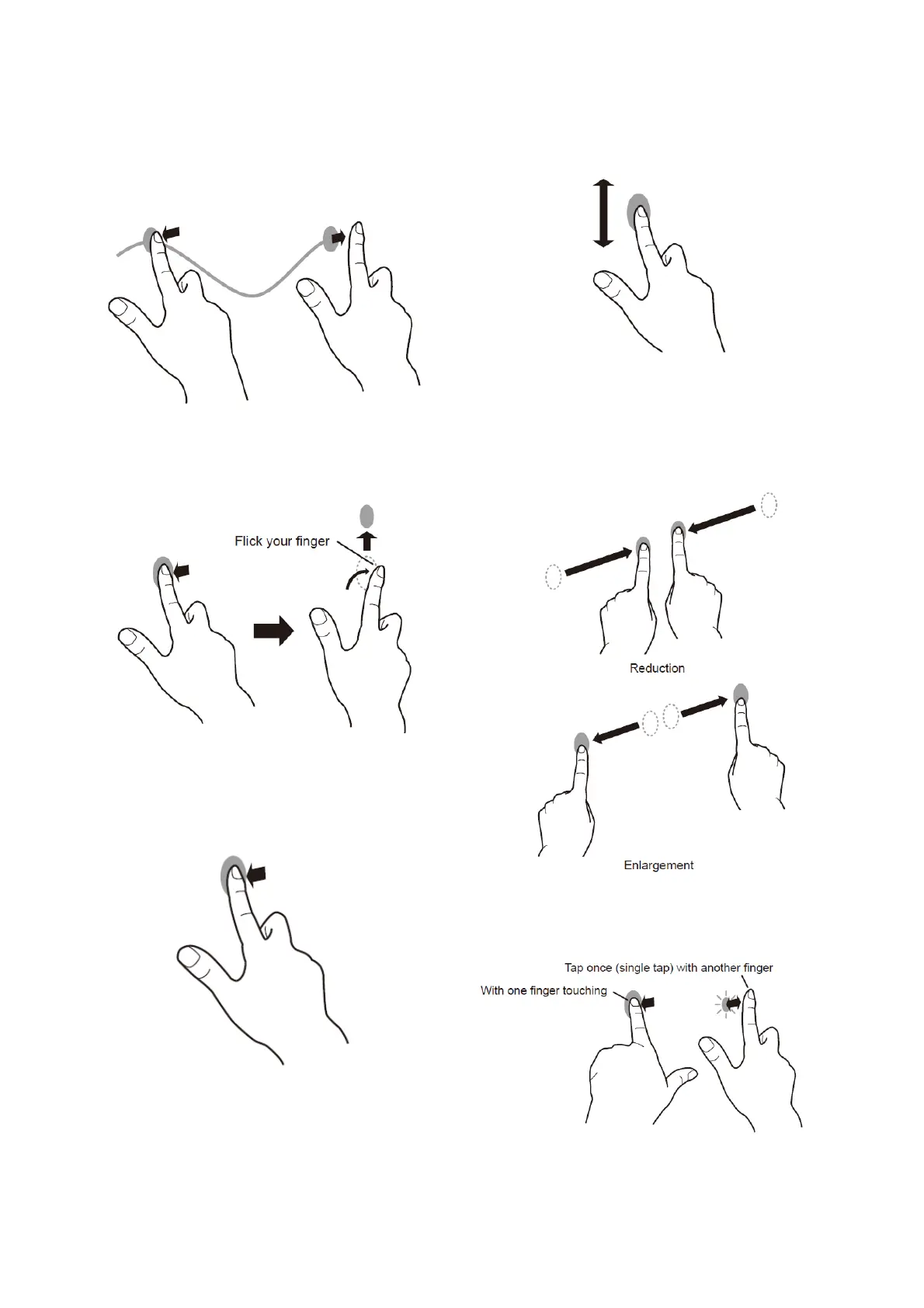
Drag-and-drop
Same action as drag-and-drop with a mouse.
Touch the screen with your finger/touch pen and move without
lifting. When you have finished the movement, lift your finger/
touch pen.
Flicks
Flick your finger/touch pen in the direction of the function you want
to use.
Press-and-hold
Same action as right-clicking a mouse.
Press briefly with your finger/touch pen, and then lift your
finger/touch pen from the screen.
Slide to pan
With your finger/touch pen touching the screen, move it up and
down to scroll the screen.
■
Finger actions
Zoom
Use in a screen that is capable of enlargement/reduction.
Touch the screen with two fingers and move your fingers closer
together to reduce the view, or apart to enlarge the view.
Press-and-tap
Same action as right-clicking a mouse.
With one finger touching the screen, tap once (single tap) with
another finger.


 To Next Page