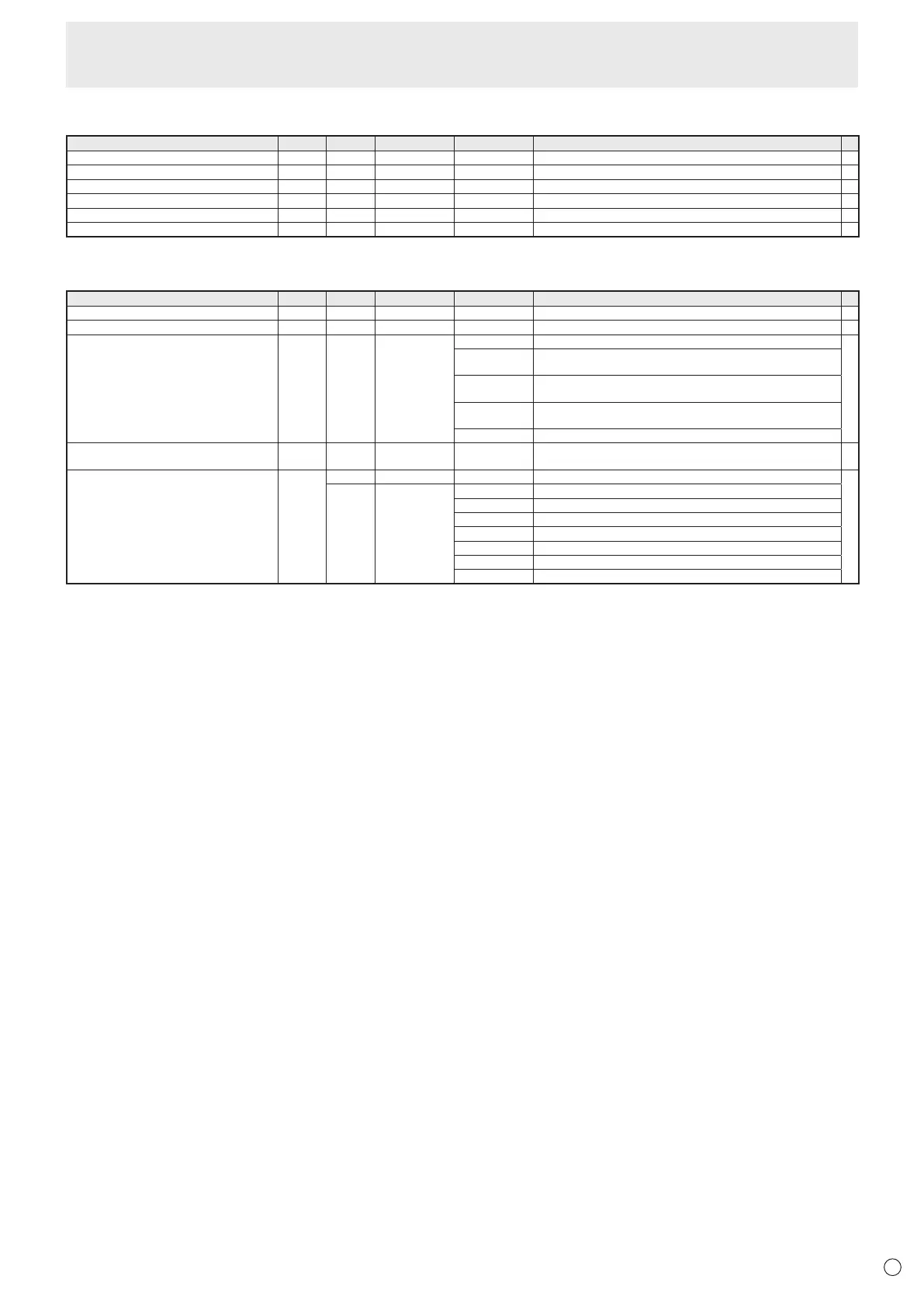
Initialization/Functional Restriction Setting (FUNCTION) menu
Function
Command Direction
Parameter Reply Control/Response contents
*
ALL RESET RSET W 0
-
ADJUSTMENT LOCK ALCK WR 0-2 0-2 0: OFF, 1:ON 1, 2:ON 2
○
OSD DISPLAY LOSD WR 0-2 0-2 0: ON 1, 1: OFF, 2: ON 2
○
LED OFLD WR 0-1 0-1 0: ON, 1: OFF
○
TEMPERATURE ALERT TALT WR 0-2 0-2 0: OFF, 1: OSD & LED, 2: LED
○
STATUS ALERT SALT WR 0-2 0-2 0: OFF, 1: OSD & LED, 2: LED
○
Others
Function
Command Direction
Parameter Reply Control/Response contents
*
VOLUME VOLM WR 0-31 0-31
○
BRIGHT VLMP WR 0-31 0-31
○
TEMPERATURE SENSOR DSTA R 0 Internal temperature normal
●
1 Internal temperature abnormal has occurred and the monitor is in
standby mode
2 Internal temperature abnormal occurred (To delete the information of
temperature abnormal, turn off the main power.)
3 Internal temperature abnormal has occurred and backlight brightness is
dimmed
4 Temperature sensor abnormal
TEMPERATURE ACQUISITION ERRT R Value Returns the temperature of the temperature sensor.
Indicates a temperature sensor abnormality when “126” is returned.
○
CAUSE OF LAST STANDBY MODE STCA W 0 Initialization
●
R 0 No detectable error has occurred
1 Standby mode by POWER button
2 Main power off by the main power switch
3 Standby mode by RS-232C
4 Input signal waiting mode by No Signal
6 Standby mode by abnormal temperature
20 Standby mode by OFF IF NO OPERATION setting
Controlling the Monitor with a PC (RS-232C)



 To Next Page