R-222T(W)
7 – 1
R200K
Service Manual
CHAPTER 7. TROUBLESHOOTING GUIDE
[1] FOREWORD
When troubleshooting the microwave oven, it is helpful to follow the
Sequence of Operation in performing the checks. Many of the possible
causes of trouble will require that a specific test be performed. These
tests are given a procedure letter which will be found in the “Test Pro-
cedure”section.
IMPORTANT:
If the oven becomes inoperative because of a blown fuse T6.3A in the
1st. latch switch - 2nd. interlock relay (RY2) - monitor switch circuit,
check the 1st. latch switch, 2nd. interlock relay (RY2) and monitor
switch before replacing the fuse T6.3A.
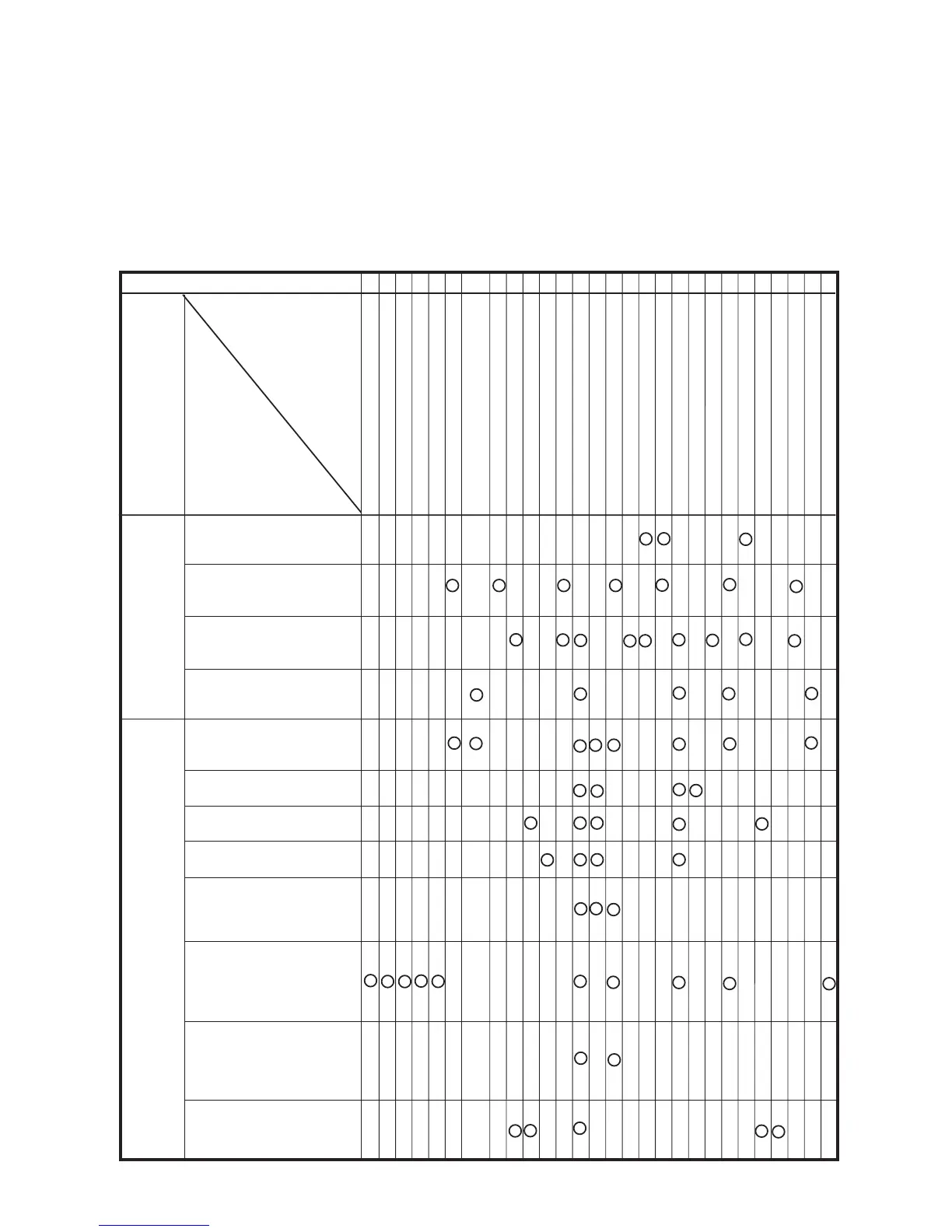
[2] CHART
MAGNETRON
POWER TRANSFORMER
H.V. RECTIFIER ASSEMBLY
HIGH VOLTAGE WIRE
HIGH VOLTAGE CAPACITOR
1ST. LATCH SWITCH
2ND. INTERLOCK RELAY CONTROL
SWITCH
MONITOR SWITCH
TEMPERATURE FUSE 150ºC (OVEN)
FAN MOTOR
TURNTABLE MOTOR
FUSE T6.3A
TOUCH CONTROL PANEL
RELAY (RY-1)
RELAY (RY-2)
FOIL PATERN ON P.W.B.
POWER SUPPLY CORD
SHORTED WIRE HARNESS
OPENED WIRE HARNESS
OVEN LAMP
WALL OUTLET
MISADJUSTMENT SWITCH
HOME FUSE OR BREAKER
BLOCKED COOLING FAN
BLOCKED VENTILATION
NOISE FILTER
KEY UNIT (MEMBREANE SWITCH)
H.V. FUSE
OFF
CONDITION
PROBLEM
CONDITION
POSSIBLE CAUSE
AND
DEFECTIVE PARTS
TEST PROCEDURE
ON
CONDITION
A B C
CK
D E JLINMKHGGFEE M
RE CK CK RE CK CK CK CK CK
Home fuse blows when pow-
ersupply cord is plugged into
wall outlet.
FUSE T6.3A blows when
power supply cord is plug-
ged into wall outlet.
"88:88" does not appear in
display but power supply cord
is plugged into wall outlet.
Display does not operate
properly when STOP/CLEAR
pad is touched.
Oven does not start when
the START pad is touched.
(Display appears)
Oven lamp does not light
(Display appears.)
Fan motor does not operate.
(Display appears.)
Turntable motor does not
operate. (Display appears.)
Oven or any electrical parts
does not stop when cooking
time is 0 or STOP/CLEAR
pad is touched.
Oven seems to be operating
but little or no heat is pro-
duced in oven load. (Micro-
wave power level is set at
100%)
Oven does not seems to be
operating properly when
70%,50%, 30% or 10% is
set. (Oven operates properly
at 100%.)
Oven goes into cook cycle
bu tshuts down before end
of cooking cycle.


 To Next Page