EasyManua.ls Logo

Sharp VC-90ET - Page 37

Sharp VC-90ET
109 pages
Print Icon
To Next Page IconTo Next Page
To Previous Page IconTo Previous Page
Loading...
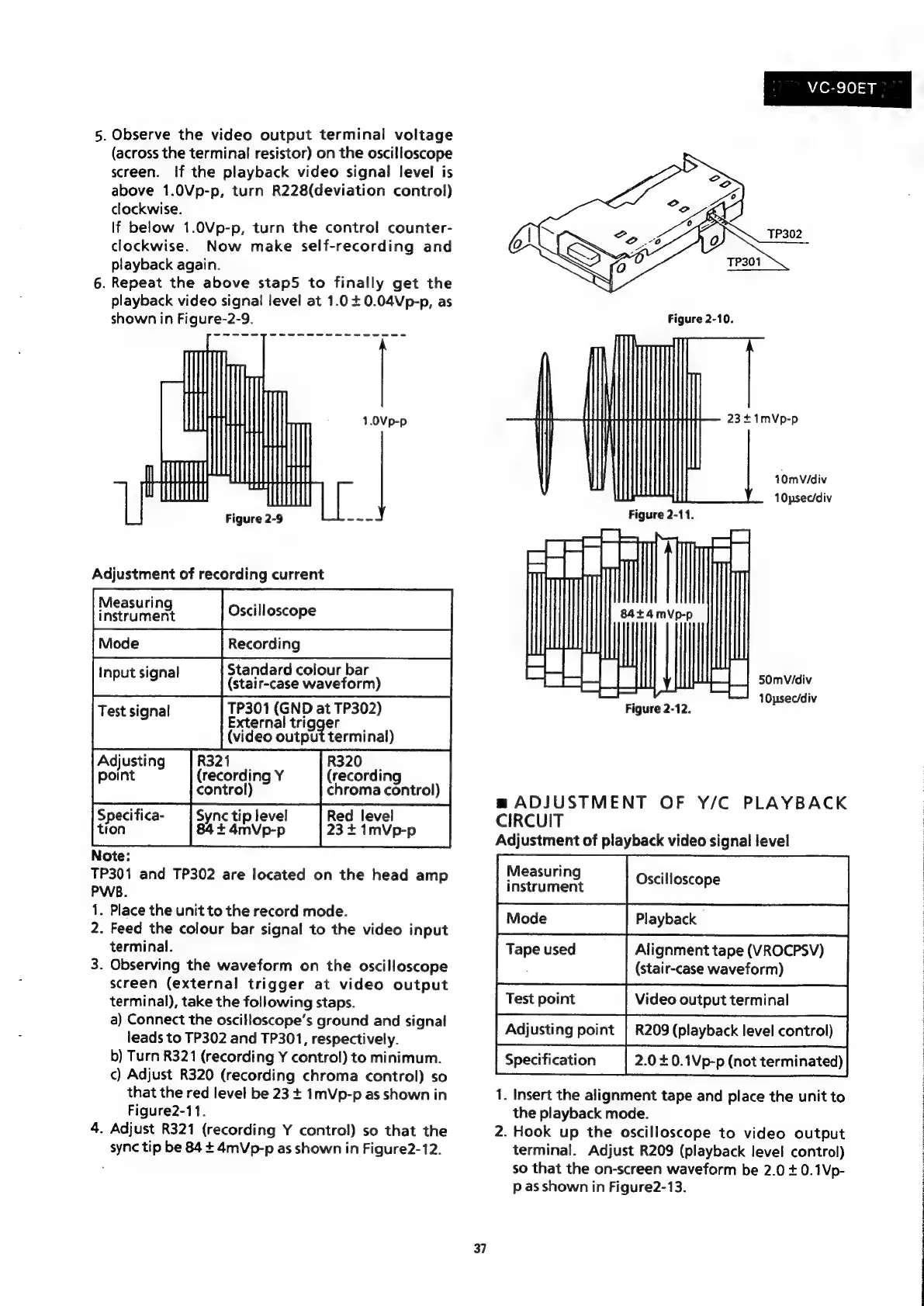
5.
Observe
the
video
output
terminal
voltage
(across
the
terminal
resistor)
on
the
oscilloscope
screen.
If
the
playback
video
signal
level
is
above
1.0Vp-p,
turn
R228(deviation
control)
clockwise.
If
below
1.0Vp-p,
turn
the
control
counter-
clockwise.
Now
make
self-recording
and
playback
again.
6.
Repeat
the
above
stap5
to
finally
get
the
playback
video
signal
level
at
1.04
0.04Vp-p,
as
shown
in
Figure-2-9.
Measuring
instrument
Oscilloscope
Standard
colour
bar
(stair-case
waveform)
TP301
(GND
at
TP302)
External
trigger
(video
output
terminal)
Adjusting
R321
|
R320
|
point
(recording
Y
(recording
control)
chroma
control)
Red
level
Specifica-
Sync
tip
level
Y
F
23
+
1mVp-p
tion
84+
4mVp-p
Note:
TP301
and
TP302
are
located
on
the
head
amp
PWB.
1.
Place
the
unit
to
the
record
mode.
2.
Feed
the
colour
bar
signal
to
the
video
input
terminal.
3.
Observing
the
waveform
on
the
oscilloscope
screen
(external
trigger
at
video
output
terminal),
take
the
following
staps.
a)
Connect
the
oscilloscope’s
ground
and
signal
leads
to
TP302
and
TP301,
respectively.
b)
Turn
R321
(recording
Y
control)
to
minimum.
¢)
Adjust
R320
(recording
chroma
control)
so
that
the
red
level
be
23
+
1mVp-p
as
shown
in
Figure2-11.
4.
Adjust
R321
(recording
Y
control)
so
that
the
sync
tip
be
84
+
4mVp-p
as
shown
in
Figure2-12.
37
VC-S0ET
23+1mVp-p
10mVidiv
10psecidiv
Figure
2-11.
z=
=.
Es
ae
a
HI
Sel
ls
50mVidiv
=
_]
:
10psecidiv
Figure
2-12.
m
ADJUSTMENT
OF
Y/C
PLAYBACK
CIRCUIT
Adjustment
of
playback
video
signal
level
Oscilloscope
Playback
Alignment
tape
(VROCPSV)
(stair-case
waveform)
Test
point
Video
output
terminal
Adjusting
point
|
R209
(playback
level
control)
Specification
2.0
£0.1Vp-p
(not
terminated)
1.
Insert
the
alignment
tape
and
place
the
unit
to
the
playback
mode.
2.
Hook
up
the
oscilloscope
to
video
output
terminal.
Adjust
R209
(playback
level
control)
so
that
the
on-screen
waveform
be
2.0
+
0.1Vp-
p
as
shown
in
Figure2-13.
Measuring
instrument
Tape
used

Related product manuals