EasyManua.ls Logo

Sharp VC-MH321HM - Page 11

Sharp VC-MH321HM
41 pages
Print Icon
To Next Page IconTo Next Page
To Previous Page IconTo Previous Page
Loading...
BASIC
OPERATION
IMPORTANT
NOTES
ON
YOUR
VCR
AND
VIDEO
TAPES
VIDEO
TAPES
@
If
you
use
only
good
quality
video
tapes,
generally
it
will
not
be
necessary
to
clean
the
video
heads.
@
If
poor
quality
tapes
are
used,
or
if
a
tape
is
loaded
after
changing
VCR
location,
oxide
from
the
tape
may
"clog"
the
video
heads.
This
will
cause
the
playback
picture
to
be
"snowy",
or
even
disappear.
@
To
remove
minor
contamination
run
a
video
tape
in
visual
search
mode.
If
this
fails,
you
will
need
to
have
the
heads
cleaned
by
a
SHARP
Service
Facitity.
Please
note,
if
cleaning
is
necessary
it
is
not
covered
by
the
guarantee.
@
Use
video
tapes
which
carry
the
mark.
AL
HOW
TO
PLAYBACK
A
VIDEO
TAPE
BEFORE
YOU
PLAYBACK
A
VIDEO
TAPE
Condensation
forms
in
the
VCR
when
it
is
moved
out
of
or
into
a
warm
place.
If
you
try
to
playback
or
record,
the
video
tape
and
VCR
may
be
damaged.
Turn
the
VCR
on
and
wait
for
about
two
hours
until
the
VCR
reaches
room
temperature
before
operating.
PLAYBACK
1.
Switch
on
your
TV
and
select
the
video
channel.
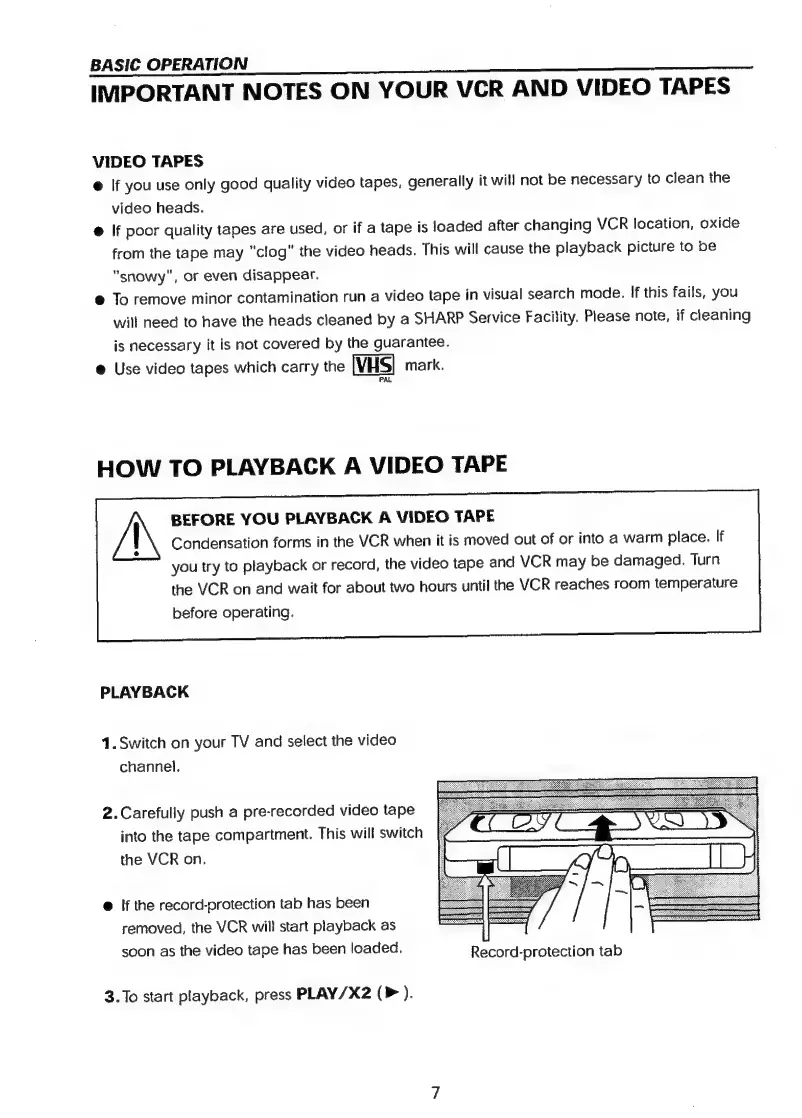
2.Carefully
push
a
pre-recorded
video
tape
into
the
tape
compartment.
This
will
switch
the
VCR
on.
@
If
the
record-protection
tab
has
been
removed,
the
VCR
will
start
playback
as
soon
as
the
video
tape
has
been
loaded.
Record-protection
tab
3.To
start
playback,
press
PLAY/X2
(P
).

Related product manuals