EasyManua.ls Logo

Sharp VC-MH321HM - Page 18

Sharp VC-MH321HM
41 pages
Print Icon
To Next Page IconTo Next Page
To Previous Page IconTo Previous Page
Loading...
BASIC
OPERATION
HOW
TO
SET
A
DELAYED
RECORDING
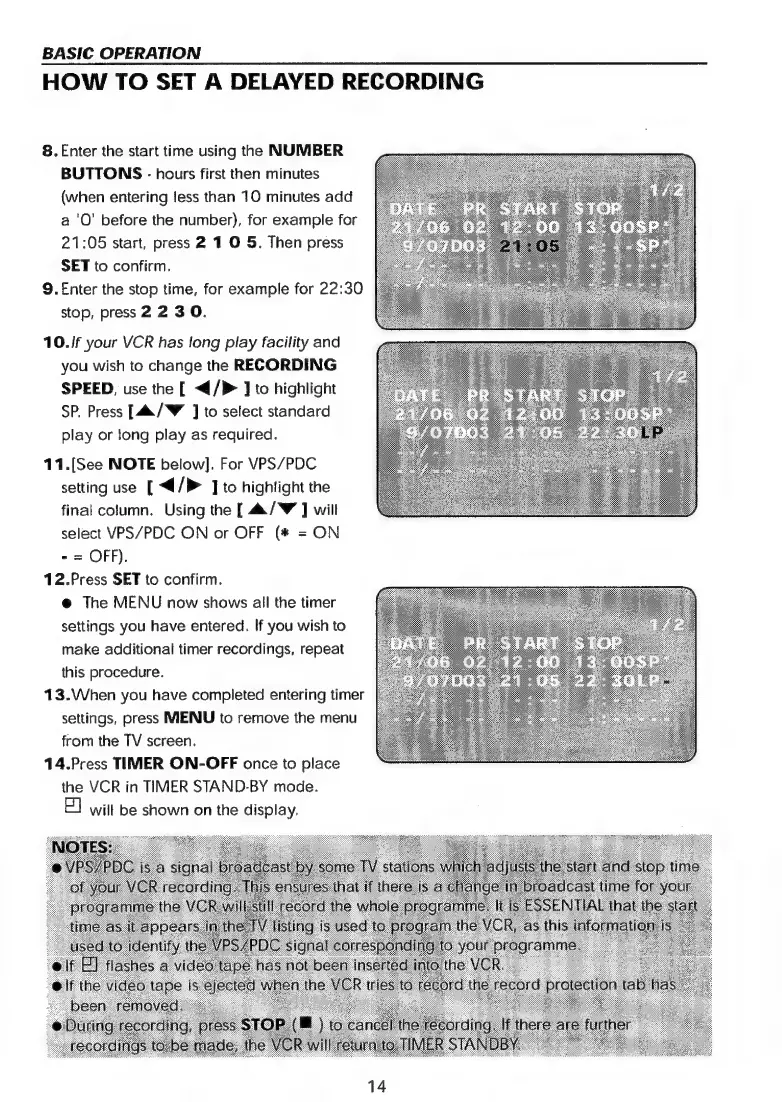
8.
Enter
the
start
time
using
the
NUMBER
BUTTONS
-
hours
first
then
minutes
(when
entering
less
than
10
minutes
add
a
'O’
before
the
number),
for
example
for
21:05
start,
press
2
1
0
5.
Then
press
SET
to
confirm.
9.£nter
the
stop
time,
for
example
for
22:30
stop,
press
2
23
0.
10./f
your
VCR
has
long
play
facility
and
you
wish
to
change
the
RECORDING
SPEED,
use
the
[
</P>
]
to
highlight
SP.
Press
[4a/W
J]
to
select
standard
play
or
long
play
as
required.
11.[See
NOTE
below].
For
VPS/PDC
setting
use
[
4/P
]
to
highlight
the
final
column.
Using
the
[
4/W
]
will
select
VPS/PDC
ON
or
OFF
(*
=
ON
-
=
OFF).
12.Press
SET
to
confirm.
@
The
MENU
now
shows
all
the
timer
settings
you
have
entered.
If
you
wish
to
make
additional
timer
recordings,
repeat
this
procedure.
13.When
you
have
completed
entering
timer
settings,
press
MIENU
to
remove
the
menu
from
the
TV
screen.
14.Press
TIMER
ON-OFF
once
to
place
the
VCR
in
TIMER
STAND-BY
mode.
E)
will
be
shown
on
the
display.
14

Related product manuals