EasyManua.ls Logo

Sharp VC-MH321HM - Page 28

Sharp VC-MH321HM
41 pages
Print Icon
To Next Page IconTo Next Page
To Previous Page IconTo Previous Page
Loading...
ADVANCED
OPERATION
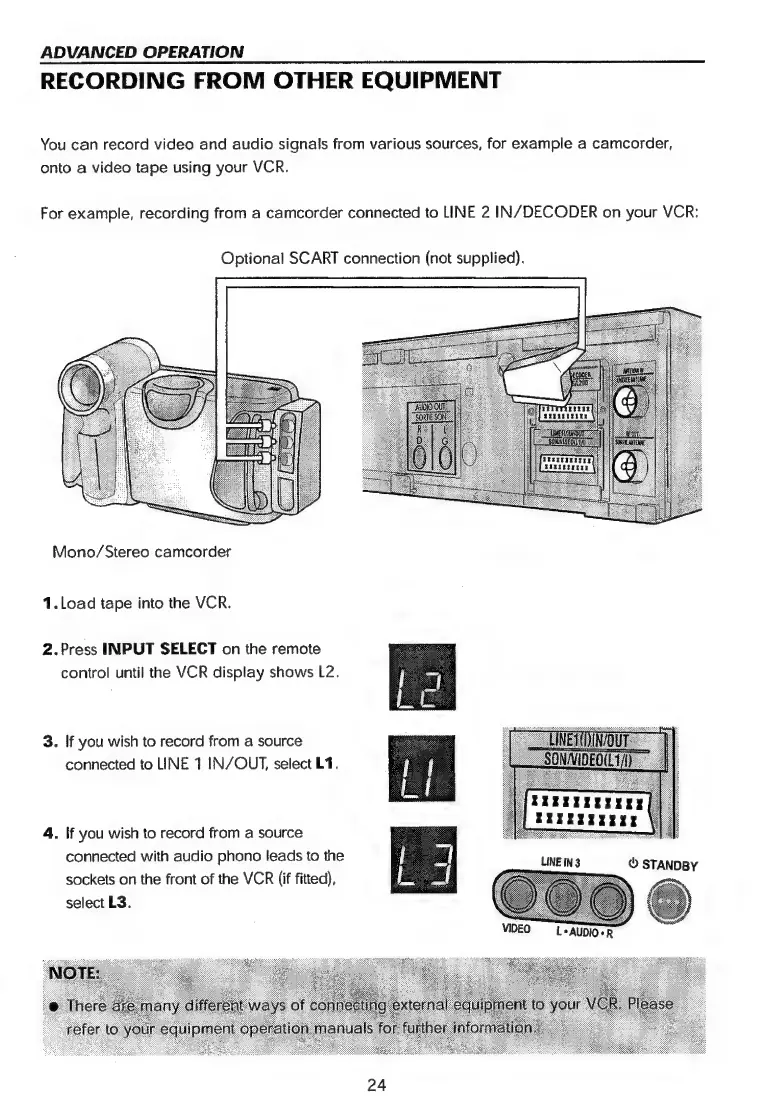
RECORDING
FROM
OTHER
EQUIPMENT
You
can
record
video
and
audio
signals
from
various
sources,
for
example
a
camcorder,
onto
a
video
tape
using
your
VCR.
For
example,
recording
from
a
camcorder
connected
to
LINE
2
IN/DECODER
on
your
VCR:
Optional
SCART
connection
(not
supplied).
Mono/Stereo
camcorder
1.
Load
tape
into
the
VCR.
2.Press
INPUT
SELECT
on
the
remote
control
until
the
VCR
display
shows
L2.
3.
!f
you
wish
to
record
from
a
source
connected
to
INE
1
IN/OUT,
select
L1.
4.
|f
you
wish
to
record
from
a
source
connected
with
audio
phono
leads
to
the
sockets
on
the
front
of
the
VCR
(if
fitted),
select
L3.
LINE
iN
3
VIDEO
L*
AUDIO+
24

Related product manuals