EasyManua.ls Logo

Sharp VC-MH321HM - Page 8

Sharp VC-MH321HM
41 pages
Print Icon
To Next Page IconTo Next Page
To Previous Page IconTo Previous Page
Loading...
INSTALLING
YOUR
VCR
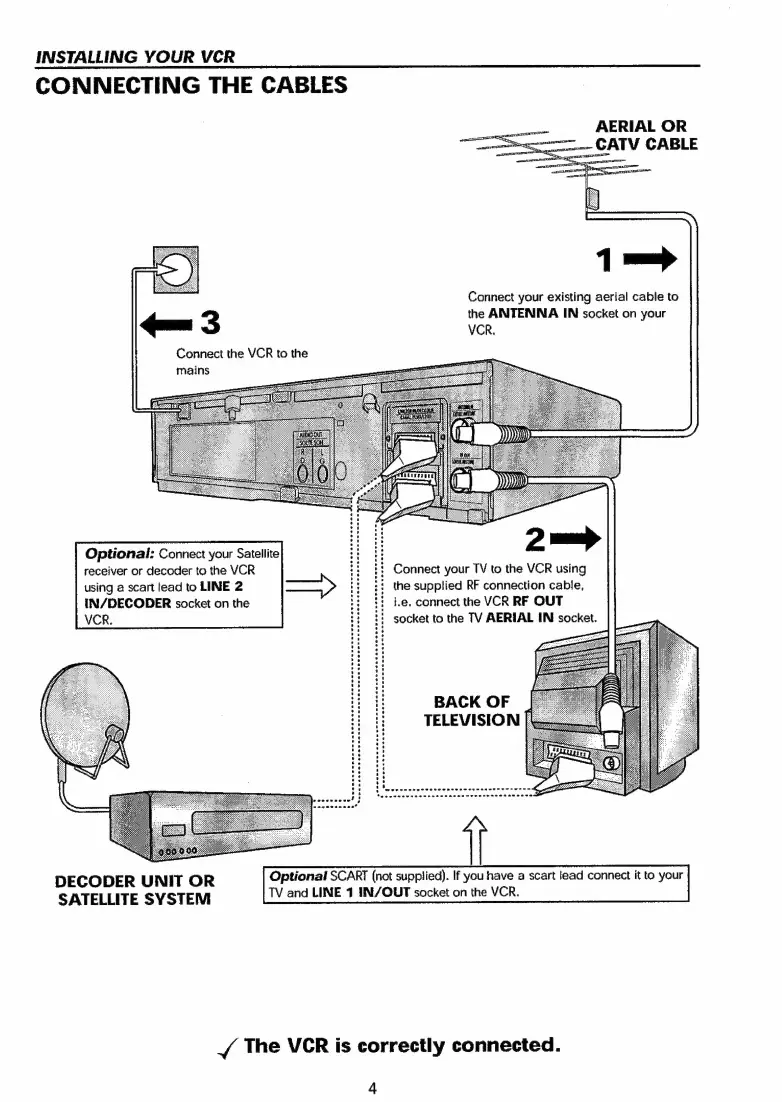
CONNECTING
THE
CABLES
eee
AERIAL
OR
oo
~.-
CATV
CABLE
1=
Connect
your
existing
aerial
cable
to
xxx:
3
the
ANTENNA
IN
socket
on
your
Connect
the
VCR
to
the
Optional:
Connect
your
Satellite
receiver
or
decoder
to
the
VCR
using
a
scart
lead
to
LINE
2
IN/DECODER
socket
on
the
VCR.
:
Connect
your
TV
to
the
VCR
using
:!
the
supplied
RF
connection
cable,
i.e,
connect
the
VCR
RF
OUT
:
socket
to
the
TV
AERIAL
IN
socket.
BACK
OF
TELEVISION
|
DECODER
UNIT
OR
Optional
SCART
(not
supplied).
If
you
have
a
scart
lead
connect
it
to
your
SATELLITE
SVSTEM
TV
and
LINE
1
IN/OUT
socket
on
the
VCR.
J
The
VCR
is
correctly
connected.
4

Related product manuals