v
Quick Operation Guide
Dual Recording
The Dual Recording function makes it possible
to record motion images on a tape and still
images on a card.
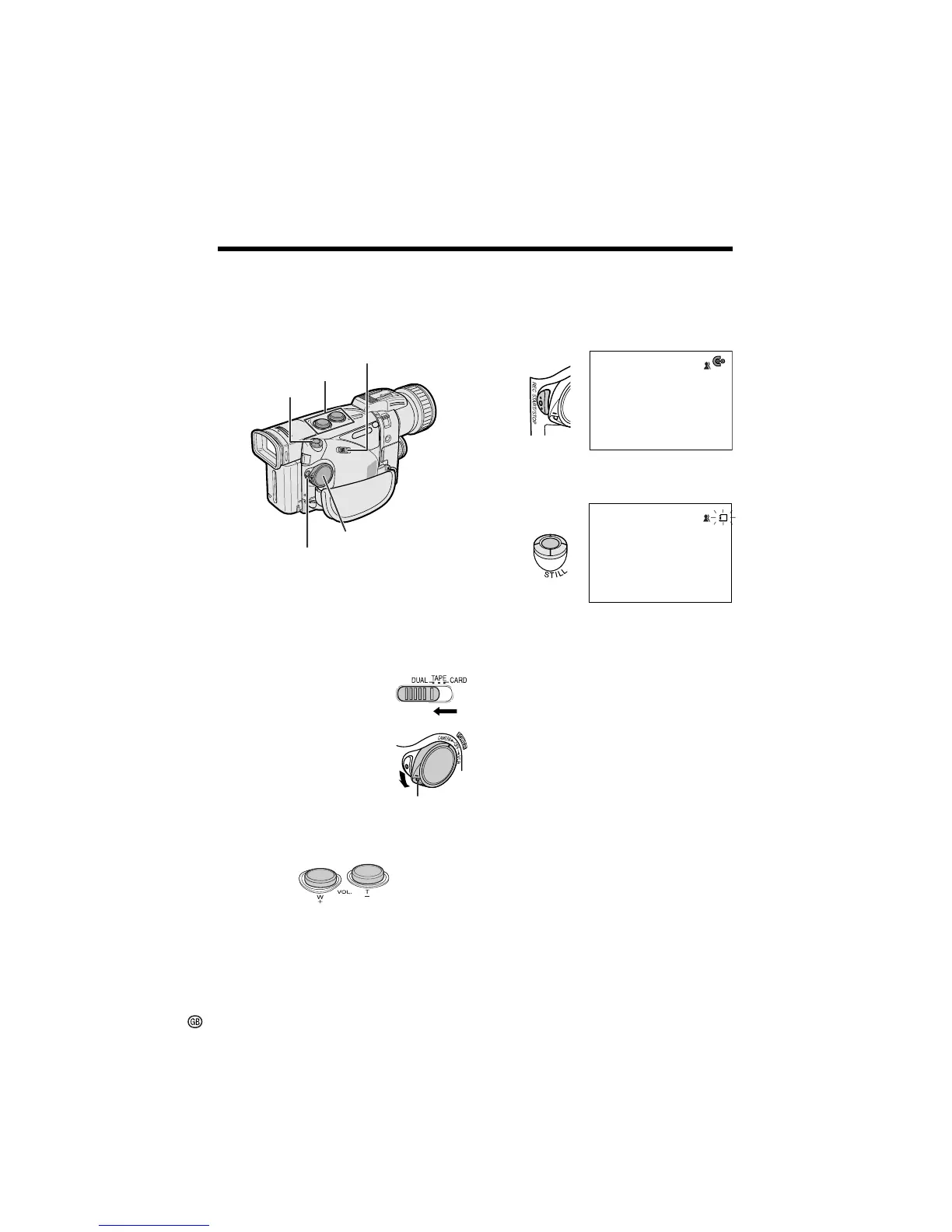
6 Press the REC START/STOP button to
begin recording motion images of the
subject on a tape.
• Press the REC START/STOP button
again to pause recording.
NORMAL
REC
AUTO
2/98
Press the STILL button to record a still
image of the subject on a card.
Lock button
1 Make sure that a Mini DV cassette and a
card are inserted.
2 Remove the lens cap. Pull out the
viewfinder completely or open the LCD
monitor.
3 Set the Media Selection
switch to DUAL.
4 Hold down the Lock
button and set the
POWER switch to
CAMERA.
Media Selection switch
STILL button
REC START/STOP button
POWER switch
NORMAL
CARD
RE CORD I NG TO
MEMORY CARD
AUTO
2/98
CARD
Power Zoom buttons
5 Press the Power Zoom buttons to frame
the subject as you desire.
To turn the power off
Set the POWER switch to OFF without pressing
the Lock button.











 To Next Page