EasyManua.ls Logo

Sharp ZQ-6100M - Page 179

Sharp ZQ-6100M
194 pages
Print Icon
To Next Page IconTo Next Page
To Previous Page IconTo Previous Page
Loading...
Operating
batteries
When
appears
on
the
display
and
the
display
is
too
dim
to
read,
the
operating
batteries
are
depleted.
Press
to
turn
the
power
off
and
then
turn
the
power
back
on.
If
the
following
message
appears
when
the
power
is
turned
on,
replace
all
4
operating
batteries
immediately.
&
ATTENTION
>
Replace
the
OPERATING
batteries,
Before
replocement
read
OPERATION
MANUAL
Replacing
the
operating
batteries
4.
Turn
the
Organizer
off.
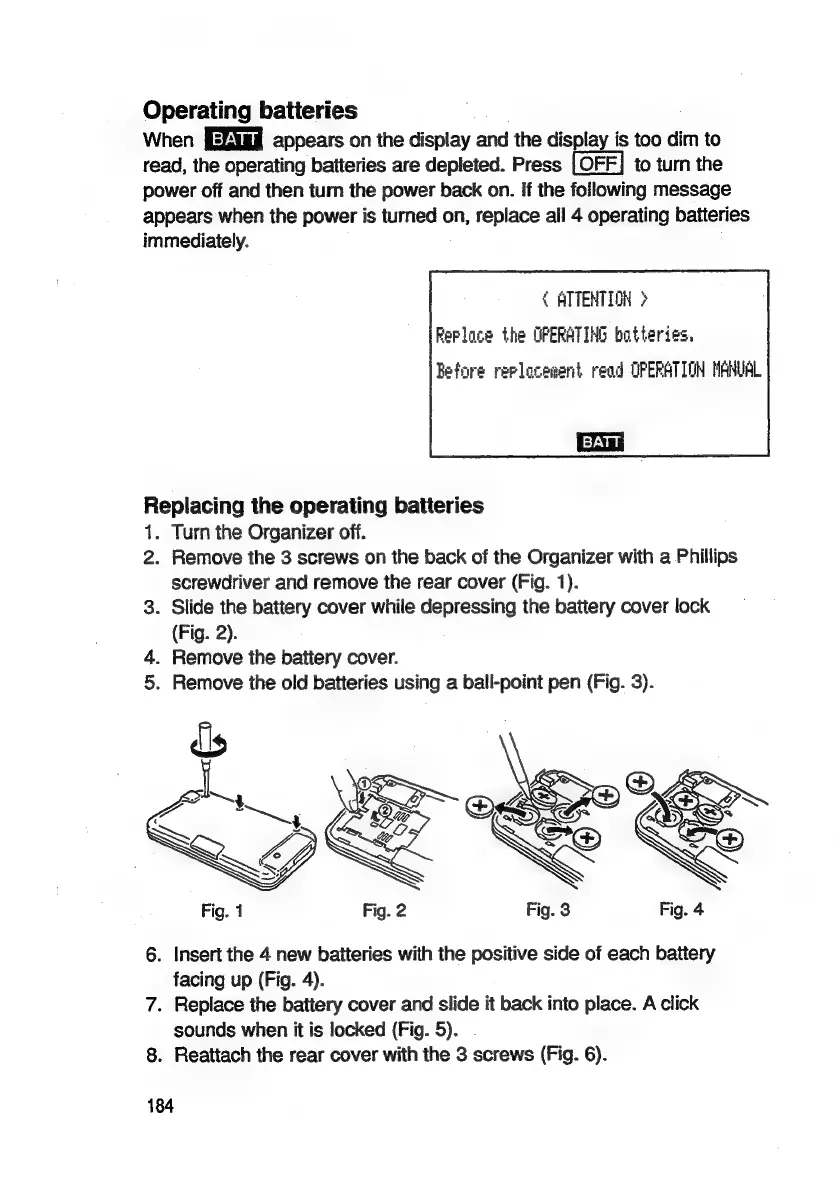
2.
Remove
the
3
screws
on
the
back
of
the
Organizer
with
a
Phillips
screwdriver
and
remove
the
rear
cover
(Fig.
1).
3.
Slide
the
battery
cover
while
depressing
the
battery
cover
lock
(Fig.
2).
4.
Remove
the
battery
cover.
5.
Remove
the
old
batteries
using
a
ball-point
pen
(Fig.
3).
6.
Insert
the
4
new
batteries
with
the
positive
side
of
each
battery
facing
up
(Fig.
4).
7.
Replace
the
battery
cover
and
slide
it
back
into
place.
A
click
sounds
when
it
is
locked
(Fig.
5).
.
8.
Reattach
the
rear
cover
with
the
3
screws
(Fig.
6).
184

Related product manuals