EasyManua.ls Logo

Sharp Zaurus ZR-5700 - User Manual

Sharp Zaurus ZR-5700
529 pages
Print Icon
To Next Page IconTo Next Page
Loading...
1
Dear Loyal Customer:
First, thank you for purchasing the Zaurus K-PDA and
welcome to the Zaurus family. We are sure you will soon
find that your new assistant will change your life and the
way you do business. We would briefly like to share with
you our vision.
Your Zaurus exists today thanks to an incredible amount of
effort and determination from our entire Zaurus team (not to
mention numerous pots of black coffee). Our team at Sharp
has a dream to change the way we all do business. As a
business person, you already know that access to
information and people anytime, anywhere is the key to
gaining a competitive edge in this fast-paced information
age. We feel Zaurus is the tool that can deliver this to you. It
is simple to use, has months of battery life, and fits in your
pocket.
How did we come up with the idea for Zaurus? Many of us
found that we were lugging around notebook computers to
take notes, generate summaries, and report back to our
office and clients. We also found that we had a lot of "down
time" that could be put to better use; sitting on trains and
planes, waiting for clients, and even in meetings. Now that
we are using the Zaurus, we travel lighter, work smarter,
and stay more in touch with our contacts and each other.
Best of all, we have very little "down time" as our "Zauri" are
always with us. Now you know why we say that "Zaurus
means business anytime, anywhere".
We need your help to spread the word. Show a friend or
someone at work how you use your Zaurus and what it can
do for them. As more and more people start using the
Zaurus, we can spend even more resources on developing
new accessories, add-on software programs, and new
versions of the Zaurus. Better yet, if you have a mobile staff
or sales force that you would like to equip with Zauri, give us
a call at 800-BE-SHARP. We'll show you how you can
improve their efficiency and productivity as well as enable
them to better keep in touch with their clients and each
other.
Finally, let us know how you feel about your Zaurus. We
look forward to getting letters from our users about how you
use it and improvements you would like to see. We cannot
promise to answer every letter, but you can be sure we read
all of the suggestions you send us. We value feedback from
our customers and try to incorporate as many requests as
we can in our new products. Each of us takes an incredible
amount of personal pride in our work and the Zaurus. We
are all Zaurus users. We believe this makes a difference in
the products we create. After using the Zaurus, we think
you'll agree.
Thanks again for purchasing the Zaurus and sharing our
dream. We look forward to shaping the future of the
information age with you.
Sincerely,
The Z Team

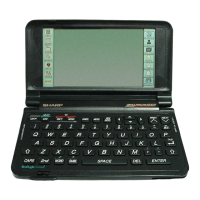
Table of Contents

Questions and Answers

  • S
    Samantha PowersAug 14, 2025
    What to do if my Sharp Organizer displays not enough memory?
    • K
      Kenneth LittleAug 14, 2025
      If your Sharp Organizer indicates insufficient memory, it could be due to the memory being full or nearly full. Try deleting unnecessary data or installing a RAM card. You can also check the amount of free memory using TOOLS/ Memory.
  • J
    joshua38Aug 17, 2025
    How to fix a blank display on my Sharp Organizer after pressing ON?
    • H
      Heather SmithAug 17, 2025
      If the display on your Sharp Organizer remains blank after pressing ON, ensure that the battery replacement switch is in the NORMAL OPERATION position. Also, try adjusting the LCD contrast. If these steps don't work, install new batteries.
  • S
    Stacy LawsonAug 21, 2025
    What to do if Sharp Organizer keys and touch buttons not working?
    • A
      Amanda DavisAug 21, 2025
      If your Sharp Organizer is on, but the keys and touch buttons aren't responding, reset the unit.
  • F
    Frank PatelAug 25, 2025
    How to improve poor display contrast on Sharp Organizer?
    • R
      Robert CohenAug 25, 2025
      To improve poor display contrast on your Sharp Organizer, adjust the LCD contrast.
  • A
    Ashley HernandezAug 27, 2025
    What to do if touch button on Sharp Organizer has no effect?
    • B
      Benjamin JamesAug 28, 2025
      If pressing a touch button or touching the display on your Sharp Organizer has no effect, calibrate the touch panel using TOOLS/Display.
  • G
    Gary JohnsonAug 31, 2025
    Why don't alarms sound at set times on my Sharp Organizer?
    • M
      Melanie WilsonAug 31, 2025
      If alarms don't sound at the set times on your Sharp Organizer, enable alarms using TOOLS/Sound.
  • J
    Jonathan FloresSep 3, 2025
    What to do if the entire keyboard including OFF does not function on Sharp Organizer?
    • M
      Meghan VelasquezSep 3, 2025
      If the entire keyboard, including the OFF button, isn't working on your Sharp Organizer, and you are in Note, unlock the keyboard by touching KEYS at the top of the display.
  • S
    Stephanie KaufmanSep 6, 2025
    What to do if PC card is inserted but it doesn't function on Sharp Organizer?
    • M
      muellerjamesSep 6, 2025
      If a PC card inserted in your Sharp Organizer isn't functioning, remove the card and then re-insert it, ensuring it's fully inserted. Press ON to access the card functions.
  • M
    Michael BryantSep 10, 2025
    Why transferring a Telephone or User File entry results in an error message on Sharp Organizer?
    • L
      Lori WilliamsSep 10, 2025
      If transferring a Telephone or User File entry from an Electronic Organizer results in an error message, be sure that the sending unit does not have a blank (no characters) Telephone/ Contact or User File/ Data File field name.

Sharp Zaurus ZR-5700 Specifications

General IconGeneral
BrandSharp
ModelZaurus ZR-5700
CategoryOrganizer
LanguageEnglish

Related product manuals