EasyManua.ls Logo

Sharp ZQ-6100M - Page 181

Sharp ZQ-6100M
194 pages
Print Icon
To Next Page IconTo Next Page
To Previous Page IconTo Previous Page
Loading...
Replacing
the
memory
backup
battery
1.
Turn
the
Organizer
off.
2.
Remove
the
3
screws
on
the
back
of
the
Organizer
with
a
Phillips
screwdriver
and
remove
the
rear
cover.
.
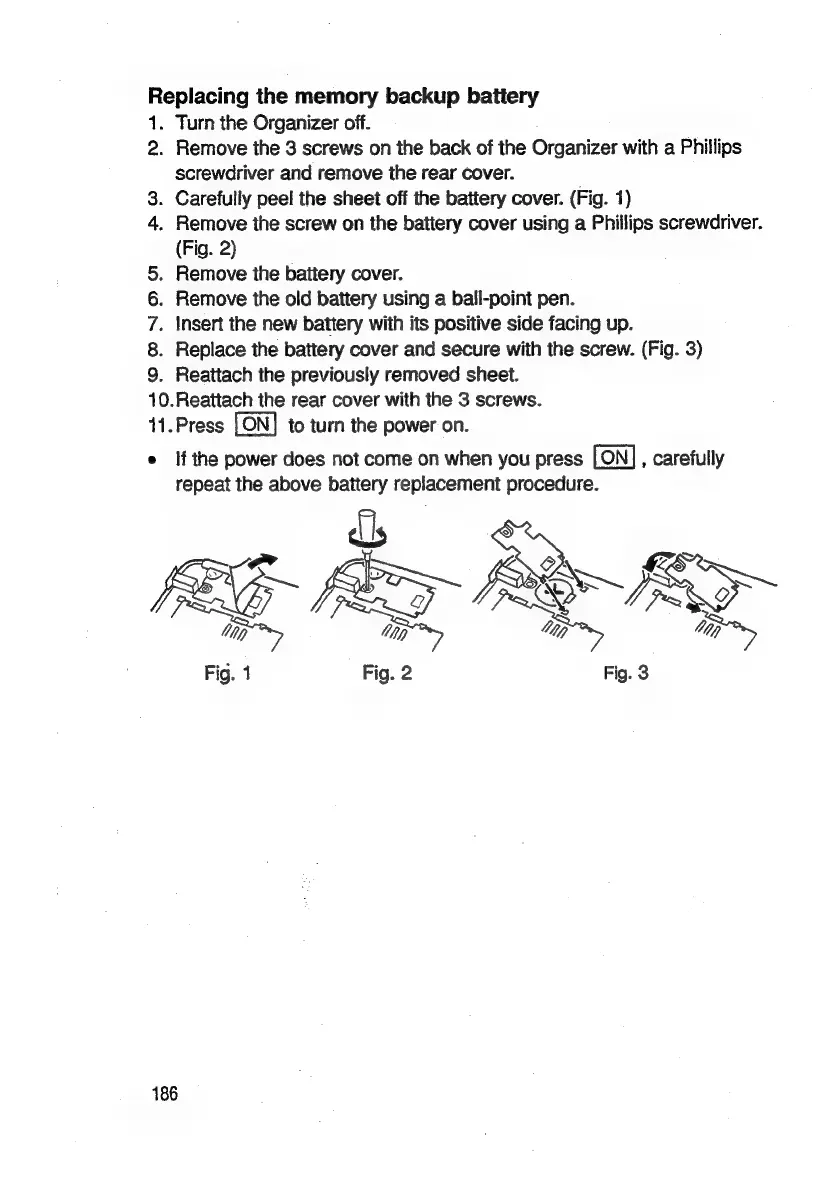
Carefully
peel
the
sheet
off
the
battery
cover.
(Fig.
1)
.
Remove
the
screw
on
the
battery
cover
using
a
Phillips
screwdriver.
(Fig.
2)
.
Remove
the
battery
cover.
.
Remove
the
old
battery
using
a
ball-point
pen.
.
Insert
the
new
battery
with
its
positive
side
facing
up.
.
Replace
the
battery
cover
and
secure
with
the
screw.
(Fig.
3)
.
Reattach
the
previously
removed
sheet.
10.Reattach
the
rear
cover
with
the
3
screws.
11.Press
to
turn
the
power
on.
e
If
the
power
does
not
come
on
when
you
press
,
carefully
repeat
the
above
battery
replacement
procedure.
b&
©
COON
OW
Sy
RG-
Bx
lip
Vip
Ns,
a
Fig.
1
Fig.
2
Fig.
3
186

Related product manuals