EasyManua.ls Logo

Sharp ZQ-6100M - Page 47

Sharp ZQ-6100M
194 pages
Print Icon
To Next Page IconTo Next Page
To Previous Page IconTo Previous Page
Loading...
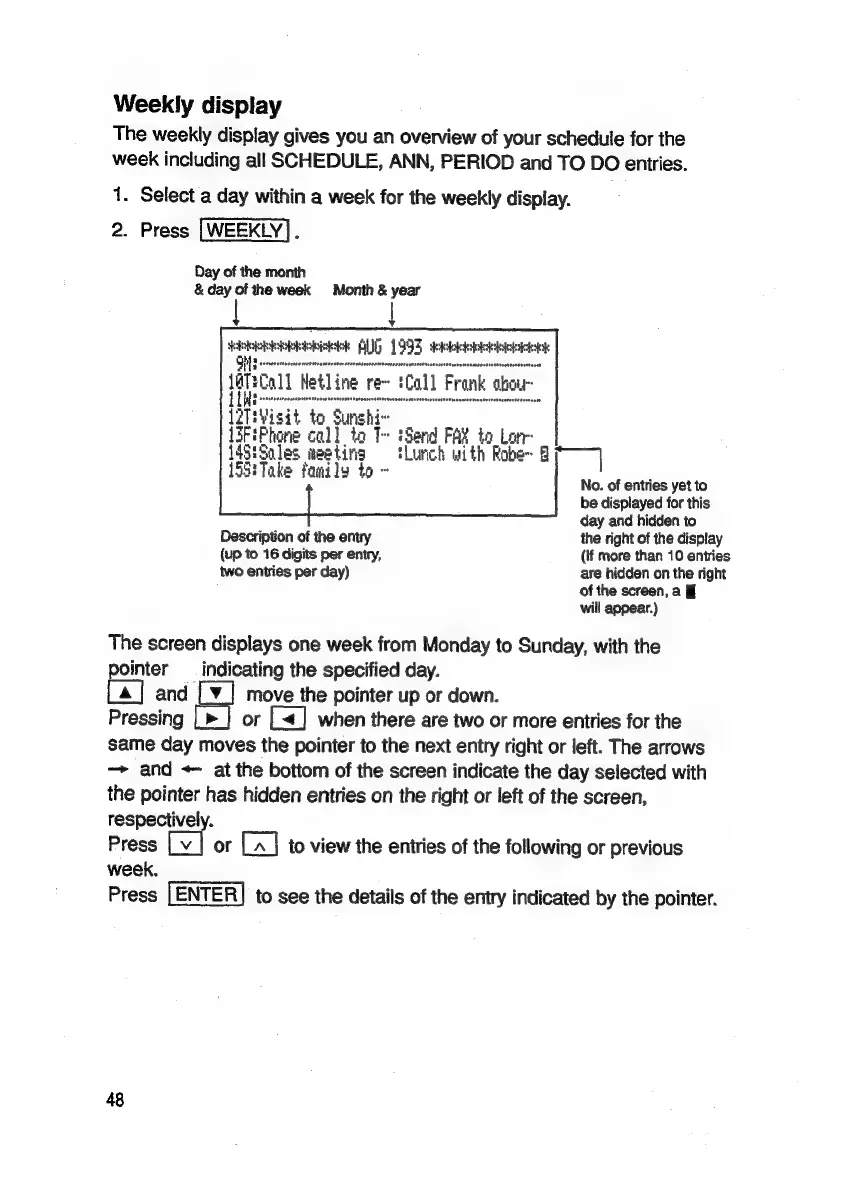
Weekly
display
The
weekly
display
gives
you
an
overview
of
your
schedule
for
the
week
including
all
SCHEDULE,
ANN,
PERIOD
and
TO
DO
entries.
1.
Select
a
day
within
a
week
for
the
weekly
display.
2.
Press
|WEEKLY].
Day
of
the
month
&
day
of
the
week
Month
&
year
|
Hebiohiesbeshs
AUG
1993
eure
teers
tftscall
Hetline
fe
iCal]
Frank
‘ou
i
Lee
tesnnesarsosanoenacersnctenyrenteeteants
TH¥isit
to
Sunshi~
FiPhone
call
to
T~
iSend
FAY
to
Lon
5
5
Sales
meeting
tLunch
with
Robe~
ay
i
|
'
1
Take
fanily
to
~
Z
3
4
3
No.
of
entries
yet
to
be
displayed
for
this
day
and
hidden
to
Description
of
the
entry
the
right
of
the
display
(up
to
16
digits
per
entry,
(if
more
than
10
entries
two
entries
per
day)
are
hidden
on
the
right
of
the
screen,
a
§f
will
appear.)
The
screen
displays
one
week
from
Monday
to
Sunday,
with
the
pointer
—_
indicating
the
specified
day.
and
[¥_|
move
the
pointer
up
or
down.
Pressing
[>
|
or
[<]
when
there
are
two
or
more
entries
for
the
same
day
moves
the
pointer
to
the
next
entry
right
or
left.
The
arrows
—>
and
<
at
the
bottom
of
the
screen
indicate
the
day
selected
with
the
pointer
has
hidden
entries
on
the
right
or
left
of
the
screen,
respectively.
Press
[v
|
or
[A]
to
view
the
entries
of
the
following
or
previous
week.
Press
to
see
the
details
of
the
entry
indicated
by
the
pointer.
48

Related product manuals