EasyManua.ls Logo

Sharp ZQ-6100M - Page 99

Sharp ZQ-6100M
194 pages
Print Icon
To Next Page IconTo Next Page
To Previous Page IconTo Previous Page
Loading...
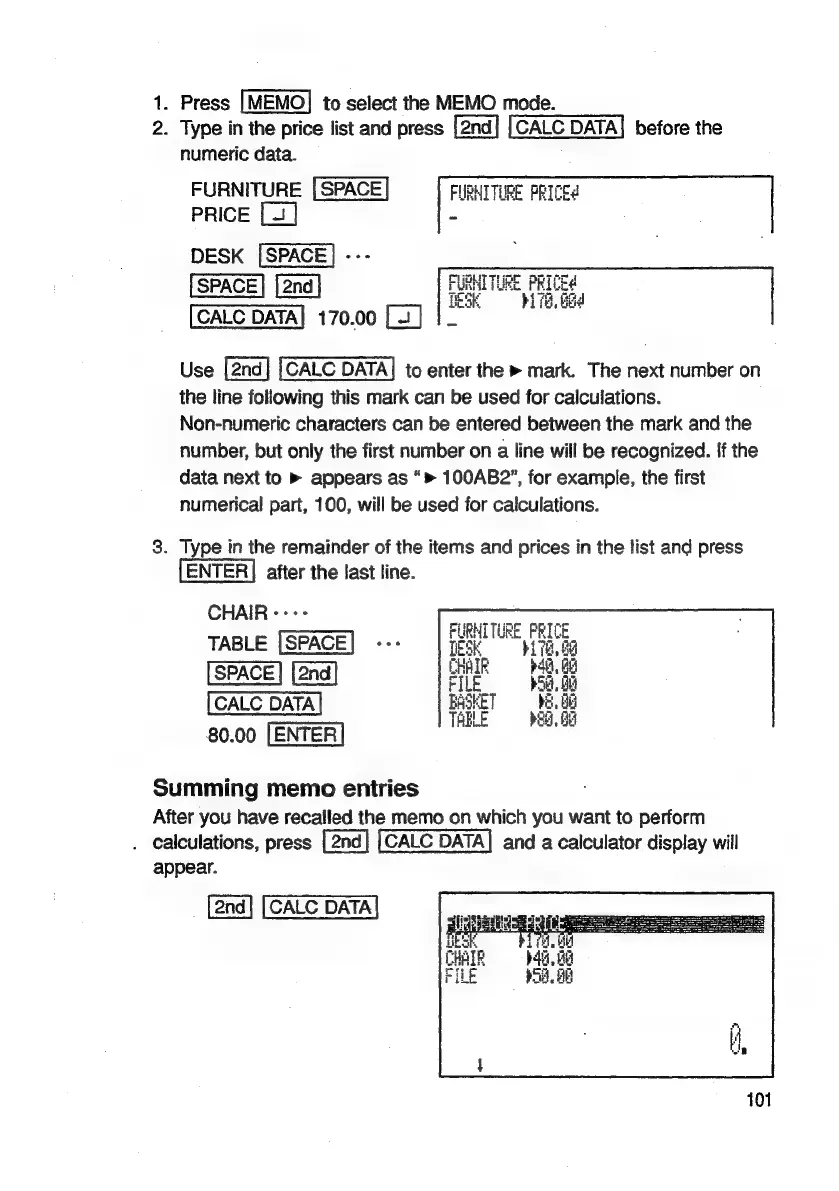
1.
Press
to
select
the
MEMO
mode.
2.
Type
in
the
price
list
and
press
CALC
DATA]
before
the
numeric
data.
FURNITURE
FURNITURE
PRICE?
PRICE
DESK
i
170.00
Use
to
enter
the
»
mark.
The
next
number
on
the
line
following
this
mark
can
be
used
for
calculations.
Non-numeric
characters
can
be
entered
between
the
mark
and
the
number,
but
only
the
first
number
on
a
line
will
be
recognized.
{f
the
data
next
to
»
appears
as
“>
100AB2”,
for
example,
the
first
numerical
part,
100,
will
be
used
for
calculations.
3.
Type
in
the
remainder
of
the
items
and
prices
in
the
list
and
press
ENTER]
after
the
last
line.
CHAIR
«++
TABLE
(SPACE!
--:
Hie.
8g
HAIR
bag.
06
SPACE
File
er
nSKET
8.08
80.00
[ENTER
Summing
memo
entries
After
you
have
recalled
the
memo
on
which
you
want
to
perform
.
calculations,
press
CALC
DATA]
and
a
calculator
display
will
appear.
a
Sm
b45,
Be
p58,
A

Related product manuals