EasyManua.ls Logo

Sharper Image 204919 - User Manual

Sharper Image 204919
9 pages
Print Icon
To Next Page IconTo Next Page
Loading...
Item No. 204919
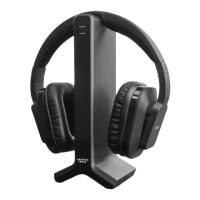
TV WIRELESS HEADPHONES
User Manual
Thank you for purchasing TV Wireless Headphones from Sharper Image. This new and
improved model is easy to set up, easy to use and even easier to charge than before.
These 2.4GHz digital wireless headphones utilize the latest technology, so you can enjoy
your favorite TV programs, day or night, without disturbing others.
• Reliable 2.4GHz digital technology
• Automatically finds the strongest signal (31-channel frequency hopping system)
• 100-ft. wireless range
• Operates approximately 14 hours (at 2/3 volume) on a full charge
• Comfortable padded design
• Simple “top charging” cradle
• Onboard volume control
• Low power alert
• Auto On / Off protects hardware and conserves battery power
• Can be used with any audio source (TV, stereo, MP3 player, etc.)
• Can be used as regular wired headphones with included 3.5mm cable
• 2 AAA size rechargeable batteries (included) can be replaced if necessary
- 1 -
FEATURES
Question and Answer IconNeed help?

Do you have a question about the Sharper Image 204919 and is the answer not in the manual?

Summary

Product Features

Identification of Parts

Installation and Setup

Installing the Base Unit

Connect the Base Unit to AC power and your TV using provided cables.

Installing Headphone Batteries

Insert 2 AAA rechargeable batteries into the right ear pad compartment.

Operating the Wireless Headphones

Operating Your TV Wireless Headphones

Turn on Base Unit and Headphones, adjust volume, and confirm signal.

Stand-by Mode

Base Unit enters stand-by mode after 5 minutes of no audio signal.

Charging the Headphones

Place headphones on Base Unit to charge; LED indicates status.

Low Battery Warning

Power/Signal LED blinks RED, beeping indicates low battery and auto-off.

Advanced Functions and Specifications

Linking a Second Pair of Headphones

Pair a second set of headphones to the same Base Unit for simultaneous use.

Alternate Use of Headphones

Use headphones as wired devices with a 3.5mm direct line-in cable.

Technical Specifications

Details on transmission mode, frequency, voltage, response, distortion, S/N.

FCC Compliance

Statement regarding compliance with FCC Rules and operating conditions.

Warnings

Important safety and operational warnings regarding modifications, batteries, and sound.

Troubleshooting Guide

No Sound from Headphones

Solutions for no audio output, including checking connections, power, and volume.

Distorted, Staticky, or Hissy Sound

Troubleshooting steps for poor audio quality, including volume and range checks.

TV Too Loud While Using Headphones

Adjust TV remote volume to lower the TV's internal speaker output.

Headphones Still Not Working

Test headphones with another TV and check TV audio output settings.

Customer Service and Warranty

Sharper Image 204919 Specifications

General IconGeneral
BrandSharper Image
Model204919
CategoryHeadphone
LanguageEnglish

Related product manuals