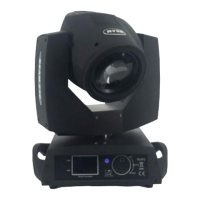
This document serves as the user's manual for a stage lighting equipment, specifically a Beam 230W 7R Lighting fixture, provided by SHEHDS, an expert in stage lighting. The manual outlines essential information for the proper operation and maintenance of the device, ensuring its longevity and optimal performance.
The lighting fixture is designed for various applications, including entertainment decoration and architectural lighting. It is described as an energy-saving LED product with a long lifespan, shockproof and dustproof characteristics. It incorporates a DMX receiver and self-running features, allowing it to produce a variety of vivid lighting effects. The device is noted for its ease of operation, making it suitable for a wide range of users and settings.
Function Description
The Beam 230W 7R Lighting fixture offers a comprehensive set of functionalities controlled via DMX channels, allowing for precise manipulation of its light output and movement. It operates in a 20-channel DMX mode, providing extensive control over various parameters.
The core functionalities include:
- Movement Control: The fixture can perform horizontal scanning across 540 degrees (X-axis) and vertical scanning across 270 degrees (Y-axis). The speed of these movements can be adjusted, including a combined XY shaft speed control.
- Strobe Effects: A versatile strobe function is available, ranging from a slow to fast strobe effect. Specific numerical ranges within the DMX channel are dedicated to different strobe speeds and switch functions, allowing for dynamic light pulsation.
- Dimming: The device features a dimming capability, allowing the light output to be adjusted smoothly from off to full brightness.
- Color Wheel: The color wheel offers a wide spectrum of colors. Users can select individual colors (Color 1 to Color 14), white light, or combinations of adjacent colors (e.g., White + Color 1, Color 1 + Color 2) to create diverse lighting moods. Additionally, there's a "color of water" effect that can transition from slow to fast.
- Static Gobo Change: The fixture includes a static gobo wheel with multiple patterns (Pattern 1 to Pattern 17). Users can select individual patterns or white light. The gobo function also supports reverse direction flow patterns, with adjustable speed from fast to slow. Furthermore, there are options for "open the white" and "design direction of water" effects, with speeds ranging from slow to fast. Specific patterns (Pattern 1 to Pattern 11) can also be set in motion, with speeds adjustable from slow to fast.
- Focusing: The focusing function allows for adjustment between near and far focus, enabling sharp or diffused light beams.
- Prism Effects: The device incorporates an eight or 16 prism effect, which can be rotated to create complex and dynamic light patterns.
- Amplification Effect: An amplification effect is available, which combines prism and atomization functions, allowing for zoom in and out capabilities.
- Atomization: A dedicated atomization function provides a soft, diffused light effect.
- Tuning: Fine-tuning adjustments for both X and Y axes are provided, allowing for precise positioning of the light beam.
- Lamp Control: A specific channel is dedicated to lamp control, likely for turning the lamp on/off or managing its operational state.
- Reset: A reset function is available to return the device to its default settings.
- Macro Function: The device includes a macro function, which typically allows for pre-programmed sequences or combinations of effects to be triggered easily.
- Speed Control: Independent speed controls are provided for the color wheel and the pattern wheel, allowing for synchronized or asynchronous movement of these elements. An adjustable optical prism-atomizing speed control is also available.
Usage Features
The device is controlled through a display interface with four buttons: Function (A), Up (B), Down (C), and Enter (D). The LED display (E) shows the current function and parameter values.
- Navigation: Pressing the Function key (A) cycles through eight different functions. The first two digits on the digital tube indicate the current function, while the last two digits represent the address code or speed parameters.
- Parameter Adjustment: The Up (B) and Down (C) keys are used to modify parameter values.
- Confirmation: The Enter (D) key confirms the selected parameter values.
The manual also outlines a "Display Control Instruction" section, which details various settings accessible through the main interface:
- Run Mode: Specifies how the device operates (e.g., DMX mode, auto mode).
- DMX Address: Allows setting the DMX starting address for the fixture.
- Channel Mode: Configures the DMX channel mode (e.g., 20 channels).
- Invert Pan/Tilt: Reverses the direction of pan and tilt movements.
- Swap Pan-Tilt: Swaps the pan and tilt axes.
- Encoder Pan-Tilt: Likely relates to the encoder settings for pan and tilt.
- No DMX Signal: Defines the fixture's behavior when no DMX signal is received.
- Display Power Save: Enables a power-saving mode for the display.
- Burn On Start Up: Configures the lamp's behavior upon startup.
- Linear Change of Color Wheel: Adjusts the color wheel's transition behavior.
- Load Default: Resets all settings to factory defaults.
- Information: Provides access to device information such as software version, DMX monitor, system errors, total fixture hours, partial fixture hours, total lamp hours, and partial lamp hours.
- Advanced Settings: Includes options for reset calibration, lamp life hours, lamp hour clear, and sensor monitoring.
- Language: Allows switching between Chinese and English.
- Screen Rotation: Rotates the display orientation.
Maintenance Features
Proper maintenance is crucial for extending the life and ensuring the optimal performance of the lighting fixture. The manual provides several key maintenance guidelines:
- Dry Environment: The device should be kept in a dry environment, and its use in wet places should be avoided.
- Intermittent Use: Using the fixture intermittently can help extend its lifespan.
- Regular Cleaning: The fan and lens should be cleaned regularly to maintain effective ventilation and lighting performance.
- Avoid Organic Solvents: The crust of the device should not be wiped with organic menstruum (solvents) to prevent damage to the product.
- Power Supply Stability: The power supply should remain within +&-10% of the specified voltage during operation. Excessive voltage can decrease lamp life, while insufficient voltage can affect luminosity.
- Cool-down Period: After powering off, if the device needs to be used again, it should be allowed to cool down for over 20 minutes.
- Professional Maintenance: For safety and to avoid electrical hazards, maintenance of the product should only be performed by professionals.
The manual emphasizes that users should comply with all warning items and instructions. Any misuse leading to damages is not covered by the guarantee, and the manufacturer is not responsible for malfunctions or problems resulting from ignoring the manual. The manufacturer also reserves the right to make technical changes without prior notice.

 Need help?
 General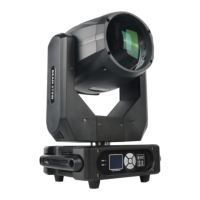



 To Next Page