EasyManua.ls Logo

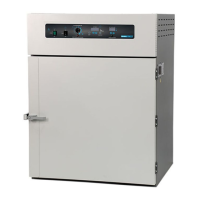
Shel lab FX28-2 - User Manual

Default Icon
18 pages
Print Icon
To Next Page IconTo Next Page
Loading...
CONSTANT
TEMPERATURE OVEN
MICROPROCESSOR
CONTROLLED
FLOOR MODELS:
FX14-2 & FX28-2
02/13
4861581-2
INSTALLATION AND OPERATIONAL MANUAL
Sheldon Manufacturing Inc. P.O. Box 627 Cornelius, Oregon 97113
EMAIL: tech@Shellab.com INTERNET: http://www.Shellab.com/~Shellab
1-800-322-4897 (503) 640-3000 FAX (503) 640-1366

Questions and Answers

  • M
    Michael BrownSep 3, 2025
    Why does the Shel lab Oven motor make noise?
    • J
      Jamie TuckerSep 4, 2025
      If the Shel lab Oven motor makes noise, ensure that the fan or blower wheel is not contacting its housing. Adjust the motor mounting bracket position to re-center the fan or blower wheel, if necessary. Check the fan or blower wheel for damage or an out-of-balance condition, and replace it if necessary. Turn the motor shaft to ensure it spins freely; if it binds or the bearings make noise, replace the motor.
  • M
    mcintoshamandaSep 2, 2025
    How to fix a Shel lab Oven door not sealing?
    • E
      Evan FritzSep 2, 2025
      If the Shel lab Oven door is not sealing, adjust the hinge blocks or twist the door. Confirm that the unit has not been damaged and the body is not out of square. Check the physical condition of the gasket for tears or punctures.
  • T
    Todd NelsonAug 31, 2025
    What to do if Shel lab Oven will not maintain set point?
    • M
      Mrs. Christine StokesAug 31, 2025
      If the Shel lab Oven will not maintain set point, ensure that the set point is at least 5 degrees over ambient temperature. Check for fluctuating ambient conditions, such as adjacent open doors or HVAC duct openings, and stabilize the ambient conditions.
  • C
    Cindy ShannonAug 29, 2025
    Why is my new Shel lab Oven smoking?
    • M
      Micheal HarrisAug 29, 2025
      If the Shel lab Oven is smoking when new, this is not uncommon. Place the unit under a vent and run it at high temperature for one hour until the smoke dissipates.
  • J
    James DoyleAug 27, 2025
    Why Shel lab Oven unit will not heat over a temperature that is below set point?
    • C
      Carrie WarrenAug 28, 2025
      If the Shel lab Oven will not heat over a temperature that is below the set point, confirm that the fan is moving and that the amperage and voltage match the data plate, and check for air movement in the chamber. Ensure that the set point is set high enough, and turn the Safety Thermostat all the way clockwise to see if the OTP light comes on. Check the connections to the sensor.
  • G
    Gary WillisAug 26, 2025
    What to do if temperature is too high in Shel lab Oven?
    • D
      Derek HamptonAug 26, 2025
      If your Shel lab Oven temperature is too high, the controller or wiring may have failed, in which case you should contact Customer Service. Also, trace the wire from the display to the probe and move the wire to check for intermittent problems, as the probe might be unplugged, broken, or have a broken wire to the sensor.
  • J
    Jesse GriffinAug 22, 2025
    Why is the temperature too low in my Shel lab Oven?
    • W
      wchapmanAug 22, 2025
      If the Shel lab Oven temperature is too low, wait for the display to stabilize after opening the door. Allow several hours for the oven to warm up and stabilize after a power failure or being turned off. Compare the current draw to the data plate to check for element failure. Confirm that the Safety Thermostat is operating correctly by observing the front panel lights to rule out high limit failure. Check all functions and wiring against the schematic, especially in recently worked-on areas, to identify any wiring problems. Finally, inspect the control panel for loose connections.

Summary

Receiving and Inspection

Initial Inspection Process

Inspect for visible exterior damage upon delivery and note any damage found on the freight bill.

Installation Procedures

Power Source Requirements

Ensure the electrical supply circuit conforms to codes. Verify voltage and ampere requirements.

Essential Safety Precautions

Control Panel Functions

Power and Timer Switches

Explains the main power switch and the timer switch functionality for controlling oven operation.

Temperature Control Interface

Describes the main temperature set point control and the overtemperature safety thermostat.

Timer Control Interface

Details the digital display, arrow pads, and buttons for setting and activating timed cycles.

Operating the Oven

Setting Temperature and Calibration

Enter set point temperature, allow stabilization, and calibrate using a reference thermometer.

Setting Overtemperature Safety

Adjust Safety Thermostat to activate approximately 10°C above the main set point.

Setting the Timer Display

Configure the timer for timed operation using the SET/TIMER display and controls.

Advanced Oven Operation

Routine Maintenance

Temperature Troubleshooting

Overheating and High Readings

Addresses issues where the oven temperature is too high or the display shows 'HI'.

Underheating and Low Readings

Addresses issues where the oven temperature is too low or the display shows 'LO'.

Heating Failure Diagnosis

Diagnoses why the unit will not heat up at all or to the set point.

Performance and Calibration Troubleshooting

Mechanical Troubleshooting

Control and Power Troubleshooting

Shel lab FX28-2 Specifications

General IconGeneral
BrandShel lab
ModelFX28-2
CategoryOven
LanguageEnglish

Related product manuals