64(111)
18.1.1 Panel Operation
1) Turn on the blower switch;
2) Turn on heater switch, and start heating operation;
18.1.2 Setting Temperature
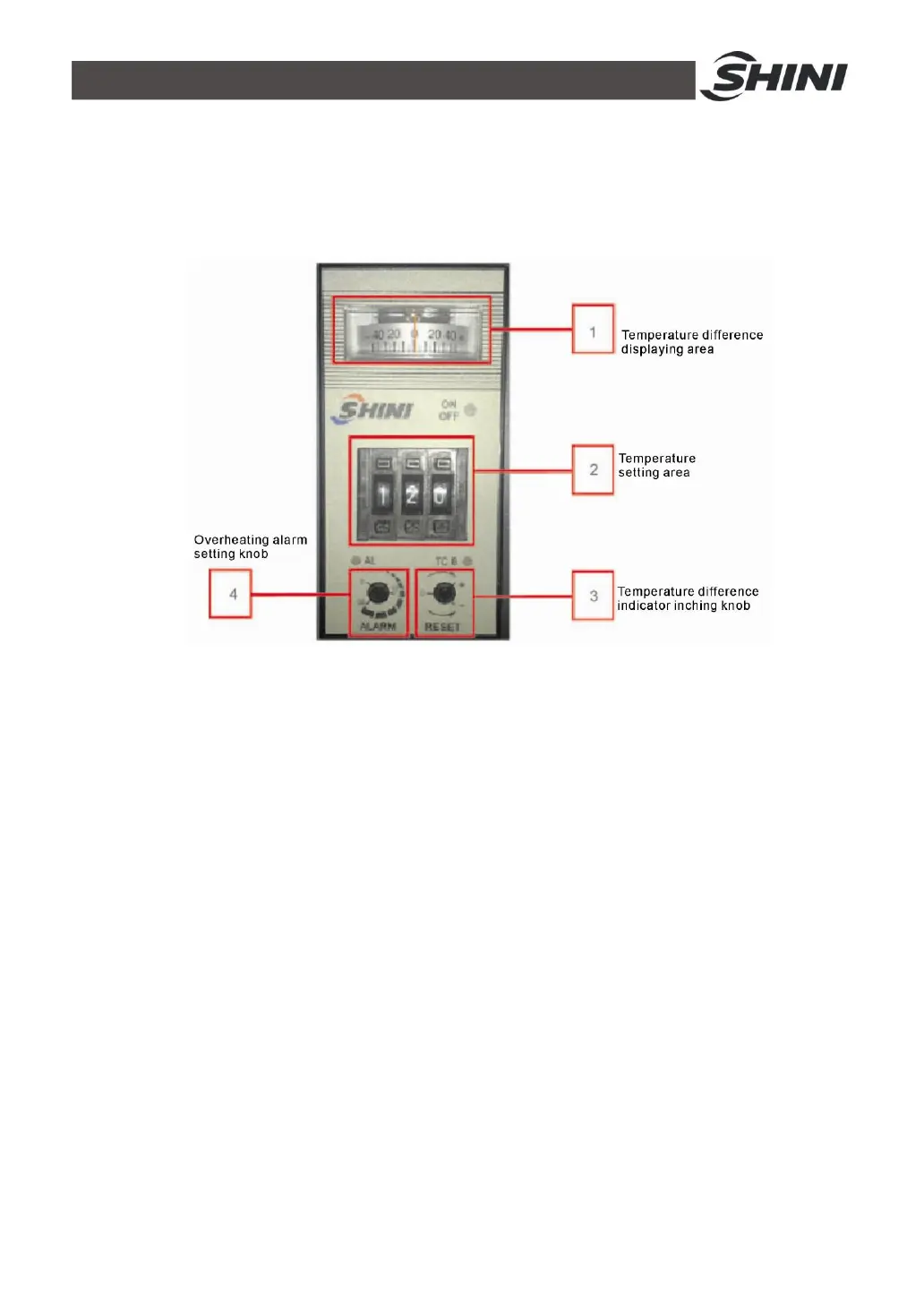
Pic. 18-2: Temperature controller
As figures on above picture 6-2:
1. Temperature difference display area. It is used to display difference value
between actual temp. and set temp. For example, if actual temperature is lower
than set temp., the pointer turns left (negative direction), otherwise, it turns
right( positive direction).
2. Temperature set area. Set value range: 0~199℃,when heating process lasts
for some time, “on/off” indicator light on temperature controller will display
yellow and green light alternatively. It means the set temperature is reached. At
the same time, observe if the value on temperature controller is consistent with
the thermometer or not. The acceptable deviation is ±2℃.
3. Inching knob of temperature difference pointer. When the working temperature
runs stably (about 1 hr after the start), the pointer should be at “0” (the
difference value between actual temperature and set value), otherwise adjust
the pointer to “0” is available by rotating the inching knob.
4. Overheat indicator setting knob. When actual temperature is no less than set



 To Next Page