Using FabCure 2
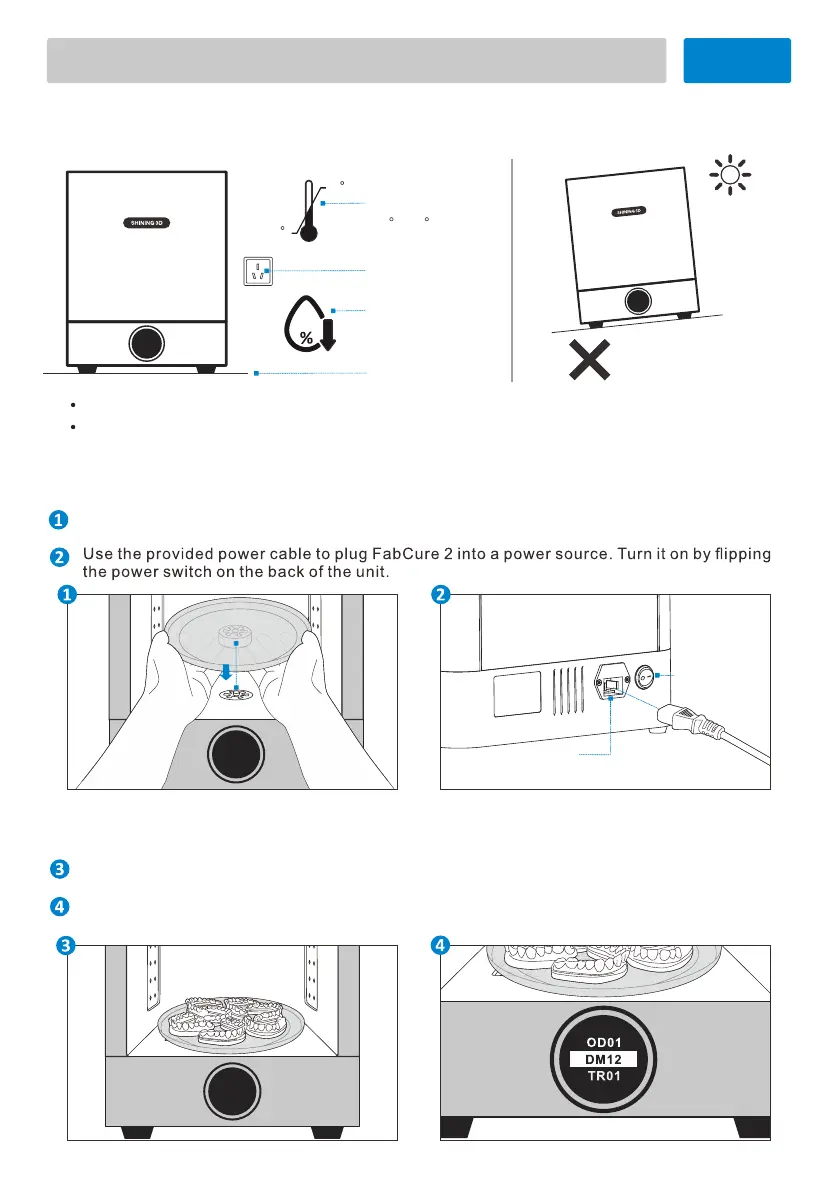
Where to Install the FabCure 2
Uneven surface
Hot environment
70
Level surface
Humidity
30-70%RH
10
30
C
C
Temperature
10 C-30 C
Power source
Power-on the FabCure 2
Power Port
Fuse: 250V AC, 6.3A
Power Switch
Open the chamber door and insert the turntable on the circular wheel mount at the base of
the cure chamber.
Find a clean, level surface with a nearby power source to install and operate the FabCure 2.
Operate the FabCure 2 in a well-ventilated room with a temperature of 10–30 °C and a
humidity of 30-70%RH . For optimal performance, do not exceed this range.
Post-Curing
Place washed and dried prints on the turntable with the most even spacing possible to allow
light and heat to reach all areas. Gently close the chamber door.
Select desired material by operating the knob to begin the process. The proper post-curing
time and temperature for the selected material will be set automatically.
02


 To Next Page