Δ Wireless Control Information
1. Wireless remote control mode:
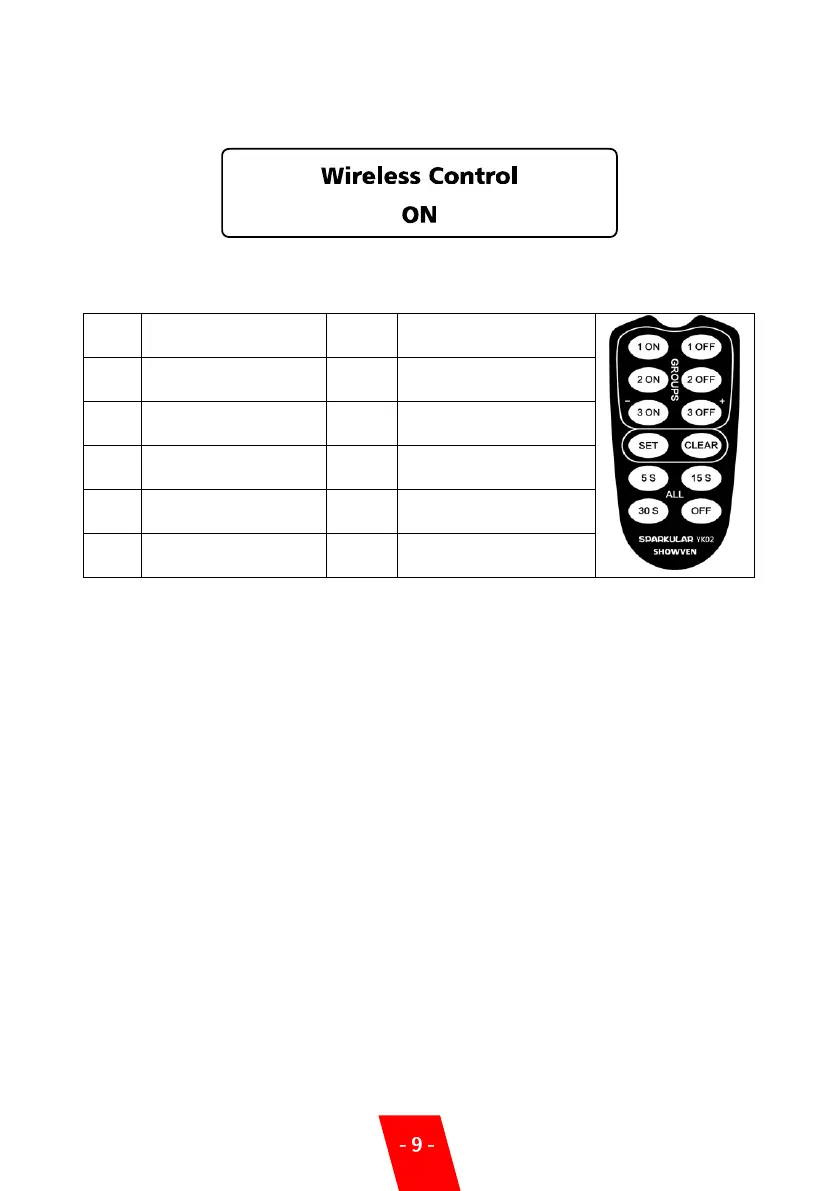
When use wireless remote control, please unplug DMX cable connection on machine, set
Wireless Control at ON status, match the remote controller with machine, pull out the antenna
on remote controller.
Match the machine with
remote
Clean material for 3
seconds
NOTE:
a) When the indicator light becomes weak on the remote controller, please replace the
battery. The battery type is 12V23A.
b) When the machine is occasionally not working, may be caused by interference, please press
the start button again.
c) Wireless control is easily influenced by interference, suggests to stay as close to machine as
possible when use remote controller, and machines cannot use metal shielding
3. Wireless host SPARKULAR
®
mini mode (requires communication cables)
a) In occasion of strong interference, using the wireless host can avoid interference, ensure
stable control.
b) Set the first unit of SPARKULAR
®
mini DMX address into “1++”, this machine address is “1”,
but it can also output DMX signal and turns into wireless host SPARKULAR
®
mini.
c) Use communication cables to connect all SPARKULAR
®
minis, the host SPARKULAR
®
mini
will receive the signal from remote controller and transfer to all other SPARKULAR
®
mini
via communication cable to realize stable signal transmission.


 To Next Page