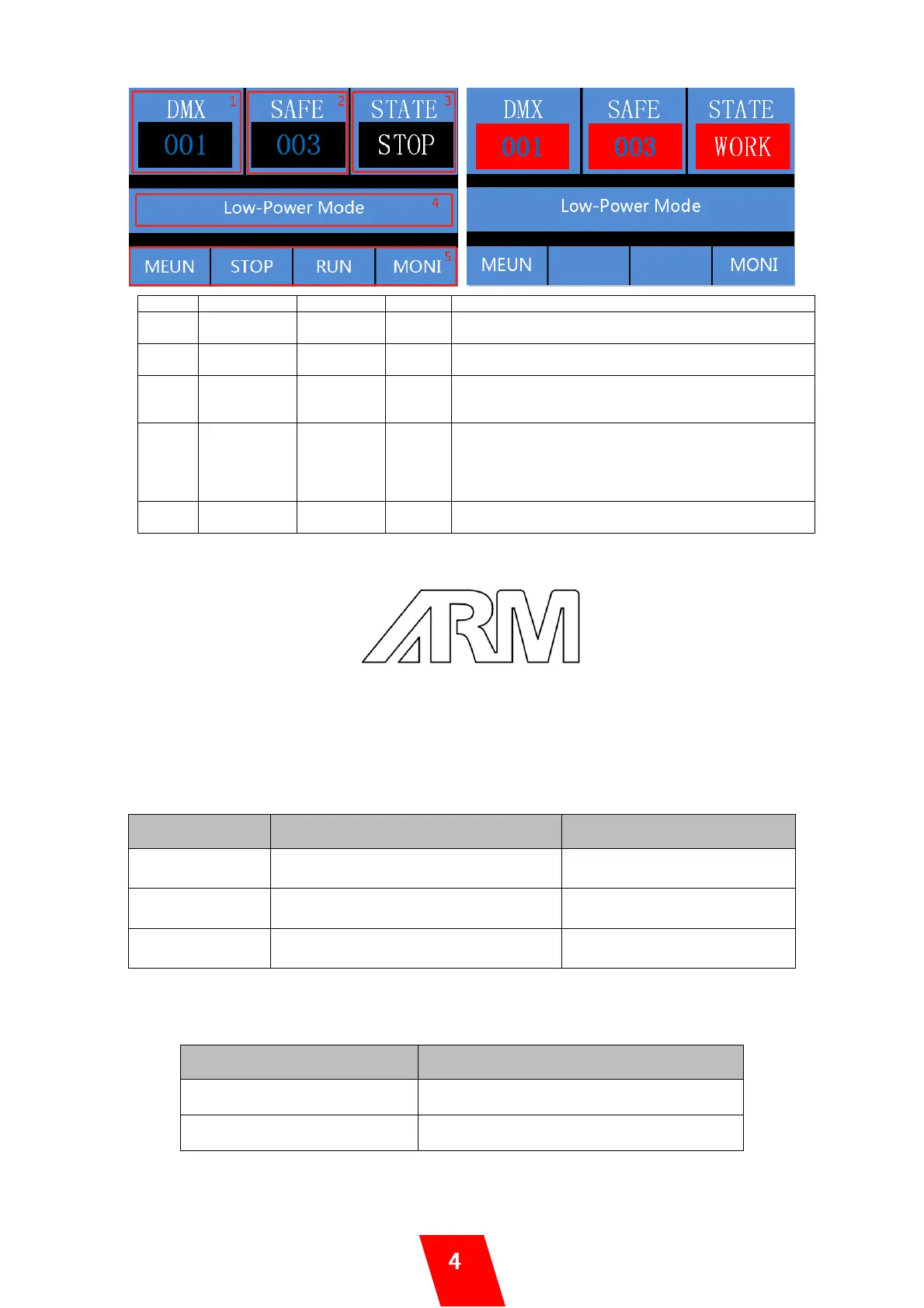
When there is DMX signal in, background color
changes from black to red
When safety channel DMX value between 20-200,
background color changes from black to red
When blower is working, STATE changes from
“STOP” to “WORK”, and background color changes
from black to red
Three types of contents will displayed here:
1. Error information
2. When under manual control, displays Run Timer
and Pause Timer
3. Output Mode
When there is DMX signal in, STOP and RUN are
hidden and disabled
2. ARM indicator light
Operators can enable/disable the arm indicator light by set the “ARM STATE” in
Advanced menu. If “ARM STATE” is ON, there will be three status:
ON: no DMX signal
OFF: DMX signal input
BLINK: DMX armed or machine blower is ON
3. Error Message
Confetti Hopper Lid is open, device stops
working or can’t start working
Close confetti hopper lid
Feeding motor blocked, device stops
working
Check the hopper and feeding
motor, solve the block problem
When blower running abnormal
Check the blower and solve the
problem
4. Monitor Interface
Press “MONI” can enter monitor interface, press “BACK” switch back to main interface.
Hopper feeding motor status monitoring
5. Menu Interface


 To Next Page
 Loading...