7.8 In Use Alternate Input (Activity LED)
This alternate input, when
activated
to a logical zero level, will turn on the
Activity
LED mounted in
th(~
pusl',
bar on the front panel
of
the drive. It can be used as an
indicator
to the operator. Examples
of
some indica.-
tions are:
1.
'Nrite
protected
Diskette is installed.
2.
Drive in
which
the diskette is to be changied.
3.
The operating system drive.
4.
Drive with a special configuration.
To install this option on standard drive,
jumper
trace'
0'
and
active
the
interface
line pin 16.
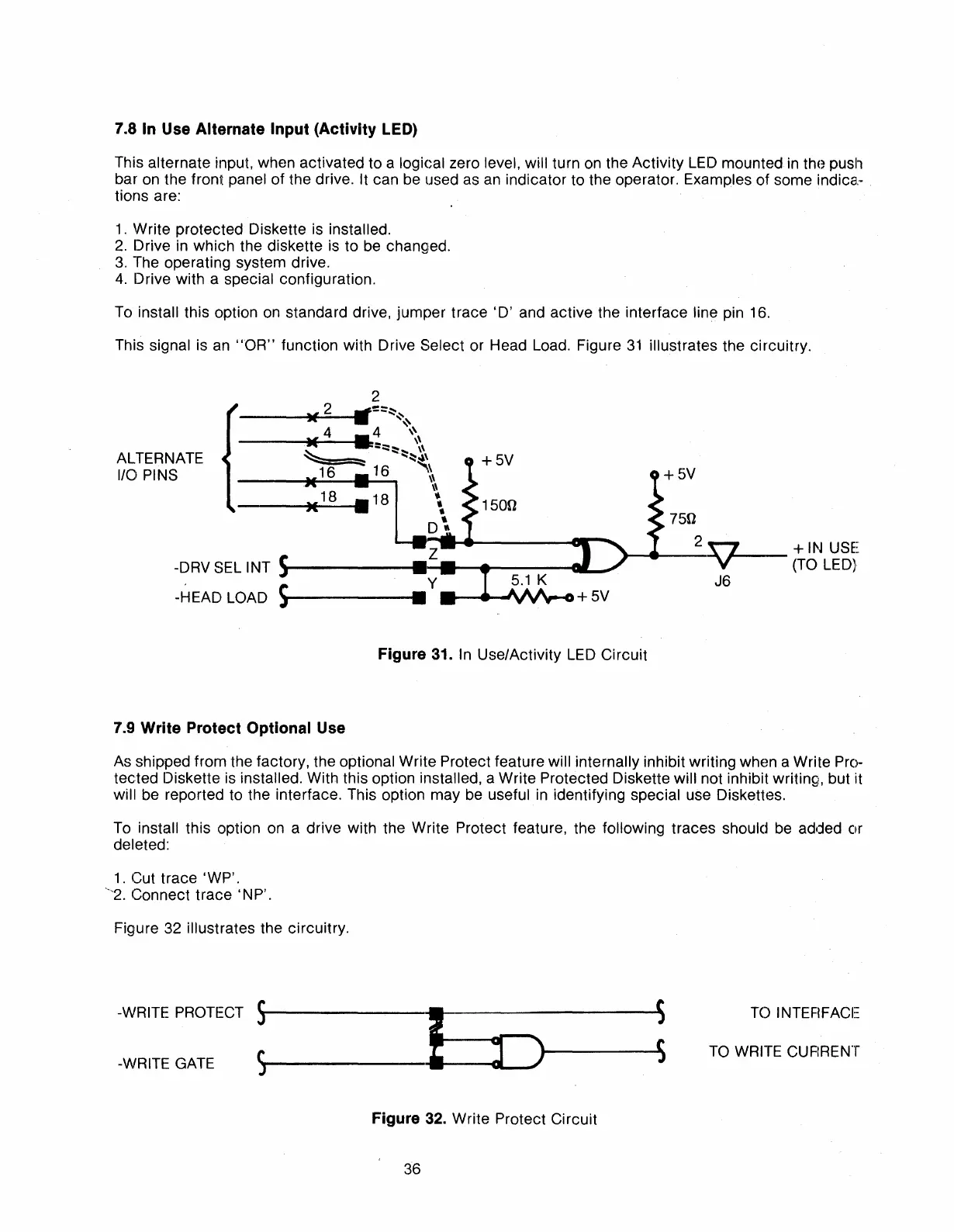
This signal is an
"OR"
function with Drive Select or Head Load. Figure
31
illustrates the
circuitry.
2
+5V
1500
__
-
__
~'V\ll_G+
5V
----V~--I
••
=::~~
4
~\
---
.....
--.~::~
....
\~\
...
~~~\
~
16
"\\
\\
\\
•
•
•
D~
750
.-
.....
__
2_,!7
__
+
IN
USE
-DRV SEL INT
~------t
......
...-----tl
__
-'
-y-
(TO LED}
J6
-HEAD LOAD
s".~
-------
ALTERNATE
110
PINS
Figure
31.
In
Use/Activity
LED
Circuit
7.9
Write Protect Optional Use
As shipped
from
the factory, the optional Write Protect feature will internally inhibit
writing
when a Write Pro-
tected
Diskette is installed. With this option installed, a
Write
Protected Diskette will not inhibit writinQi, but
i:t
will be reported to the interface. This option
may
be useful in identifying special use Diskettes.
To install this option on a
drive
with the
Write
Protect feature, the following
traces
should be added
or
deleted:
1.
Cut
trace
'WP'.
-'-2.
Connect
trace'
NP'.
Figure 32 illustrates the circuitry.
-\lIlRITE PROTECT
S'r-------~~-----,
~
-WRITE GATE 5 ..
D----
......
TOINTEFlFACE
TO WRITE CUFIRENT
Figure
32.
Write
Protect
Circuit
36



 To Next Page