P/N 1126870 Rev. B
Wireless Remote Programming & Operating Instructions - continued
3
Receiver will accept and respond to signals from up to three
remotes. Receiver will not respond to signals from remotes that
have not been paired to it.
NOTE: Only SMART3™ remotes will function with
SMART3™ receivers. The original SMARTtransmitter
®
or
SMART1+™ cannot be used.
PAIRING (INTRODUCING) REMOTE(S) TO RECEIVER
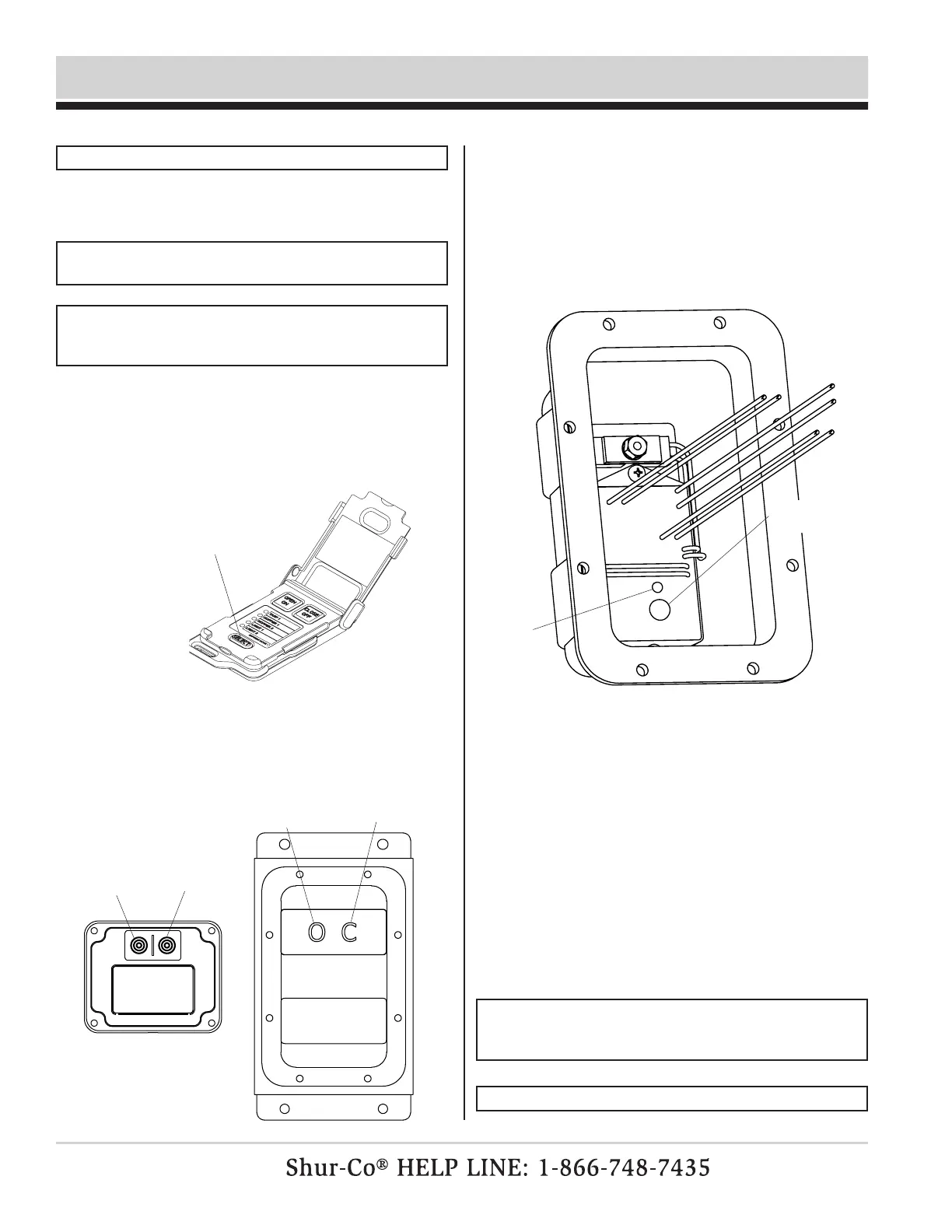
red led
light
programming
button
NOTE: Remotes are typically paired to receivers at factory if
remote is shipped with receiver.
STEP 1: Connect receiver to power. Make sure target re-
ceiver is connected to 12-volt power supply. Keep
remote within 20' of receiver during pairing process.
Option 1: On receiver, press and hold simultaneously both Open
and Close buttons on receiver. After three seconds,
you will hear buzzer beep. Release buttons. Receiver
is now in pair mode.
NOTE: When you press OPEN and CLOSE on receiver, you
may hear a click from solenoid in receiver box, but outputs
will not stay on while both buttons are held simultaneously.
NOTE: While in PAIR MODE, receiver will not turn outputs on.
STEP 2: Prepare remote. Open remote lid and use Select but-
ton to select desired channel on remote. Set remote
aside, but do not close lid.
STEP 3: Put receiver into pair mode.
STEP 4: Put remote into pair mode. Pick up remote and press
and hold simultaneously both OPEN and CLOSE but-
tons on remote. After three seconds, channel indicator
light will go solid. Release buttons.
STEP 5: Complete pairing. Remote will now pair to receiver.
If pairing was successful, receiver buzzer will beep
twice. Remote can now be used to control receiver.
If pairing was unsuccessful, receiver will time out of
Pair Mode after 15 seconds and buzzer will beep
once. Try again to pair.
STEP 6: Repeat process for any other remotes.
Option 2: Standard receiver boxes only: Remove eight screws
holding plastic cover on receiver box. Pull cover off
gently, but do not disconnect any wires. Press and
hold programming button next to red light. Red light
will go solid. After three seconds, light will start blink-
ing and buzzer will beep. Release button. Receiver
is now in Pair Mode.
select button
open button
close button
receiver
mini-module
open button
close button


 To Next Page
 Loading...